



Showing posts sorted by relevance for query CAMEO 3. Sort by date Show all posts
Why Now May Be the Best Time Ever to Buy a Silhouette CAMEO 3
Thursday, May 16, 2019
With the recent announcement that Silhouette CAMEO 4 will be released later this year, now may be the best time ever to get a Silhouette CAMEO 3.
 If you’re considering getting your first Silhouette CAMEO or already own one but want to upgrade or need a back up - here are five reasons to think about getting a CAMEO 3 now…before you no longer can.
Silhouette CAMEO 3 vs CAMEO 4: Do I Need Both? (Comparison Chart)
Monday, May 27, 2019
With the recent announcement that the new Silhouette CAMEO 4 will be released later this year - now many Silhouette CAMEO 3 (and older model) owners are wondering if they should upgrade.
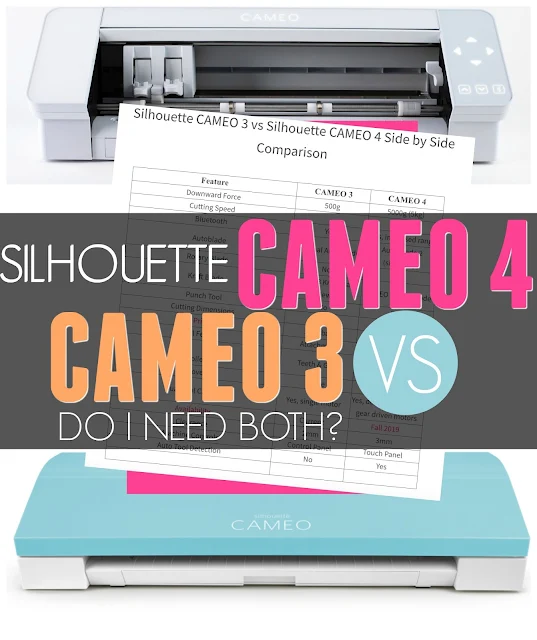 The answer is really up to you and what you want to do with your machine because the features of the Silhouette CAMEO 3 vs CAMEO 4 are significantly different.

Silhouette CAMEO 3 Hidden Mat Supports
Monday, March 19, 2018
If you're one of those who unpacked that Silhouette CAMEO 3 as fast as possible, plugged it in and started cutting right away, you may have missed one of the hidden features of the Silhouette cutting machine.

There is a series of hidden mat supports tucked into the tool drawer - and they come in very handy.

There is a series of hidden mat supports tucked into the tool drawer - and they come in very handy.
How to Use Two Sketch Pens in Silhouette CAMEO 3
Wednesday, April 4, 2018
Thanks to the dual carriage, the Silhouette CAMEO 3 makes it easy to use two tools at the same time - including sketch pens.

Using two different color sketch pens takes a little set up in Silhouette Studio - which is what I'm going to show you today!

Using two different color sketch pens takes a little set up in Silhouette Studio - which is what I'm going to show you today!
Silhouette CAMEO 3 Getting Started Help for Beginners
Thursday, July 28, 2016
Thinking about getting a Silhouette CAMEO 3 when its release date rolls around NEXT WEEK?! If you're looking for some help getting started with CAMEO 3 or wondering what all the hype is about - you've come to the right spot!
 There are some obvious differences in the Silhouette CAMEO 3 vs. CAMEO 2 and earlier versions. Even for those Silhouette machine owners who are upgrading, there will be a slight learning curve as you get adjusted to the new machine - and software.

Silhouette CAMEO 3 Pause Status: How to Fix It When It's Stuck
Tuesday, December 13, 2016
Can we just have a chat here for a second because my inbox has been overflowing lately with emails from those experiencing the Silhouette CAMEO 3 Pause Status issue.

Fear not...there's an easy fix and it's one that I wish I could plaster in big.bold.letters on every CAMEO 3 box that is shipped out. Before you make your first cut with the Silhouette CAMEO 3...you need to update the firmware.

Fear not...there's an easy fix and it's one that I wish I could plaster in big.bold.letters on every CAMEO 3 box that is shipped out. Before you make your first cut with the Silhouette CAMEO 3...you need to update the firmware.
Colored Silhouette CAMEO 3 Bundle Giveaway! (Plus Teal CAMEO on Pre-Order!)
Tuesday, August 21, 2018
Ahh you guys!! The new colored Silhouette CAMEO 3s unveiled in May at the Silhouette Summit are about to start shipping...and they're gorgeous!!

Even better news - you have a chance to win a Teal, Pink or Black Silhouette CAMEO 3 Bundle of your choice!

Even better news - you have a chance to win a Teal, Pink or Black Silhouette CAMEO 3 Bundle of your choice!
7 Best Silhouette CAMEO 3 Bundles...IMHO
Wednesday, March 29, 2017
I get asked a lot from crafters, husbands of crafters, Silhouette CAMEO beginners and Cricut user (aka converts!) about the best Silhouette CAMEO 3 bundle.
 Many of these types of emails start with something like...
While there are lots of great Silhouette CAMEO bundles, what's 'best' for one person may not be the best for someone else....because your reasoning for wanting the machine or your purpose in using it may be different. So to help answer the burning question on the best bundle I've picked my 7 favorite CAMEO bundles based on crafting needs and wants...

"There are soooo many Silhouette CAMEO bundles on Amazon, I'm overwhelmed and not sure what I actually need to get started."I always respond back with the same question: What's the main reason you want to get a Silhouette CAMEO? What types of Silhouette CAMEO projects are you looking to do...at least initially?
While there are lots of great Silhouette CAMEO bundles, what's 'best' for one person may not be the best for someone else....because your reasoning for wanting the machine or your purpose in using it may be different. So to help answer the burning question on the best bundle I've picked my 7 favorite CAMEO bundles based on crafting needs and wants...
Silhouette CAMEO 4 vs CAMEO 3: 8 (More) Subtle But Important Differences
Thursday, September 12, 2019
When the Silhouette CAMEO 4 was first announced in May 2019 we took a side by side look at Silhouette CAMEO 3 vs CAMEO 4. Most of the differences I initially pointed out focused on the power of the machine like cutting speed, force, and the ability to cut much thicker - and therefore more - materials.

Now that pre-orders have started and I have a Silhouette CAMEO 4 in my hands and am using it like a crafter in my craft room, rather than staring at it in a conference center, I'm noticing some additional differences between the old and new CAMEO machines.

Now that pre-orders have started and I have a Silhouette CAMEO 4 in my hands and am using it like a crafter in my craft room, rather than staring at it in a conference center, I'm noticing some additional differences between the old and new CAMEO machines.
Silhouette CAMEO 3 Bluetooth Set Up Tutorial
Tuesday, August 16, 2016
The Silhouette CAMEO 3 Bluetooth feature is one of those features that has been highly anticipated. However, let's just be honest here, it's also causing a lot of frustration, confusion and questions on how to set up and establish the Silhouette CAMEO 3 Bluetooth connection.
 There are several steps and - again being honest - they can be confusing. Like I literally thought my head was going to explode! Lucky for you, I figured it out and now I'm going to try to lay it out in as simple as steps as possible for you so you can get your Silhouette CAMEO 3 Bluetooth set up and cutting!

How to Set Up Silhouette CAMEO 3 to Bluetooth in Silhouette Studio V4
Tuesday, September 12, 2017
Connecting the Silhouette CAMEO 3 to Bluetooth changed slightly with the update to Silhouette Studio V4.

This Silhouette tutorial will walk you through how to set up to cut wirelessly with Bluetooth if you're using a CAMEO 3.

This Silhouette tutorial will walk you through how to set up to cut wirelessly with Bluetooth if you're using a CAMEO 3.
Silhouette CAMEO 3: Best Version of Software to Avoid Errors, Bugs, and Headaches
Thursday, March 9, 2017
Is your Silhouette CAMEO 3 having issues? Is your Silhouette Studio V3.8 constantly causing you to pull out your hair?

The good news - is there are two things that will pretty much fix the majority of the Silhouette CAMEO 3 and Silhouette Studio Version 3.8 errors, issues, and problems.

The good news - is there are two things that will pretty much fix the majority of the Silhouette CAMEO 3 and Silhouette Studio Version 3.8 errors, issues, and problems.
How to Move the Silhouette CAMEO 3 Rollers
Tuesday, February 13, 2018
If you are cutting on your Silhouette CAMEO, without a cutting mat, you will likely need to move you rollers to ensure the material does not slip while cutting.

Fortunately the rollers on the Silhouette CAMEO 3 are easier to move than on the CAMEO 1 or 2.

Fortunately the rollers on the Silhouette CAMEO 3 are easier to move than on the CAMEO 1 or 2.
Guaranteed Way to Get Bad Cuts with Silhouette CAMEO 3 AutoBlade (And How to Fix It)
Monday, March 5, 2018
One of the most common issues from Silhouette CAMEO beginners is that their CAMEO 3 Autoblade is cutting through the vinyl (or other material) and the backing. The same goes for the Portrait 2 Autoblade.

In most cases there are two quick fixes that will fix the issue and get you cutting successfully in a hurry.

Silhouette CAMEO Cross Cutter Tool Tutorial...So THAT'S How You Use It!
Wednesday, August 17, 2016
The Silhouette Cross Cutter Tool is one that has always boggled my mind. I had half-attempted to use it a handful of times, but never really understood what it would be useful for....plus it always seems to tear my vinyl. I mean, who needs to cut the vinyl at the back of their machine? That's why when Silhouette School weekly contributor Becky Dykes asked me if I had a tutorial already on how to use the cross cutter with Silhouette I basically just laughed and said, "I don't understand the use for that tool."

Thankfully Becky and I were in the same boat - but she was ready to tackle this one and figure out exactly how to use the Silhouette CAMEO cross cutter.

Thankfully Becky and I were in the same boat - but she was ready to tackle this one and figure out exactly how to use the Silhouette CAMEO cross cutter.
Silhouette CAMEO 3 Tools and Machine Compatibility
Monday, October 5, 2020
Not sure which tools will work in your Silhouette CAMEO 3? No worries I've got you covered.

With the new Silhouette CAMEO 4 having different tools than the CAMEO 3, it can be confusing to know which tools work in which machine. This Silhouette tutorial will explain which Silhouette tools are compatible with the Silhouette CAMEO 3...and in which carriage.
Inkjet Printable HTV on Glitter HTV: Silhouette Tutorial
Wednesday, September 16, 2020
Don't feel like layering glitter heat transfer vinyl or don't have every color glitter HTV on hand? You're in luck because I have a hack for you today!

You can apply printable HTV to white glitter HTV and get a multi-color glitter look a lot quicker and even without having every different color HTV for your project!
How to Cut Craft Foam with Silhouette 2mm Kraft Blade (Cut Settings)
Monday, November 4, 2019
It's now easier than ever to cut Craft Foam with your Silhouette machine...and you don't even need to have a CAMEO 4!

The new 2mm Silhouette Kraft Blade cuts Craft Foam like butter and I have the perfect cut settings for you.

The new 2mm Silhouette Kraft Blade cuts Craft Foam like butter and I have the perfect cut settings for you.
Teal and Lavender Silhouette CAMEO 3 Released for Black Friday: Get Early Bird Access (And Other Extreme Deals!)
Wednesday, November 22, 2017
Teal and lavender are the new pink and black! Silhouette America has released a VERY limited number of Teal and Lavender Silhouette CAMEO 3 machines for Black Friday!

And because you're friends with me you can gain early access to this sale right now by using my code SILSCHOOL at checkout. (If you don't enter the code, you won't get the discount.) Shhhhh don't tell anyone...just kidding tell everyone who needs a new (or backup!!) CAMEO or blades or mats or software upgrades or a Curio or Mint...

And because you're friends with me you can gain early access to this sale right now by using my code SILSCHOOL at checkout. (If you don't enter the code, you won't get the discount.) Shhhhh don't tell anyone...just kidding tell everyone who needs a new (or backup!!) CAMEO or blades or mats or software upgrades or a Curio or Mint...
Silhouette CAMEO 3 Firmware Update Errors: 3 Ways to Fix It
Wednesday, April 26, 2017
One of the first things Silhouette CAMEO 3 users should do is update their firmware to V1.40 on their cutting machine. But...what happens if your computer can't seem to successfully complete the firmware update?

There are actually three different ways to fix the issue and they're all pretty easy.

There are actually three different ways to fix the issue and they're all pretty easy.
Subscribe to:
Posts (Atom)


.png)


