



Showing posts with label Silhouette Hacks. Show all posts
Silhouette Hack: Craft Foil over HTV for an Amazing Effect!
Monday, September 4, 2023
I just blew my own mind with this little Silhouette hack!! I have figured out a way to add metallic craft foil to fabrics and apparel and the results are amazing!
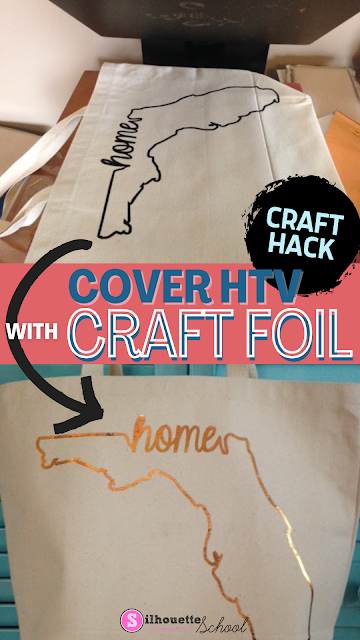
The secret is not ink and heat (as is normally the case with reactive foils), but heat transfer vinyl and heat. Yes, just plain ol' smooth HTV!!
12 Silhouette Hacks You Shouldn't Craft Without
Monday, August 28, 2023
If you've been hanging around Silhouette School for any length of time, you know I love to share Silhouette hacks and workarounds with you. They're the little crafting shortcuts that make crafting more fun, easier, faster, and cheaper. They're also often times the ones that make you go "Why Didn't I Think of That?!"

Today I am sharing 12 of the best Silhouette Hacks that I advise you don't craft without. Hold on to your hats because you're about to have your mind blown. Click on any of the title links to go to the Silhouette CAMEO Tutorial.

Today I am sharing 12 of the best Silhouette Hacks that I advise you don't craft without. Hold on to your hats because you're about to have your mind blown. Click on any of the title links to go to the Silhouette CAMEO Tutorial.
How to Get Vinyl to Stick to PVC (Like DIY Drink Pouches)
Wednesday, July 5, 2023
If you're looking for a fun way to personalize a party, make your own drink pouches and add some vinyl!
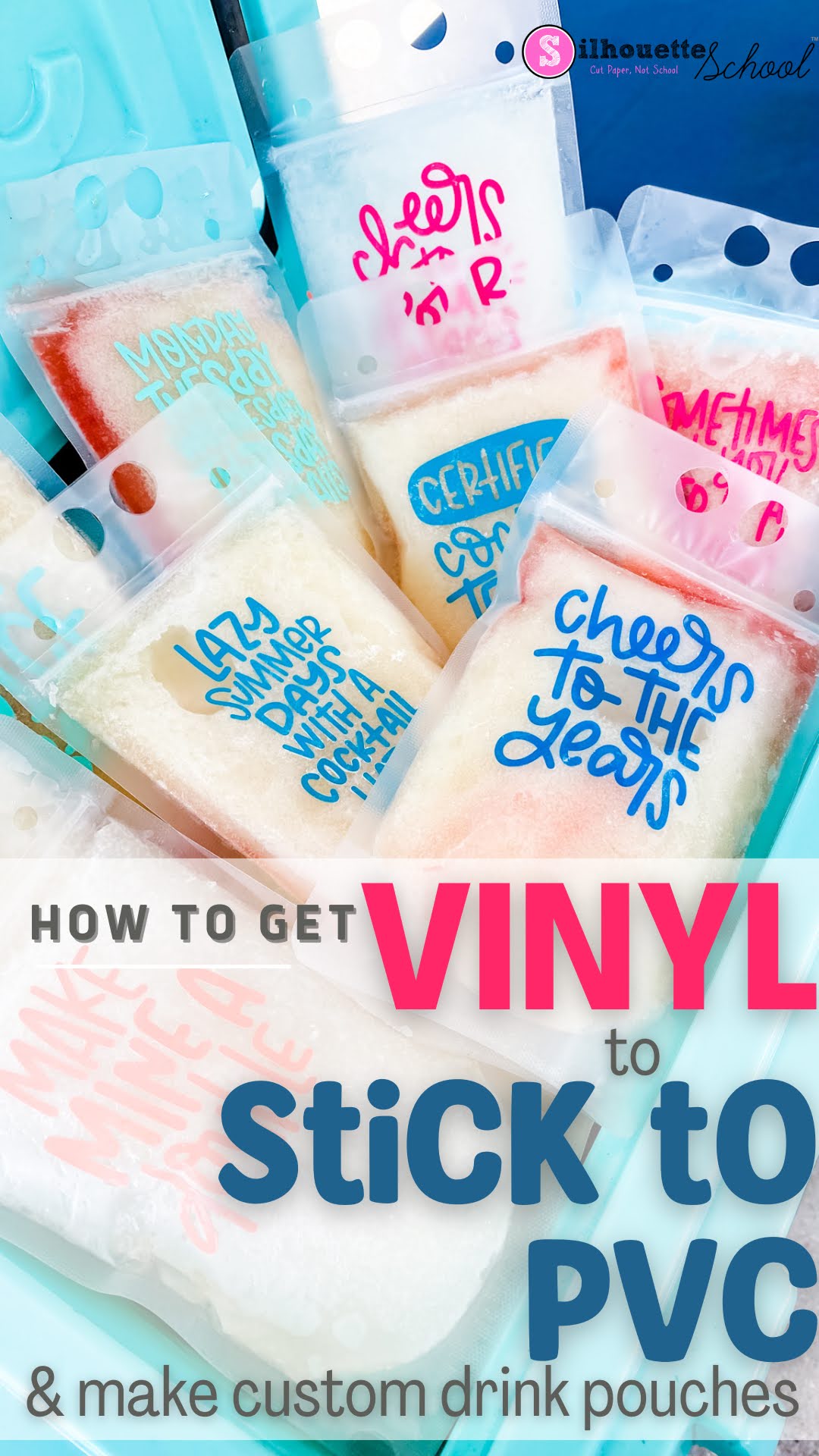
Vinyl doesn't always want to easily stick to PVC...but there is an easy trick so read on.
Cutting Laminated Shapes and Print and Cuts with Silhouette (Plus Perfect Cut Settings)
Thursday, June 22, 2023
If there's one thing I know it's that there is always another way to use your Silhouette machine....like, say, with a laminator. I recently got myself a (very basic) laminator and let me tell you, nothing is safe! I know what you're thinking: laminators are only for teachers. WRONG!

I've combined the powers of my Silhouette CAMEO and my laminator to make custom bookmarks, planner inserts, photo booth props, dry erase games for my kids, luggage tags, the list goes on.

I've combined the powers of my Silhouette CAMEO and my laminator to make custom bookmarks, planner inserts, photo booth props, dry erase games for my kids, luggage tags, the list goes on.
HTV Hack: How to Cover a Stain on a Shirt
Tuesday, December 6, 2022
Here's another useful way how to use heat transfer vinyl - cover stains on clothes! Let's face it, we all have a pile of 'to-donate' clothes. Recycle some of yours (or your kids) old favorites with handy this HTV hack for how to cover a stain on a t shirt.

Putting Vinyl on Wine Glasses: 7 Tips for Success
Thursday, August 11, 2022
Putting vinyl on wine glasses and other curved glassware is something that many Silhouette crafters struggle with.

Today I'm going to share 7 tips for adding vinyl to wine glasses so it's straight.

Today I'm going to share 7 tips for adding vinyl to wine glasses so it's straight.
Trick for Weeding Vinyl: Use the Silhouette Studio Fill Tool
Thursday, April 7, 2022
Have you ever cut a piece of vinyl or heat transfer vinyl and then weeded out the wrong area?

There's pretty much no way to fix it other than to re-cut. BUT there is a way to avoid weeding the wrong area.

There's pretty much no way to fix it other than to re-cut. BUT there is a way to avoid weeding the wrong area.
Silhouette Studio Larger Grid Numbers Hack
Thursday, February 24, 2022
I can't be the only one who's left straining my eyes to see grid numbers on the cutting mat in Silhouette Studio.

There's a way to make the numbers darker, but there's no way to make them significantly larger. There is a hack though and it's along the same lines as the Silhouette Studio trick I showed previously on changing the mat color in Silhouette Studio.

There's a way to make the numbers darker, but there's no way to make them significantly larger. There is a hack though and it's along the same lines as the Silhouette Studio trick I showed previously on changing the mat color in Silhouette Studio.
How to Place an HTV Monogram Straight...Without Measuring
Tuesday, January 18, 2022
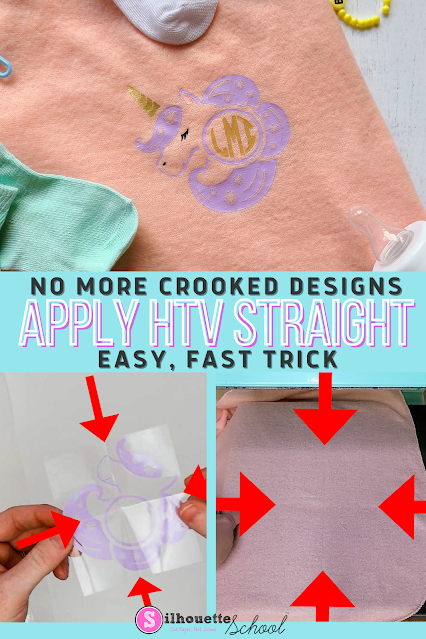
If you struggle with centering HTV monograms and placing them on straight, then this trick is for you!
Reusable Stencil Sheets with Silhouette Studio and Ikonart (Multiple Stencil Hack)
Wednesday, July 21, 2021
I have finally figured out how to make reusable stencils with Silhouette Studio thanks to Ikonart Stencil System.

And I have a hack for you that's going to let you make multiple stencils out of each reusable stencil sheet...even if they're made at different times!
Silhouette Studio Offset Tool: Why Are Pointed Corners Square?
Monday, April 26, 2021
If you're using the offset tool and wondering why sometimes the offset isn't giving you pointed corners on shapes like stars or hearts, it's not just you.

For some reason the offset squares off pointed corners instead of making an accurate offset- but there is an easy workaround.
Foil Quill Hack for Faster Foiling (But Be Warned)
Thursday, April 8, 2021
I love the Foil Quill Magnetic mat when foiling with my CAMEO 3 because of how much time it saves avoiding the need to tape the foil down. Unfortunately that magnetic mat isn't real Silhouette CAMEO 4 friendly due to the big metal bar which tends to "eat" the magnets.

That got this anti-tape crafter thinking...and I had a lightbulb moment and a Silhouette / Foil Quill hack that I will be using from here on out.

That got this anti-tape crafter thinking...and I had a lightbulb moment and a Silhouette / Foil Quill hack that I will be using from here on out.
Quickly View All Fonts in Your Silhouette Studio Designs with this Hack!
Tuesday, February 9, 2021
If you're struggling with font paralysis - as in you can't decide which font to use, you can quickly view all fonts that you have installed in Silhouette Studio!

In this Silhouette Studio text tutorial, I'll share the secret to viewing your text design with many different fonts so you can choose the perfect one!
Silhouette Hack to Save Vinyl When Layering
Wednesday, October 28, 2020
If you're a fan of the registration mark method of layering vinyl (and I would highly suggest it) you know it can come at the cost of vinyl.

To perfectly layer vinyl, the registration marks need to be in the same position for each piece of the design. However that can lead to a lot of wasted vinyl. Today I'm sharing a Silhouette trick that will help you save vinyl when layering!

To perfectly layer vinyl, the registration marks need to be in the same position for each piece of the design. However that can lead to a lot of wasted vinyl. Today I'm sharing a Silhouette trick that will help you save vinyl when layering!
Silhouette Deep Cut Blade Review (And What It Can Cut in CAMEO)
Thursday, August 13, 2020
If you're considering the Silhouette Deep Cut Blade for Silhouette CAMEO or Portrait, this review and tutorial will give you a good start including cut settings for otherwise hard to cut materials.

The Silhouette Deep Cut blade can cut materials up to 2mm thick. Those are usually reserved for the Curio, CAMEO 3, Portrait 2 and Silhouette CAMEO 4 which are the machines that have the higher clearance and therefore can cut thicker materials. However I was also able to use the Deep Cut blade with success in my CAMEO 2. This gives you some options if you want to avoid or can't use the Kraft Blade.

The Silhouette Deep Cut blade can cut materials up to 2mm thick. Those are usually reserved for the Curio, CAMEO 3, Portrait 2 and Silhouette CAMEO 4 which are the machines that have the higher clearance and therefore can cut thicker materials. However I was also able to use the Deep Cut blade with success in my CAMEO 2. This gives you some options if you want to avoid or can't use the Kraft Blade.
Custom Face Masks with HTV the Quick and Easy Way!
Wednesday, August 12, 2020
Custom face masks are in high demand right now and with a Silhouette CAMEO or Portrait you can easily make them with both HTV or sublimation.

The biggest challenge of adding a sublimation transfer or heat transfer vinyl on face masks is the shape of the mask itself. I have few tricks that should help you deal with the shape and any seams to get a better press.

The biggest challenge of adding a sublimation transfer or heat transfer vinyl on face masks is the shape of the mask itself. I have few tricks that should help you deal with the shape and any seams to get a better press.
How to Press Multi-Color HTV Designs in One Press: Silhouette Hack
Tuesday, July 21, 2020
If you're looking for a no-fail method for aligning and pressing 2-color HTV designs, then look no further!

Using the simple trick explained in this Silhouette tutorial, you'll save time by knowing exactly where to align the different colors of your HTV design and save money because this trick is designed to save as much HTV as possible.

Using the simple trick explained in this Silhouette tutorial, you'll save time by knowing exactly where to align the different colors of your HTV design and save money because this trick is designed to save as much HTV as possible.
Heat Press Hacks for Silhouette Users
Thursday, July 16, 2020
Everyone loves a good Silhouette hack, right? Today I'm sharing a couple of heat press hacks with you because...we all need to save time, money, and materials in our crafting, right?
If you hate wasting scraps and are looking for the key to the best seal when pressing, then today's your day!
 |
Sublimation Printing with Silhouette CAMEO and Heat Transfer Vinyl
Thursday, June 4, 2020
Sublimation printing with Silhouette CAMEO (or Portrait) is gaining more and more popularity with Silhouette crafters because of the amazing results! It's a great alternative to heat transfer vinyl when you have complex designs and multi-color designs that would be difficult to layer with heat transfer vinyl.

The problem is not all fabric can be sublimated on...it has to be a 50/50 cotton/polyester blend minimum (and preferably more than 65% polyester for best results) which means you need special blanks. But there is a workaround and it uses white glitter heat transfer vinyl which will essentially let you do sublimation on any fabric.

The problem is not all fabric can be sublimated on...it has to be a 50/50 cotton/polyester blend minimum (and preferably more than 65% polyester for best results) which means you need special blanks. But there is a workaround and it uses white glitter heat transfer vinyl which will essentially let you do sublimation on any fabric.
How to Save Vinyl When Cutting Offsets or Outlines (Silhouette Video Tutorial)
Thursday, May 14, 2020
If you're looking for ways to stretch your vinyl stash and save some money - then this trick should help.

When cutting offsets or outlines for vinyl decals and heat transfer vinyl designs it can create a lot of waste in the middle area if you just weed it out and throw it away. Now you save save that vinyl and use it for another project.
Subscribe to:
Posts (Atom)


.png)


