



Showing posts with label Intermediate Silhouette Tutorials. Show all posts
Silhouette Circle Monogram Tutorial (Your Font Choice!)
Thursday, January 8, 2026
How to Cut Paper Cleanly With Silhouette: 10 Tips for Success!
Thursday, December 18, 2025
Vinyl gets a lot of attention around here, but paper crafts are still hugely popular and some of the most amazing creations cut with the Silhouette machines are with paper.

Paper can get a bad rap sometimes because it's not the easiest material to cut cleanly with Silhouette. It can shred, it can tear, it can get stuck to the mat. Today I'm sharing 10 tricks to help you get better paper cuts with your Silhouette.

Paper can get a bad rap sometimes because it's not the easiest material to cut cleanly with Silhouette. It can shred, it can tear, it can get stuck to the mat. Today I'm sharing 10 tricks to help you get better paper cuts with your Silhouette.
DIY Patriotic Nails Tutorial (And More Patriotic Silhouette Projects)
Thursday, July 3, 2025

Now that that's out of the way...it's less than a month until July 4th already and I'm sharing my first patriotic Silhouette project today. This one was kind of a challenge for me (not only because it's my monthly contribution to the Silhouette Challenge group), but also because I'm terrible at painting my own nails (as you'll see), let alone blinging them out with special designs. Thankfully, my Silhouette made the job sooooo much easier!
The first thing I did was get my red, white, and blue nail polish. I picked them at the dollar store only because I can't really see myself wearing white or blue nail polish any other time of the year and I wasn't willing to shell out more than buck for a bottle.
Let's talk toes first since they were the easiest. I painted my big toes blue and then cut stars out of white permanent vinyl (651) and stuck them directly onto the the nail. I found that a design that's just about .75 square inch works well. Easy peasy and made even easier because I'm giving you the free cut .studio cut file to download. I planned to paint each of the other four toe nails red and white striped, but they were just too tiny...so I cheated and painted each nail a solid color.
How to Make a Glitter Fill in Silhouette Studio
Thursday, March 20, 2025
If you work with glitter heat transfer vinyl or glitter vinyl a lot you may have found it necessary to create a mock up in Silhouette Studio only to realize that a solid color doesn't even come close to the glitter look.

This Silhouette tutorial will show you exactly how to make glitter fills in Silhouette Studio so you can create realistic glitter mock ups!

This Silhouette tutorial will show you exactly how to make glitter fills in Silhouette Studio so you can create realistic glitter mock ups!
How to Screen Print Using Vinyl: Silhouette Tutorial
Thursday, October 3, 2024
So you want to know how to screenprint with vinyl and Silhouette?!

You've come to the right spot because today I'm going to show you how easy it is to cut a re-usable vinyl stencil with your Silhouette to make screen print shirts with a silk screen.

You've come to the right spot because today I'm going to show you how easy it is to cut a re-usable vinyl stencil with your Silhouette to make screen print shirts with a silk screen.
How to Fill Sticker Sheet Backgrounds with Patterns in Silhouette Studio (Free Sticker Sets)
Thursday, September 12, 2024
No one likes boring stickers...and you're in luck because it's possible to design, print and cut professional-looking custom stickers with your Silhouette!
The added touch of a custom sticker sheet backing will take your sticker sets to the next level..no more boring white!
 |
| This is a sponsored post but all opinions are my own. |
The added touch of a custom sticker sheet backing will take your sticker sets to the next level..no more boring white!
What To Do If You Can't Ungroup in Silhouette Studio
Monday, August 26, 2024
Did you ever have a design or font in Studio Studio that you can't ungroup, but you need to remove some cut lines?

Fear not! Read on for this trick on how to remove unwanted cut lines when ungroup is grayed out in Silhouette Studio.
How to Make Print and Cut Sticker Sets (Silhouette Studio V4 Tutorial)
Tuesday, June 18, 2024
I love making little sticker sets with my Silhouette CAMEO and it's pretty easy to do!
Depending on the size, you can get several sticker sets out of each piece of sticker paper. This beginner Silhouette sticker tutorial will walk you through how to set up and print and cut multiple sets of stickers in Silhouette Studio V4.
 |
| This is a sponsored post but all opinions are my own. |
Vinyl Nail Decal Tips and Sizing Guidelines: Silhouette Tutorial
Tuesday, May 14, 2024
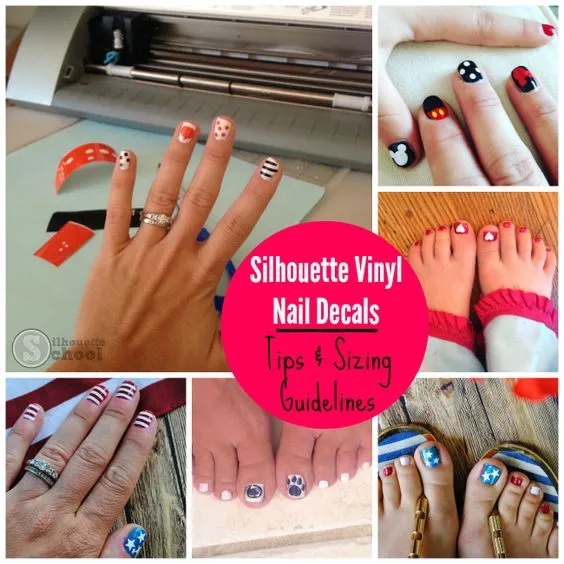
If you've joined the vinyl nail art club - welcome! I've been using vinyl to decorate my own, as well as my daughter's finger and toenails, for almost as long as I've owned a Silhouette. Whenever I share a photo of our vinyl nail art I get questions - most about cutting such small designs and sizing the decals. Today I am going to answer the three biggest questions I get about Silhouette vinyl nail designs so you can get decorating your nails, too!

Silhouette Studio Gradient Fill Tool Tutorial
Thursday, May 9, 2024
Did you know you can fill designs with a gradient fill in Silhouette Studio?
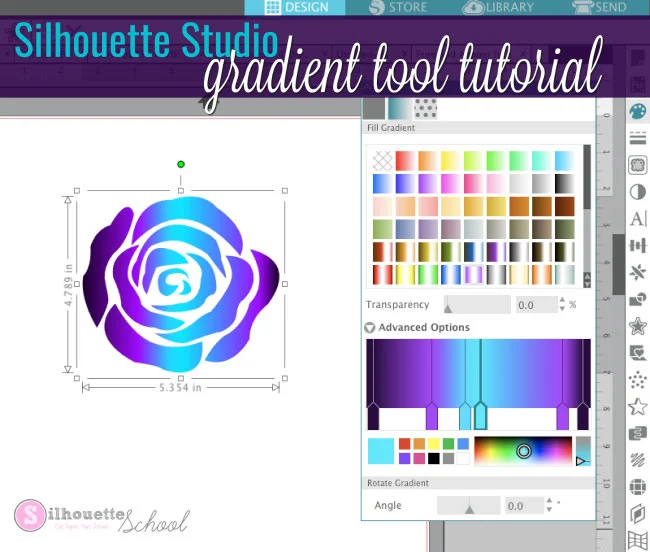

There are default quite a few gradient color options in Silhouette Studio, but you can also customize the gradient fills as well.
Fastest (and Scariest) Way to Weed Vinyl...5 Tips and a Silhouette Video Tutorial
Tuesday, March 26, 2024
I recently shared a quick video on the Silhouette School Facebook page showing a vinyl weeding technique I called "BandAid Method"...for obvious reasons. And from the sound of the collective gasp, you all lost.your.minds.

This technique where you quickly rip off the excess vinyl around the cut design, rather than slowly pulling away the negative, has also been called Snap Weeding. Some also suggest "Waxing Method" might be most appropriate. I'll let you decide.

This technique where you quickly rip off the excess vinyl around the cut design, rather than slowly pulling away the negative, has also been called Snap Weeding. Some also suggest "Waxing Method" might be most appropriate. I'll let you decide.
Beginner Glass Etching Tutorial with Silhouette Stencil
Tuesday, March 19, 2024
Did you know you can use etching cream on glass dishes so they're safe for the microwave and oven?

This etching glass tutorial will walk you through exactly how to cut a Silhouette stencil and go about etching pyrex glassware.

This etching glass tutorial will walk you through exactly how to cut a Silhouette stencil and go about etching pyrex glassware.
21 Silhouette Tutorials, Tips and More (November 2023 Wrap Up)
Thursday, November 30, 2023
I am not sure where November went, but it flew by!

If you missed anything on Silhouette School, we were jam packed with Silhouette tutorials on the new machines, Studio tips, free designs and much more! We always have you covered!
Silhouette Hack: Craft Foil over HTV for an Amazing Effect!
Monday, September 4, 2023
I just blew my own mind with this little Silhouette hack!! I have figured out a way to add metallic craft foil to fabrics and apparel and the results are amazing!
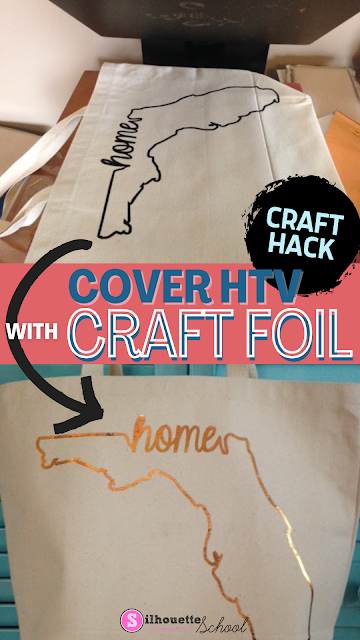
The secret is not ink and heat (as is normally the case with reactive foils), but heat transfer vinyl and heat. Yes, just plain ol' smooth HTV!!

Transferring Photos to Wood with Silhouette Temporary Tattoo Paper
Tuesday, August 22, 2023
A few weeks ago I shared a cool trick on using Silhouette Temporary Tattoo paper on stone tiles to make coasters...and I got a lot of questions about whether the same method would work on wood.
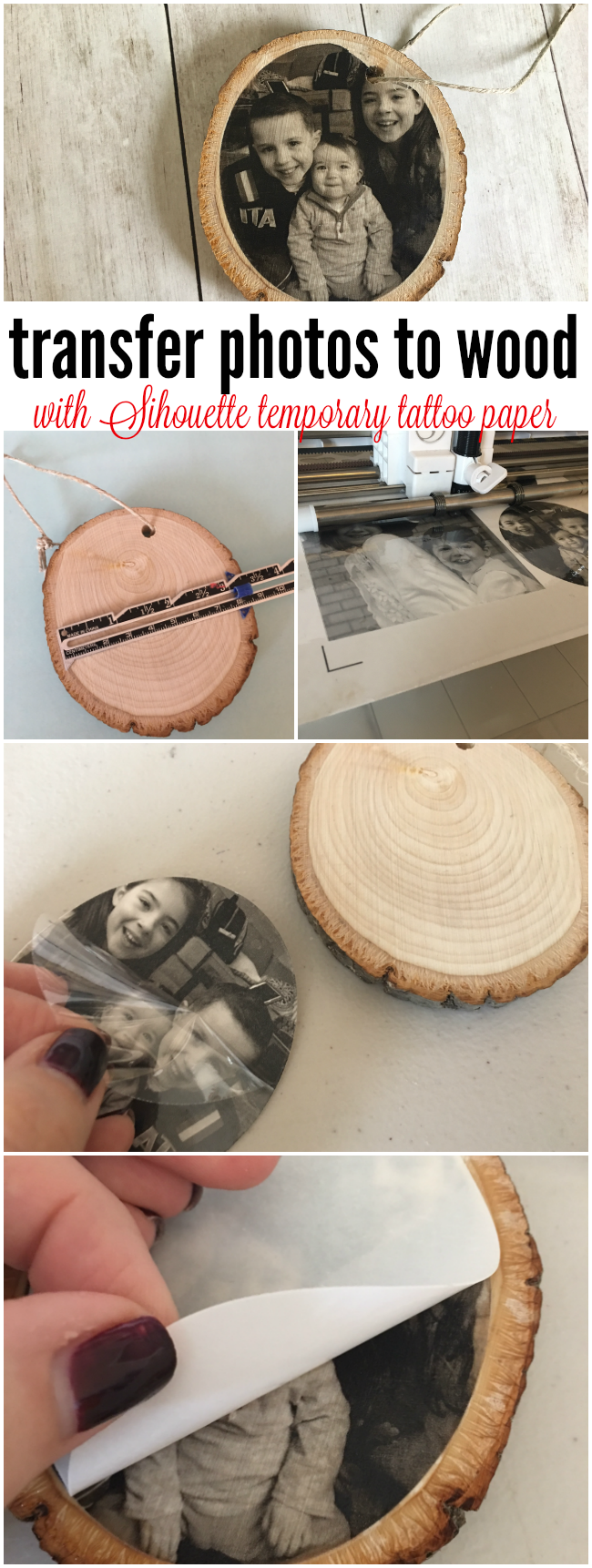
So I'm back...and I'm happy to report you can in fact use Silhouette Temporary Tattoo paper to transfer photos to wood!

So I'm back...and I'm happy to report you can in fact use Silhouette Temporary Tattoo paper to transfer photos to wood!
Make Photo Coasters with Silhouette Temporary Tattoo Paper
Monday, August 7, 2023
Grab yourself some Silhouette temporary tattoo paper and let's make DIY photo coasters on tile.

Temporary tattoo paper is is amazingly versatile and can be used on wood and stone tiles! I have always loved photo coasters and the Silhouette temporary tattoo paper is perfect for this application.
Cutting Laminated Shapes and Print and Cuts with Silhouette (Plus Perfect Cut Settings)
Thursday, June 22, 2023
If there's one thing I know it's that there is always another way to use your Silhouette machine....like, say, with a laminator. I recently got myself a (very basic) laminator and let me tell you, nothing is safe! I know what you're thinking: laminators are only for teachers. WRONG!

I've combined the powers of my Silhouette CAMEO and my laminator to make custom bookmarks, planner inserts, photo booth props, dry erase games for my kids, luggage tags, the list goes on.

I've combined the powers of my Silhouette CAMEO and my laminator to make custom bookmarks, planner inserts, photo booth props, dry erase games for my kids, luggage tags, the list goes on.
How to (Easily) Make Wavy Text in Silhouette Studio
Thursday, April 6, 2023
Tired of plain old boring straight text? Perhaps sometime you want to wrap text around a circle as we showed you how to do here or make it wavy like a roller coaster. If so, you're in the right spot.
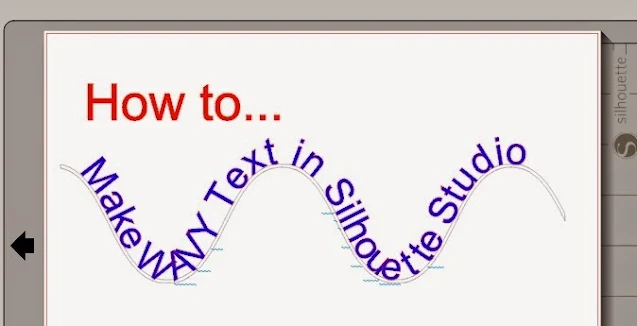
Making wavy text is pretty simple to do actually. The most complicated part is getting the wave shape - but we even have a work around for that, if you'd like!
23 Silhouette Tutorials, Tips and More! (January 2023 Wrap Up)
Wednesday, February 1, 2023
I can't believe that we are already a month into 2023...AND it's time to look back at all the free Silhouette tutorials we shared last month!

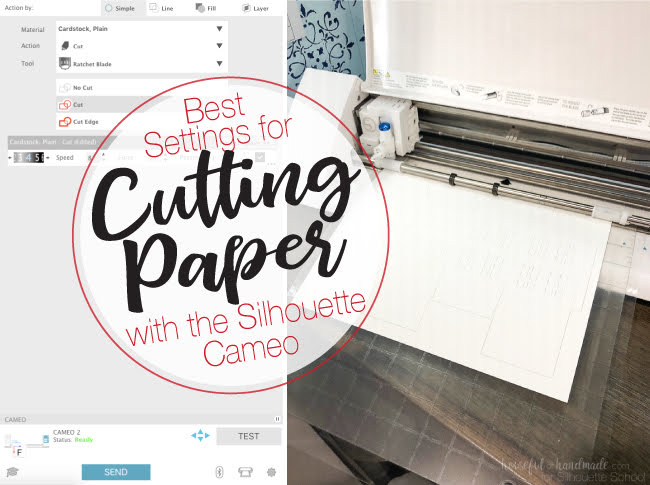
Best Silhouette Cut Settings for Paper
Thursday, December 1, 2022
Well you guys seemed to like all my tips for cutting paper with Silhouette so today we're going to take a closer look the best cut Silhouette settings for paper!

Of course there are all different kinds and weights and textures of paper which means the cut settings will vary. Kati from Houseful of Handmade is here today to share the perfect paper cut settings!
Subscribe to:
Posts (Atom)


.png)


