Copyright Silhouette School 2016. Powered by Blogger.


Showing posts with label Silhouette Studio tutorials. Show all posts

How to Join Two Lines in Silhouette Studio

I get the question of how to join two lines in Silhouette Studio quite a bit.

join two lines silhouette studio, silhouette studio, how to join lines in silhouette studio, silhouette 101, silhouette america blog

There are a couple of different approaches to this depending on what exactly you're trying to accomplish. This tutorial will go through three ways to join lines in Silhouette Studio.

How to Print to Brother SP-1 Sublimation Printer from Silhouette Studio

Wondering how to print to your Brother SP-1 sublimation printer from Silhouette Studio?  

brother sublimation,sublimation,sublimation oven,Silhouette Studio tutorials,Sublimation Printing,


It's SO easy, fast and direct. Read on for the steps to print your sublimation templates and designs directly to the Brother sublimation printer (and all you need is FREE Silhouette Studio.

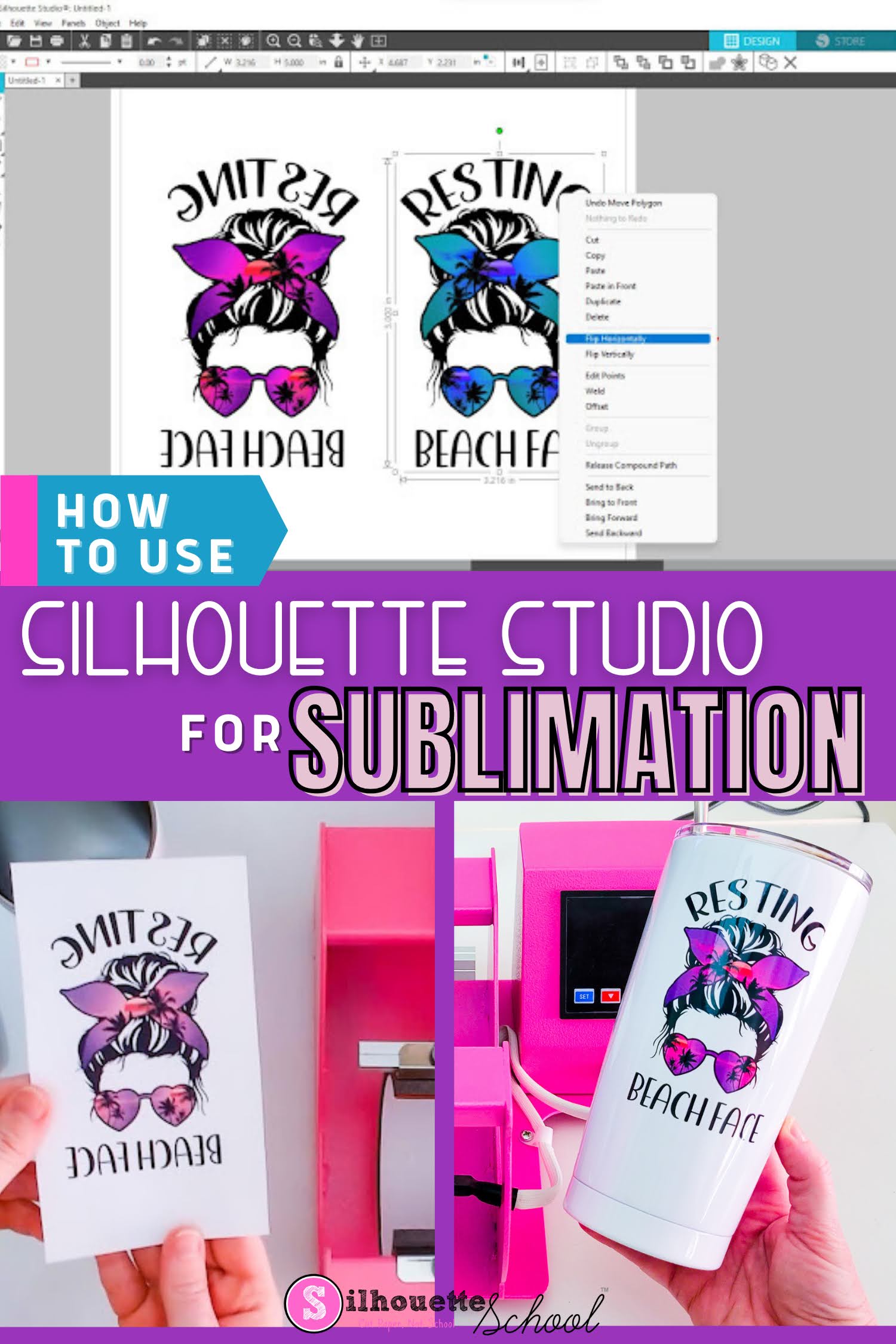
Silhouette Studio for Sublimation: Free Software for Epson and Sawgrass

Silhouette Studio can be used for Sublimation printing for not only designing, but also print layout. 

silhouette 101, silhouette america blog, sawgrass, epson sublimation, silhouette studio v4

You don't even need a Silhouette cutting machine to use Silhouette Studio for Sublimation! Just download Silhouette Studio free. 

This tutorial will explain how to use Silhouette Studio for sublimation. 

How to Get a Solid Fill with Silhouette Sketch Pens or Foil Quill

Don't want an outline, but want to give your design or font a solid fill when using sketch pens or Foil Quill with your Silhouette machine?

silhouette america blog, silhouette 101, foil quill, sketch pens, etching

It's easier than ever to do in Silhouette Studio.  This beginner Silhouette tutorial will walk you through the few steps to go from the standard cut file to a solid filled sketched or foiled design.

Free Silhouette Studio Keyboard Shortcuts Printable

Sometimes designing and editing your Silhouette files can feel like it takes forever. Clicking back and forth between tools and trying to figure out where to find the functions you need is a hassle. But did you know there are a whole slew of Silhouette Studio keyboard shortcuts?!

silhouette studio, silhouette design studio, silhouette studio tutorials, silhouette 101, silhouette america blog

If you haven't used them before, keyboard shortcuts will change how you use Silhouette Studio. Silhouette School monthly contributor Kati from Houseful of Handmade is here today to share how to use Silhouette Studio keyboard shortcuts along with an adorable free keyboard shortcut printable that you can easily reference!

How to Knockout Text in Silhouette Studio

Create some knockout projects using this knockout text technique! 

silhouette 101, silhouette america blog, knockout, silhouette studio tutorials, silhouette studio designing

In this Silhouette Studio knockout tutorial we'll walk through how to design custom knockout name designs in the Silhouette software.  

Intro to Snap Lines in Silhouette Studio V4.4

When Silhouette Studio V4.4 is released (it’s currently in closed beta), it will include a new tool for designing: Snap Lines.

silhouette 101, silhouette america blog, snap lines, silhouette studio, silhouette studio v4.4


Snap Lines can be used like guides to quickly align shapes and elements on each other when designing in Silhouette Studio.

How to Use the Line Patterns Tool in Silhouette Studio

The Line Patterns feature was quietly added to Silhouette Studio V4.3 (with DE+ or higher)...and I think it’s fair to say remains a bit of a mystery still.

silhouette 101, silhouette america blog, line patterns tool, line patterns, silhouette studio

The Line Pattern tool can be found within the Line Style panel or accessed from the Quick Access Tool Bar.

Fill Color Swatches Disappeared in Silhouette Studio! How to Get Them Back

If you suddenly have no color swatches in your Silhouette Studio Fill Color panel, don’t panic.

silhouette 101, silhouette america blog, fill color, silhouette studio tutorials, studio v4.2


There’s a new option in the Fill Color panel that will display or hide the default color swatches. You may have accidentally hidden them or your software may just be playing tricks on you. Either way it’s easy to get them back.

22 Must Read Silhouette Tutorials (August 2019 Wrap-Up)

Another month flew by here at Silhouette School which means it is time to wrap things up so that we can move along to the next month with everything we have in store...and September is going to be extremely exciting with the official launch of CAMEO 4.

silhouette 101, silhouette america blog, sublimation, infusible ink, cameo 4

But first, we can't go anywhere without taking a look back at all of the awesome fun we had in August! 

Silhouette Studio V4.3: Updated Page Set Up Panel

Silhouette Studio V4.3 will move out of closed beta and into open beta soon. Once in open beta anyone can download and install the Silhouette software version.

silhouette 101, silhouette america blog, studio v4.3, silhouette studio, silhouette design studio

Among the new features of Silhouette Studio V4.3 is a subtle, but important change to the Page Set Up Panel.

Silhouette CAMEO 4 Matless Cutting Feature Explained

The Silhouette CAMEO 4 will be able to cut unlined materials - such as paper - without a cutting mat.

silhouette 101, silhouette america blog, matless cutting, cameo 4, cutting without mat

While cutting mats will be available for the Silhouette CAMEO 4 - and I would still recommend using them - the among the Silhouette CAMEO 4 features is matless cutting - thanks to a new variable cutting force feature.

20 Silhouette Tutorials and Project Ideas! (April 2019 Wrap Up)

If you're looking for Silhouette CAMEO tutorials we've got 20 awesome ones for you! 


silhouette cameo tutorial, silhouette cameo tutorial for beginners, silhouette cameo tutorial, silhouette 101, silhouette america blog

But before we get to what's ahead in May, let's take a look at all that was covered in April!!!

Why JPEG and PNGs Won't Save as Custom DPI from Silhouette Studio (And the Fix)

If you're trying to save a JPEG or PNG from Silhouette Studio and the custom DPI won't save - there's a quick and easily fix.

silhouette 101, silhouette america blog, DPI, silhouette studio, silhouette business edition

DPI stands for Dots Per Inch and the higher the DPI the better resolution the image.

The 11 Best Silhouette Print and Cut Tutorials

If you haven't mastered - or even tried - Silhouette print and cut yet, you're missing out.

silhouette print and cut, print and cut silhouette, silhouette cameo print and cut, silhouette america blog, silhouette 101

Print and cut is one of the most awesome features of the Silhouette machines and it can be used on almost any material from paper and vinyl to heat transfer vinyl, tattoo paper, sticker sheets and more!

Silhouette Studio for Cricut: How to Make Silhouette Software Work with Cricut

If you're wondering if Silhouette Studio is compatible with Cricut...the answer is yes!

silhouette america blog, silhouette 101, cricut, silhouette studio, design space


Silhouette Studio is a much more robust design software than Cricut Design Space and that, along with not needing Wifi to use the software, has a lot of Cricut users swapping software programs.

Big Change to SVG Designs in Silhouette Studio V4.2

There's a big change to how Silhouette Studio treats imported SVG designs in the latest version of Silhouette Studio V4.2.

Silhouette svg files, svg silhouette, silhouette cameo svg, silhouette 101, silhouette america blog

No longer will SVG designs come into the Silhouette software with the cut lines turned off by default!

How to Set a Score Line with Silhouette CAMEO or Portrait

If you prefer score lines on your Silhouette paper projects over perforated cut lines, it's possible to set a score line in Silhouette Studio.

Silhouette paper cuts, Paper cutting machine, paper cut, paper cutting art, paper cutting

It's actually really easy to cut score lines with Silhouette CAMEO or Portrait as long as you know where to find the option in the software!

How to Keep Multiple Versions of Silhouette Studio on MAC Computer

It's not only possible, but easy to keep multiple versions of Silhouette Studio on your computer - especially if you have a MAC.

Silhouette Studio designer edition tutorials, Silhouette Studio Software tutorials, Silhouette Design Studio tutorials, silhouette tutorial, silhouette cameo tutorial for beginners

It's all about how the program is named.

Open SVG Files by Default with Silhouette Studio Instead of Your Internet Browser

If your SVGs are opening in an Internet Browser window instead of Silhouette Studio when you double click...fear not! There is a fix.

Silhouette svg files, svg silhouette, silhouette cameo svg, silhouette studio svg, Free svg files for silhouette

Once you set this up it will teach your computer how to treat SVG files so they'll no longer open with Internet Explorer, Safari, Chrome or Firefox.