How to find firmware updates is really one of the most common questions I get.
If you're having an issue with your hardware it's natural to think a firmware update will fix that. But if you go looking for a firmware update - you'll find it's not as simple as download and run it.
If you're trying to figure out how to save a Silhouette file as an SVG file so you can use it with your laser or another cutting machine - it's just a few clicks to convert.
One of the biggest benefits of Silhouette Studio is that it can be used to design for so many other types of equipment and software and you don't even need to have a Silhouette machine.
In this tutorial I'll show you step by step how to convert a Silhouette file to an SVG.
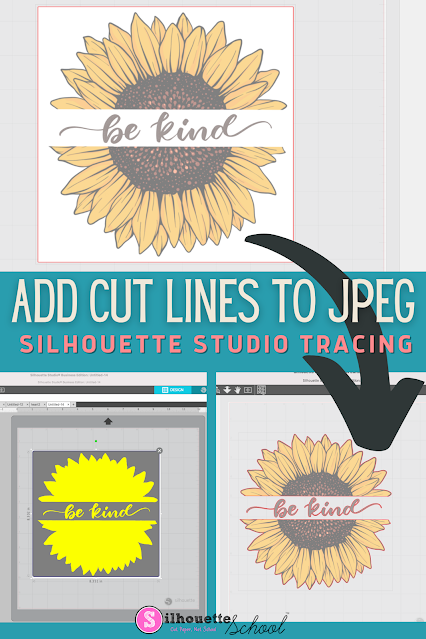
You can add cut lines to a JPEG in Silhouette Studio by using the trace tool.
The free version of Silhouette Studio allows you to import JPEG files making it a popular file type choice for some. This tutorial will show you how to add a cut line to a JPEG image in the Silhouette software.
One of the most common questions I get is how to remove a photo background in Silhouette Studio. And the good news is there are two ways to do it right inside the software - no Photoshop, no Canva, no extra apps needed.
Here's the thing. The method you use depends on your photo. I'm going to show you both so you can pick the right one for whatever you're working on.
I'm using these techniques to make DIY big head cutouts - but this works for any project where you need a cut-to-shape image, like photo booth props or custom stickers.
There's a lot of confusion right now about Silhouette Studio V4 and V5 — specifically whether you should update, whether you have to update, and why so many experienced Silhouette users are still on V4 by choice.
The short answer is that most people do not need (and should not be using) V5. For the majority of Silhouette machines, V4 is still the better option.
If you've ever worked on a design in with a ton of elements and tried to manually click each one to select a specific color… this tip is going to save you so much time.
Silhouette Studio has a feature built right into the top toolbar that lets you select all objects of the same line color — or the same fill color — in one single click. It's called Select by Line Color and Select by Fill Color. This tutorial focuses on Silhouette Studio V5, but the process and the tool is the exact same in Silhouette Studio V4 as well.
There are various ways to try to speed up the Silhouette software, including making sure you're not overloading the software. Read on to learn how to increase the processing speed.
Affinity is now free...like completely free. Like you don't even need to put a credit card in - free.
Canva, who owns Affinity, is making the downloadable design software available to anyone and whether you're a crafter or a small shop or a graphic designer this is HUGE news!!
Have you ever pulled a PNG file into Silhouette Studio and then you literally can't do ANYTHING with it?
You can't click it. You can't move it. You can't select it. Nothing! It is SO frustrating, and it only happens with PNG files. Read on to learn how to fix this frustrating problem when importing PNG files into Silhouette Studio.
If you need to move Silhouette Studio to a new computer there are some important steps you'll need to take before you actually install the Silhouette software on your new computer.
As long as you follow these steps you should have no problem as you prepare to move your Silhouette software, Silhouette library, and custom cut settings to a new computer.
If you're trying to get your Silhouette CAMEO 5 connected to Silhouette Studio for the first time, there are a few steps you'll need to take.
In this CAMEO 5 beginner tutorial I'll walk you through everything so you can get Silhouette Studio downloaded, installed and setup so you're ready to begin cutting.
If you're a long time user of Silhouette Studio that decided to install Silhouette Studio V5 the Send panel may throw you.
While most of the changes in Silhouette Studio V5 are cosmetic, the Send panel got an overhaul that I would argue it didn't need. Read on to learn more about what you need to know about the updated V5 Send panel.
If Silhouette Studio is running slow or crashing there are a handful of reasons why.
There are also four things to check right away to try to improve the speed and stop the crashing from continuing to happen. Read on for what to do if Silhouette Studio software is slow or crashing.
It's still in beta, which I think is pretty obvious, given my first experience with Silhouette Web. Read on for how to get started using Silhouette Web and why you might (or might not) want to.
Did you ever find a perfect DTF or sublimation design but it's not quiet the right color?
You can recolor images in Silhouette Studio with just the click of a button or two. Read on for how easy it is to make color changes to your designs for FREE.
Step up your custom t-shirt game with this super quick and easy Silhouette Studio design trick to adding a cool shadow effect to any text design!
You can use this trick in any version of Silhouette Studio and it's perfect for beginners who are looking to start adding more elements to their designs.
You may have noticed the Silhouette Design Store is slow..painfully slow. An announced May 2024 update to the Design Store as well as the Silhouette America website is going much slower than I'm sure anyone would like...including Silhouette.
It's preventing or causing delays in downloads, syncing and navigating. So..what's a crafty person who needs designs and fonts to do? Read on..









.jpg "Split screen feature in silhouette studio")




.png)