Copyright Silhouette School 2016. Powered by Blogger.


Showing posts with label Stickers. Show all posts

Is Flexi Still Free with Roland? No! (And here's what to use instead)

If you bought a Roland recently you probably noticed the software that's included has changed. Flexi does not come free with a Roland anymore. That's the cut line creation program that's been included with the Roland BN2 series since it's launch.  

Flexi,Print and Cut,Roland,Roland Designer,Stickers,versaworks,


The good news is - you don't need it. Roland has replaced Flexi with their own free web-based software called Designer that can create cut line and perf cut lines. Plus it syncs right into VersaWorks.  

I've been using it for sticker sheets and I'll show you exactly where it shines and where it falls apart. 

How to Make Stickers with Canva and Silhouette CAMEO

Are you ready to step up your sticker game? Making custom stickers with Canva and Silhouette CAMEO is easier than you think! 

silhouette 101, silhouette america blog, stickers, canva, silhouette cameo

In this blog post, I'll share my best tricks for how to make stickers with Canva and Silhouette CAMEO. 

UV DTF Laminator: The One You Already Have Will Probably Work

If you are getting into printing UV DTF stickers, you have probably seen that the desktop UV printers all have their own laminator you can buy. And they are not cheap.  

laminated stickers,Stickers,uv,UV DTF,UV DTF printer,uv dtf stickers,uv stickers,


The question I keep getting is whether the laminator you already own will work. I put both my cheap Amazon laminator and a cold laminator I had to the test to see if we could save you some money! 

Stickers with Borders: How to Fix Extra Internal Cut Lines in Silhouette Studio

If you're trying to add a white border around stickers in Silhouette Studio and now you have a bunch of unwanted internal cut lines - there's an easy fix. 

Stickers,remove cut lines,how to trace,Tracing,sticker,


Trying to select and delete those little islands isn't possible without deleting the entire offset.  They're one of the most common frustrations people run into when making white border stickers in Silhouette Studio. Here's exactly what they are and how to get rid of them.

First Print and Cut in Silhouette Studio V5 (Important Changes)

If you're using Silhouette Studio V5 for print and cut, there are some important changes you'll want to be aware of. 

Stickers,registration marks,Silhouette Studio,Print and Cut,silhouette studio tutorial,print and cut sticker machine,V5,

Even if you're not a beginner, I would highly suggest going through this step by step tutorial the first time you are printing and cutting in V5. 

How to Turn Any Image into a Sticker with White Border in Silhouette Studio

If you're a sticker maker, but exclusively looking for "sticker designs" you're really limiting yourself. 

Stickers,Designing,How to,Silhouette Studio 4,silhouette studio v5,print and cut sticker machine,sticker,

Any design or image can be turned into a sticker by adding a border in Silhouette Studio. So whether or not your design is "sticker ready" is really irrelevant - because you can make it sticker ready! 

Read on for the step by step on how to turn any image into a print and cut sticker. 

The All-in 1-Amazon Print and Cut Sticker Machine for Under $200

Turns out there is a print and cut sticker machine on Amazon for under $200. 

sticker,sticker printer,print and cut sticker machine,Stickers,sticker shop,

I currently have two print and cut machines - a Roland BN2-20A and an iColor 250 - both cost thousands. So when Liene reached out to see if I'd be interested in trying their new sticker printer, I jumped at the chance. 

How to Make White Border for Stickers with Silhouette CAMEO

You can make a white border for stickers with Silhouette CAMEO by quickly adding an offset in Silhouette Studio. 

silhouette 101, silhouette america blog, print and cut, stickers, sticker paper

This tutorial will show you step by step how to add a white border to stickers in Silhouette Studio. 

Silhouette Registration Mark Types EXPLAINED (3 vs 4 Marks)

If you're new to the Silhouette Cameo 5a or coming from an older CAMEO model, you might have noticed that your registration marks look different. 

Print and Cut,Silhouette Print and Cut,cameo 5,Silhouette cameo 5,silhouette cameo 5a,registration marks,Stickers,

This isn't a bug or an error - it's actually one of the differences between the CAMEO 5a (and Silhouette Pro MK II) and the rest of the Silhouette machines which use a three mark system. 

Converting Sticker Designs for Transfers and Sublimation - Video Tutorial

Have you ever wanted to turn a sticker design into a heat transfer or sublimation print? 

Silhouette Studio,silhouette studio 5,Print and Cut,Stickers,

Designs made for stickers often have a white border that you don't want on a shirt or mug.

How to Use Sublimation Sticker Paper with Silhouette CAMEO or Portrait

Have you heard of sublimation stickers? You're basically sublimating onto sticker paper then printing and cutting.  

sublimation,Silhouette and Sublimation,sublimation printer,Sublimation Printing,Stickers,vinyl stickers,

The process seems  is long and involved...and I'm not a patient person, but I picked up a pack of HTVRont Sublimation Sticker sheets from Amazon to give it a try. Read on to learn how to make sublimation stickers which are bright, vibrant, and waterproof. 

Sticker Shop Game Changer | Print Rolls of Contour Cut Stickers at Home!

If you're looking to print rolls of contour cut stickers at home or for your sticker shop - do not sleep on the iColor 250. 

icolor 250,print and cut sticker machine,sticker,sticker printer,sticker shop,Stickers,vinyl stickers,

It may disguise itself as a "label printer," but the iColor 250 is a what I call a magic sticker printer because of what this little machine can do!

You can print and cut continuous rolls of stickers - either the same stickers or sets of stickers. Read on for how to do this. 

How to Remove White Border From Stickers (To Use them for Sublimation or Transfers!)

Want to get more out of your sticker designs so you can them for heat transfers and sublimation, too? 

Stickers,sticker,transfer printer,print and cut sticker machine,Print and Cut,Silhouette Print and Cut,


Even though many sticker designs come with white borders that look great for stickers - they're not ideal for transfers or sublimation.  In this quick tutorial, I'm going to show you exactly how to remove those white borders using Silhouette Studio's trace by color tool. 

Print and Cut Silhouette CAMEO 4: Beginner Sticker Tutorial (Free Sticker Designs)

If you've never made print and cut stickers with your Silhouette CAMEO 4 this beginner tutorial will walk you through everything you need to know. 

silhouette 101, silhouette america blog, stickers, cameo 4, print and cut

I'm also going to include the free sticker designs for download so you can focus on the process of printing and cutting. 

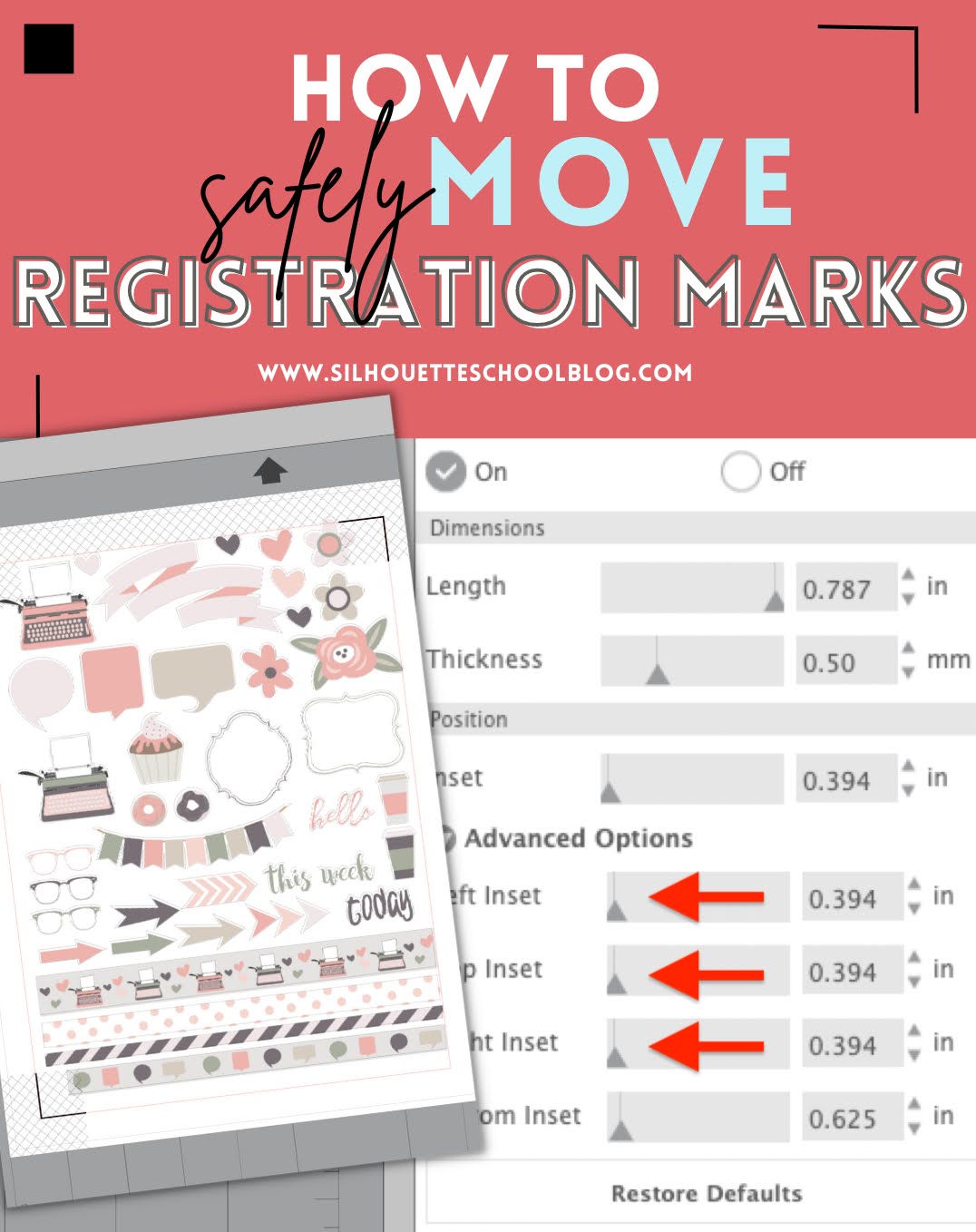
How to Change Position of Registration Marks in Silhouette Studio

You can change the position of registration marks in Silhouette Studio to create a larger printable and cuttable space. 

silhouette 101, silhouette america blog, registration marks, stickers, print and cut

It may also be necessary to change the position of print and cut registration marks to ensure all of your marks print correctly.  Read on for how to move registration marks in Silhouette Studio. 

Waterproof Sticker Paper, Printable Foil, Printable Iron On...Oh My!

Since writing my sticker book, The Ultimate Silhouette Sticker Guide, I get asked often about various types of sticker paper and where it can be purchased.  I'm thrilled to say I've finally found my sticker paper people: OnlineLabels.com!

Silhouette tutorial, no bleed waterproof sticker paper, sticker paper
This is a sponsored post but all opinions are my own.
Ohhh emmm gee, you guys!  Online Labels has every possible type of sticker paper you could ever think of! Not only do the majority of their printable sticker and label sheets come in both glossy and matte options, they're also available for both laser and inkjet printers!

Free Vinyl Sticker Pricing Calculator: Stop Underpricing Your Work

If you're wondering how much to sell vinyl stickers for, you're not alone! One of the biggest challenges for sticker businesses is knowing exactly what to charge.

Stickers,sticker shop,pricing calculator,vinyl stickers,Roland,print and cut sticker machine,roland bn 20,sticker calculator,roland bn20a,vinyl pricing,roland bn2-20a,


Too often, small sticker businesses and Etsy sticker shops end up underpricing their stickers, not accounting for all their costs, and actually losing money on orders! Read on to learn more about my free pricing calculator and how to use it!

Print and Cut Sticker Printer: Introducing the iColor 250 Sticker Machine (MAC and PC)

If you run a sticker shop or custom sticker business, I just found what hopefully will end up being one of the best printers to print stickers!!

silhouette 101, silhouette america blog, stickers, print and cut, sticker printer

The Uninet iColor 250 is a super compact, super fast print and cut sticker machine that can print on 5" wide sticker and label material as well as speciality materials like magnet, BOPP (a polypropylene material with permanent adhesive), and metallics. 

There is a lot to like about the iColor 250 including that this print and cut sticker printer works on both a PC and a MAC as well as its small size and fast, high resolution printing. Did I mention the small learning curve?

Yes, the price tag is high, but so are the margins on stickers especially for a machine that both prints and cuts leaving you hands off rather than fussing with registration marks and multiple machines. 

Read on to learn if the iColor 250 print and cut sticker machine is right for your small business. 

How to Design Pattern Sticker Sheets with Silhouette Studio

You can take your sticker sheets up a notch by replacing the boring white background with a fun pattern by making pattern sticker sheets.
Stickers,Print and Cut,patterns,sticker,Silhouette CAMEO print and cut,digital patterns,Sticker Paper,Patterns and Backgrounds,


This is relatively easy to do in Silhouette Studio. Follow the steps below to create your own custom sticker sheets with a pattern background. 

How to Make Silhouette Stickers with a White Edge

You can easily make Silhouette stickers with a white edge in just a few clicks. 

Stickers,offset,Print and Cut,Home Printer,sticker printer,Sticker Paper,


In this tutorial I'll show you how to add a white edge to stickers that you can print and cut with your Silhouette CAMEO or Portrait.