Copyright Silhouette School 2016. Powered by Blogger.


Showing posts with label Weeding. Show all posts

How to Add a Weeding Box in Silhouette Studio...and Why You Should

If you haven't used weeding boxes in Silhouette Studio - that's going to change today. 

silhouette 101, silhouette america blog, weeding, silhouette studio v4, adhesive vinyl

Weeding boxes are extremely helpful when weeding vinyl and HTV for several different reasons. They help break up the negative space around the design or text which helps avoid problems while weeding specifically small pieces of your design pulling up.  This Silhouette tutorial will show you how to add a weeding box in Silhouette Studio and why you should.

How To Reverse Weed Roland Transfers To Stop Small Pieces from Lifting - Video Tutorial

If you're like me, dealing with printed heat transfer vinyl and those static Roland liners is incredibly frustrating. 

reverse weeding, roland transfers,Roland,Weeding,HTV, htv


Trying to weed a detailed design only to have the small pieces lift off the liner is enough to make me pull my hair out! But don't worry, I've found a simple solution to this common headache.

A Must-Try HTV Vinyl Weeding Technique - Heat Press Weeding

This HTV Weeding Trick Will Change Your Crafting Life!

Weeding,Glitter HTV,HTV,siser HTV,Heat Transfer Vinyl,glitter heat transfer vinyl,Heat Press,

If you love using heat transfer vinyl (HTV) as much as I do, you know the joy of creating custom t-shirts, mugs, and personalized gifts. But you also know the struggle of weeding those delicate, intricate designs. 

Fastest (and Scariest) Way to Weed Vinyl...5 Tips and a Silhouette Video Tutorial

I recently shared a quick video on the Silhouette School Facebook page showing a vinyl weeding technique I called "BandAid Method"...for obvious reasons. And from the sound of the collective gasp, you all lost.your.minds.

vinyl decals, vinyl decal, vinyl window decals, vinyl stickers, bandaid method

This technique where you quickly rip off the excess vinyl around the cut design, rather than slowly pulling away the negative, has also been called Snap Weeding.  Some also suggest "Waxing Method" might be most appropriate.  I'll let you decide.

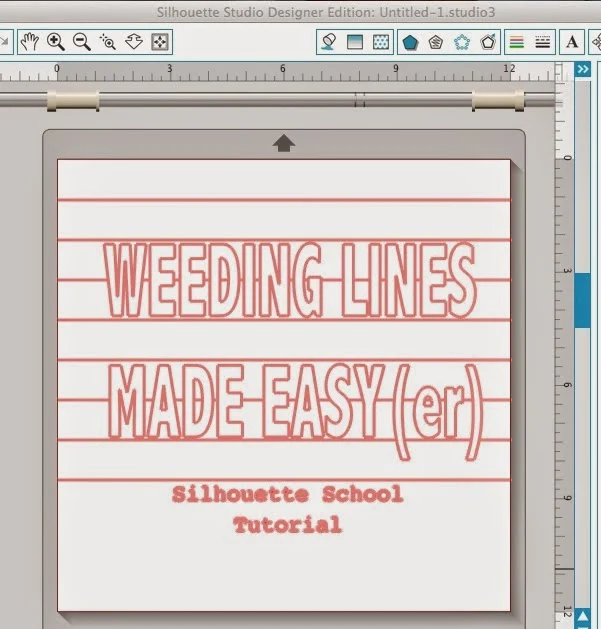
How to Add Weeding Lines in Silhouette Studio: The Why Didn't I Think of That Method

Weeding lines in Silhouette Studio help to break up the negative space around a design to make weeding the vinyl or HTV easier. 

silhouette 101, silhouette america blog, weeding lines, silhouette studio, offset

Manually adding weeding lines can be time consuming and the Silhouette Studio automatic weeding lines in Business Edition can be too restrictive - but this "why didn't I think of that" method is super fast and easy!  

How to Reverse Weed Vinyl: Small Letters and Tiny Cuts

If you ever tried to weed small vinyl letters or detailed cuts only for the design or text to lift while weeding, you probably aren't reverse weeding. 

silhouette america blog, silhouette 101, weeding vinyl, reverse weeding, adhesive vinyl

When reverse weeding vinyl you weed from the sticky transfer tape rather than the vinyl backing. The transfer tape helps prevent the small letters and cuts from lifting while you're weeding. Follow this tutorial for how to reverse weed adhesive vinyl (this doesn't work for HTV). 

How to Make Custom Weeding Boxes in Silhouette Studio

If you're not using weeding boxes or weeding lines to help you weed vinyl and HTV you're making things harder for yourself. 

Silhouette 101, Silhouette America Blog, Weeding Boxes, adhesive vinyl, halloween wood sign


In Silhouette Studio you can make weeding boxes any shape you want using the often-forgotten polygon drawing tool. This tutorial will explain how to make custom weeding boxes in Silhouette Studio. 

Adding Weeding Lines in Silhouette Studio (Why and How)

Weeding lines aren't just for those with Silhouette Studio Business Edition. You can manually add them yourself even if you have the basic software.

Weeding lines, Silhouette Studio, Silhouette tutorial, silhouette 101, silhouette america blog

Weeding lines are hugely helpful because they divide the negative space around a design into more manageable sections.

Did you ever try to weed a large piece of vinyl only to end up with the excess sticking  - and maybe even ruining - your cut piece because you couldn't keep it out of the way?

Trick to Make Weeding HTV Easier

If you've ever struggled weeding heat transfer vinyl - there's a simple trick that can make weeding HTV a whole lot easier.

Silhouette Heat Transfer Vinyl, Heat Transfer Vinyl Silhouette, Weeding, Silhouette 101, Silhouette America Blog

And not just easier...but faster too!

How to Fake a Test Cut With Silhouette CAMEO or Portrait

Did you ever forget to test cut when cutting with your Silhouette CAMEO? Or should I say "forget"?

silhouette cameo test cut, silhouette cameo tutorial, silhouette cameo tutorial for beginners, silhouette cameo tutorial, silhouette 101

The problem is if you don't test cut you can't be sure that your material has been properly cut. And once you unload that material from the Silhouette cutting machine, there's no second chance cutting.

6 Tips for Weeding Small HTV Designs (Mandalas & Zentangles)

If you struggle to weed HTV designs that are small intricate and very delicate I have a couple of tips for you today.

HTV, Silhouette 101, Silhouette America Blog, Heat Transfer Vinyl, Weeding

These five tips will specifically help you if you’re looking to weed things like mandala designs, zentangles, and other intricate designs - which often include a lot of small pieces and can be difficult and challenging to weed.

Best Way to See Cut Lines when Weeding HTV

If you struggle with seeing the cut lines when weeding HTV, you're not alone.

silhouette 101, silhouette america blog, ottlite, ott lite, heat transfer vinyl

I have been weeding heat transfer vinyl for years and despite all the ideas, hacks, gadgets and tools out there I have found one simple trick that consistently makes seeing the cut lines easier: overhead light.

New Silhouette CAMEO 4 Easy Weed Feature using Weeding Tool (aka Punch tool)

As soon as Silhouette America announced the CAMEO 4 would include what they call an “Easy Weed” option, the questions came pouring in.

silhouette 101, silhouette america blog, cameo 4, self weed, punch tool

I had an inbox full of emails and a comments all over social media about rumors the Silhouette CAMEO 4 weeded for you. So let’s clear up exactly what the easy weeding feature is because...no, the machine, as powerful as it is, is not self-weeding.

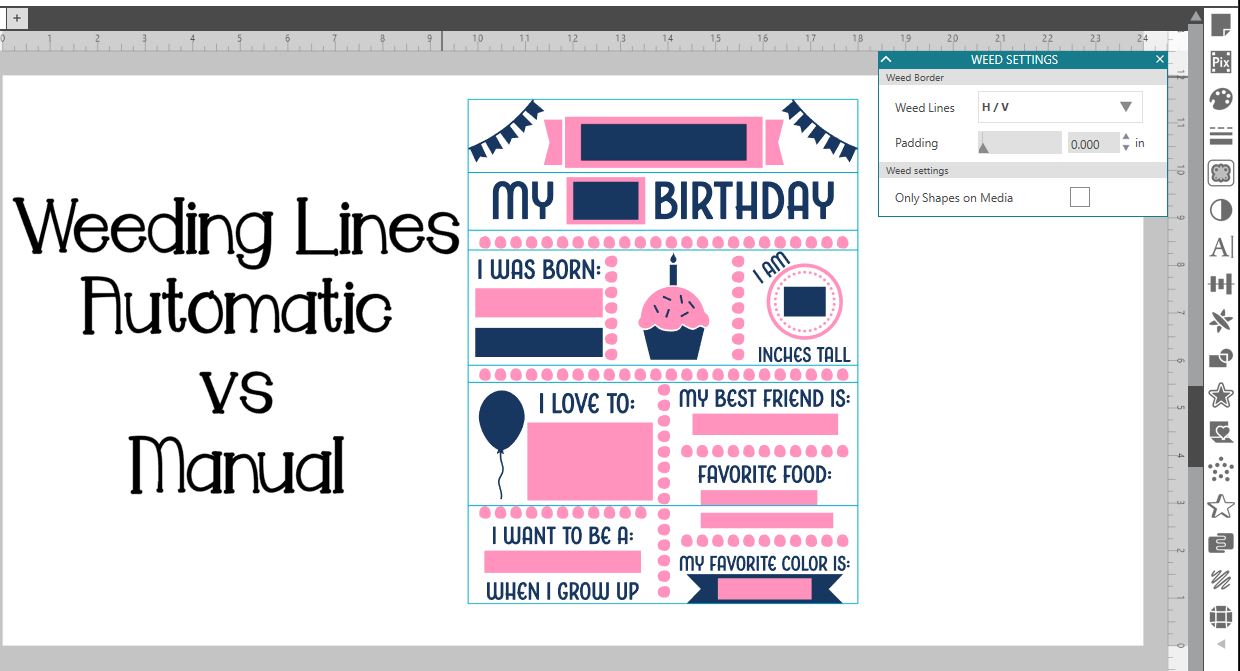
Silhouette Studio Weeding Lines Tutorial: Automatic vs. Manual

What's all the buzz about weeding lines in Silhouette Studio?

vinyl weeding tools, best weeding tool, weeding vinyl, vinyl hook, silhouette studio

Silhouette School contributor, EllyMae from Silhouette Secrets+, is here to share the low down on when you can and should use the Silhouette Studio Business Edition Automatic weeding lines feature vs. manually adding your own.

Using Silhouette Studio Business Edition Weeding Lines Tool

One of the most popular features of Silhouette Studio Business Edition is that it includes a feature to add weeding lines with just a few click.  The weeding line feature does take some getting used to though as it does not treat weeding lines the same way you're probably used to if you've been adding weeding lines manually in the Designer Edition or standard edition of Silhouette Studio.

Silhouette tutorial, Silhouette Studio, weeding lines, business edition

Silhouette Weeding Lines Tutorial: 7 Steps for Beginners

Silhouette, weeding lines, steps for beginners, beginners, Silhouette tutorialIt has come to my attention that perhaps a simpler version of the weeding lines tutorial is needed....and so today I'm going to give you bare bones weeding lines.

In just 7 steps you'll be all set to cut and weed easier.

If you're unfamiliar, weeding lines help cut the vinyl in the negative space down into smaller, easier to manage sections so it's easier to weed and you don't risk the excess sticking to the actual design while you're trying to weeding.  Alight let's get started..

1. Open up Silhouette Studio.

2. In your work area, using the Draw a Line tool...draw a line.
Silhouette, weeding lines, steps for beginners, beginners, Silhouette tutorial, draw a line


3. Select the line > copy and paste it.