Here's the issue - and it's not that you have too many files or that the search is broken. It's that files you created or imported, specifically, are simply missing the information that would let a search find them.
Showing posts with label Cut Files. Show all posts
Can't Find Your designs in the Silhouette Studio Library? Here's Why
Wednesday, August 19, 2026
You know you own the file. You bought it, or you made it yourself, and now you need it. You type what you are pretty sure it was called into the search bar, and you get zero search results.
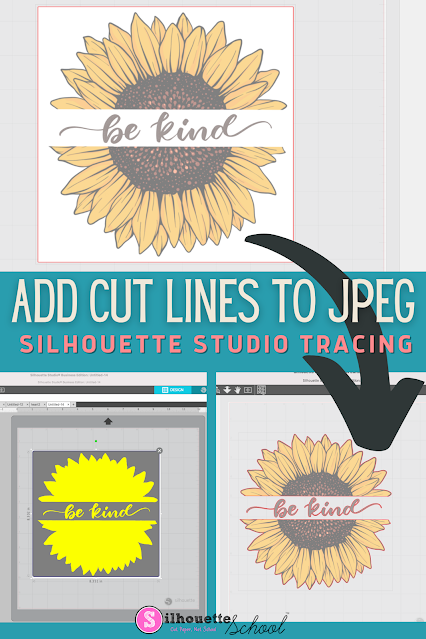
How to Add Cut Lines to JPEG in Silhouette Studio
Thursday, May 28, 2026
You can add cut lines to a JPEG in Silhouette Studio by using the trace tool.
The free version of Silhouette Studio allows you to import JPEG files making it a popular file type choice for some. This tutorial will show you how to add a cut line to a JPEG image in the Silhouette software.
SVG Vs PNG: Which File Type Should You Use for Cutting?
Monday, December 8, 2025
One question I get on repeat is: "Should I use SVG or PNG files with my Silhouette?"
Honestly, the answer is not completely straightforward. If you have the choice between the two, selecting the ideal file type usually comes down to the technique or process you're going to use.
In this tutorial I'm going to share some really big benefits of SVG files when you're going to be cutting, especially with designs you want to customize.
How to Open Files and Designs in Silhouette Studio from Free Google Drive
Monday, June 16, 2025
If you're not storing your Silhouette files and designs in the Silhouette library any longer in favor of using the free Google Drive - now you might be wondering "How do I open them in Silhouette Studio?"
It's actually very easy and fast to open files that are not stored in the Silhouette library when you're ready to work with them.
This tutorial is part of a series so if you haven't read the first two parts of the series on creating a free Google Drive account or importing your Silhouette library into Google Drive, check out those first.
How (And Why) to Import Your Silhouette Library to Google Drive
Wednesday, June 11, 2025
If you're looking for the best place to store your Silhouette files, I will continue to recommend Google Drive.
In this tutorial, which is part of my Safely Storing Your Silhouette Files series, I am sharing details on how to import your Silhouette library into Google Drive.
Total Beginner: How to Setup a Free Google Drive Account (to Store Your Silhouette Files)
Monday, June 9, 2025
If you're looking for a free place to store Silhouette files - or files you get from other places like So Fontsy - that's safe and accessible from multiple computers, Google Drive is hands-down my recommendation.
Google Drive will give you 15GB of free cloud storage. It's easy and fast to set up and I have a full tutorial for you if you've never set up a Google Drive account before now!
Easiest Way to Open and Use Silhouette Files NOT Stored in Silhouette Library
Monday, April 28, 2025
With all the recent changes to the Silhouette Cloud storage limits, I'm getting a lot of questions about how to use Silhouette files once you've moved them out of Silhouette Studio.
It's actually very easy. In this tutorial, I'll show you exactly how to access and use your Silhouette files when they're stored somewhere else on your computer or on an external drive.
Why Bad Silhouette Cuts on Vinyl and HTV May NOT Be User Error (VIDEO)
Thursday, September 5, 2024
If your Silhouette CAMEO is not making clean cuts when cutting vinyl and HTV, there's a good chance it's NOT user error (and I don't often say that).
The default cut settings in Silhouette Studio V4.1 and higher are not accurate for the vinyl and HTV materials which makes getting a good cut without any adjustments nearly impossible. The trick for how to make Silhouette cut deeper should start with the force, not the blade depth.
Labels:
CAMEO 4,
CAMEO 4 help,
cut,
Cut Files,
Cut Settings,
Heat Transfer Vinyl,
HTV,
Silhouette CAMEO,
Vinyl
How to Improve Print Colors from Silhouette Studio
Tuesday, August 6, 2024
If the color prints from Silhouette Studio are dull and not as bright and vibrant as you'd like when you're exporting them, there is a little trick to fixing that.
Silhouette Studio users often complain the colors of their exported PNG and JPEG files, specifically, are "off". In this tutorial I'll show you how to improve your print colors so you get bright, beautiful, and vibrant colors when exporting from Silhouette Studio.
Freebie Friday Camping Squad Free Silhouette Cut File
Friday, July 19, 2024
Happy Friday! I'm back with another amazing freebie for you!
Customize camping gear for all of your family and friends with this weeks free cut file, Camping Squad.
Freebie Friday Happy Camper Free Silhouette Cut File
Friday, July 12, 2024
Hello Happy Camper! Here is another Freebie Friday cut file for you!
Get ready for an outdoor adventure with this weeks free cut file, Happy Camper!
Open Files Directly in Silhouette Studio (Totally Avoiding the Library)
Wednesday, July 10, 2024
You don't ever have to use the Silhouette Studio library. I am always surprised by how many users aren't aware of this.
You can not only open files but also save images without ever using the Silhouette Studio library. In this tutorial I'll show you how to open your images directly in the Design area.
Freebie Friday Sweet Summer Time Can Wrap Free Silhouette Cut File
Friday, July 5, 2024
Happy Friday! Here is another summertime freebie for you!
This week we are feeling those summer vibes with this adorable freebie, sweet summer time can wrap.
Freebie Friday Sweet Summer Time Free Silhouette Cut File
Friday, June 28, 2024
Happy Friday! Since summer is in full swing, here is a summer time freebie for you!
Nothing says summer like a sweet juicy watermelon! So this week's freebie is this Sweet Summer Time watermelon design.
Freebie Friday Coffee With Friends Free Silhouette Cut File
Friday, June 21, 2024
It's Friday and you know what that means....time for another freebie!
This week I am sharing this coffee and friends cut file, because coffee with friends is always a good idea!
Freebie Friday Smoking Hot Grill Master Free Silhouette Cut File
Friday, June 14, 2024
Happy Friday!! Here is another free cut file for you!
Freebie Friday Happy Fathers Day Free Silhouette Cut File
Friday, June 7, 2024
Whoo hoo it's Friday!! Time for another free cut file.
This week we are celebrating the Dads with this adorable Happy Father's day mustache design.
Freebie Friday The Beach Is My Happy Place Free Silhouette Cut File
Friday, May 31, 2024
Happy Friday! You know what that means, it is time for another free cut file.
Time to spread some beachy vibes with this weeks freebie!
What is Going on With the Silhouette Design Store? 2024 Update
Tuesday, May 28, 2024
You may have noticed the Silhouette Design Store is slow..painfully slow. An announced May 2024 update to the Design Store as well as the Silhouette America website is going much slower than I'm sure anyone would like...including Silhouette.
It's preventing or causing delays in downloads, syncing and navigating. So..what's a crafty person who needs designs and fonts to do? Read on..
Freebie Friday Goodbye School Hello Pool Free Silhouette Cut File
Friday, May 24, 2024
Happy Friday! Here is another FREE cut file for you!
Subscribe to:
Posts (Atom)


.png)


.jpg)


.png)