

 |

Showing posts with label Silhouette CAMEO for Business. Show all posts
How to Save as SVG in Silhouette Studio (and JPEG and PDF too)
Thursday, August 22, 2024
It's now possible to export as an SVG directly from Silhouette Studio.
In order to save as an SVG, JPEG, or PDF from Silhouette Studio, you must have both Silhouette Studio 4.1 or higher and Business Edition.
How to Keep Track of Orders for Small Business (Silhouette or Cricut)
Thursday, May 16, 2024
If you have found yourself "organizing" orders on sticky notes or a notebook it may be time to get a little more organized and streamlined with a free order management "software" for small business.

Many Silhouette crafters did not intend to sell their items when they started out with their Silhouette CAMEO...but inevitably a friend, neighbor, or friend of a friend asks "Can I buy one from you?" And you have yourself a small business almost overnight with no way for order tracking.
One order is easy to remember or jot down on a notepad, but take it from someone who was in that position six years ago and now has a handful of employees..it's not the way to scale. You need an ordering system for small business. Also take it from me..it's FAR easier to implement an order management system from the start and the Google Suite tools - all free - make it easy to do.

Many Silhouette crafters did not intend to sell their items when they started out with their Silhouette CAMEO...but inevitably a friend, neighbor, or friend of a friend asks "Can I buy one from you?" And you have yourself a small business almost overnight with no way for order tracking.
One order is easy to remember or jot down on a notepad, but take it from someone who was in that position six years ago and now has a handful of employees..it's not the way to scale. You need an ordering system for small business. Also take it from me..it's FAR easier to implement an order management system from the start and the Google Suite tools - all free - make it easy to do.
5 Tips for Creating Mock Ups in Silhouette Studio That Sell
Thursday, October 13, 2022
If you sell digital cut files or buy commercial use designs to make products to sell with your Silhouette, you should make sure your mock up game is strong!

Mock Up photos help sell physical goods and digital designs by letting potential customers 'see' the finished product without you actually creating it first. Put it to you this way...which of the above sets do you think sells more?
Craft mock ups are a huge help in selling digital products as well allowing designers to show examples of how their cut files can be used. These five tips will help you take your mock up game to the next level so you can sell more - and at a higher price!

Mock Up photos help sell physical goods and digital designs by letting potential customers 'see' the finished product without you actually creating it first. Put it to you this way...which of the above sets do you think sells more?
Craft mock ups are a huge help in selling digital products as well allowing designers to show examples of how their cut files can be used. These five tips will help you take your mock up game to the next level so you can sell more - and at a higher price!
DIY Custom Packaging for Small Business for (Almost) FREE!
Wednesday, September 21, 2022
If you're looking for a way to create custom packaging for your small business, you can do it for pretty much free.
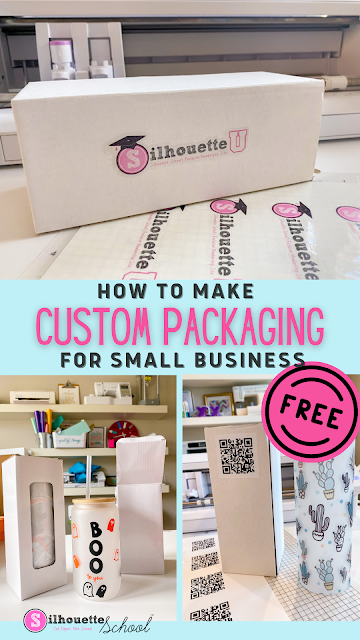

Whether you're selling t shirts or tumblers, mugs or other custom items you can customize packaging for free with the help of your Silhouette machine.
How to Easily Crop Photos in Silhouette Studio
Thursday, March 24, 2022
Did you know you can crop photos right in Silhouette Studio?!

It's nothing more than a few clicks which means it's super easy and fast. This Silhouette Studio tutorial will show you exactly how to crop photos in the Silhouette software.
How to Make Ready to Press Heat Transfers with HTV and Silhouette CAMEO
Wednesday, September 15, 2021
If you've ever tried to make a ready to print HTV transfer you probably very quickly realized it's not the easiest thing to do.

When layering multiple colors of heat transfer vinyl each layer needs to be pressed separately making ready to ready to print transfers challenging. Sometimes though - whether it's to ship a HTV transfer to an uncrafty friend or prepare your shop before the busy holiday rush - making ready to heat press transfers is necessary. In this advanced Silhouette tutorial I'll show you how to make ready to print heat transfers for shipping or storing!
Why Small Silhouette Businesses Should Consider Outsourcing Transfers
Tuesday, January 7, 2020
If you run a small Silhouette business you probably - from time to time - get asked if you can take a bulk order.

Ten or 20 shirts doesn't seem like much before you start cutting, weeding, and pressing, but we all know time is money. Sometimes it just makes the most business sense to outsource!

Ten or 20 shirts doesn't seem like much before you start cutting, weeding, and pressing, but we all know time is money. Sometimes it just makes the most business sense to outsource!
How to Save HEX IDs and Pantone Colors in Silhouette Studio (V4.3)
Tuesday, July 9, 2019
When Silhouette Studio V4.3 is released, it will be easier than ever to save HEX and Pantone codes in Silhouette Studio.

The new Custom Color Palettes features can be used to save HEX and Pantone colors that are easily accessible right from the Fill Color and Line Color tool panels.
Why Now May Be the Best Time Ever to Buy a Silhouette CAMEO 3
Thursday, May 16, 2019
With the recent announcement that Silhouette CAMEO 4 will be released later this year, now may be the best time ever to get a Silhouette CAMEO 3.
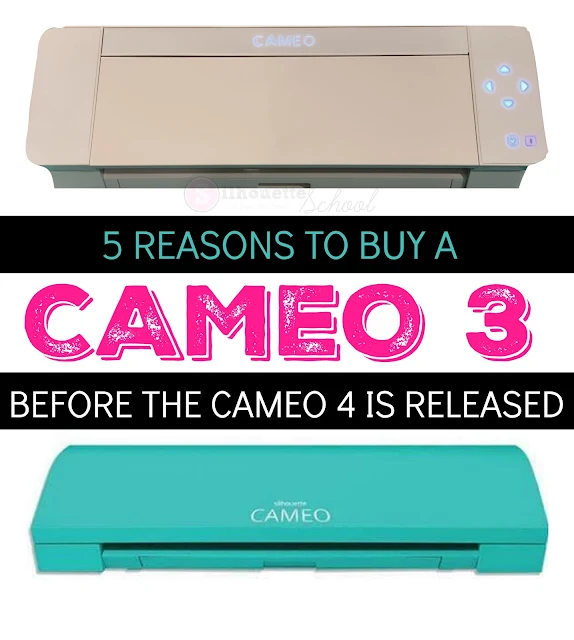 If you’re considering getting your first Silhouette CAMEO or already own one but want to upgrade or need a back up - here are five reasons to think about getting a CAMEO 3 now…before you no longer can.

Free Mug Mock Up Photo (And Video Tutorial On How to Use It)
Friday, March 8, 2019
It's already time for another Freebie Friday here at Silhouette School!

And this Friday we are sharing a little something different - a freebie craft mock up!
#1 Thing NOT to Do as a Silhouette CAMEO Beginner
Thursday, January 3, 2019
One of the biggest mistakes Silhouette beginners make is to rush into taking orders or requests from friends and family.

It's almost a guarantee as soon as you get a Silhouette CAMEO and people realize you can make a custom shirt or a vinyl decal they will ask you to make something for them. And you're going to want to say YES to all.the.things. Don't.
Yet.

It's almost a guarantee as soon as you get a Silhouette CAMEO and people realize you can make a custom shirt or a vinyl decal they will ask you to make something for them. And you're going to want to say YES to all.the.things. Don't.
Yet.
Second Silhouette CAMEO: 7 Ways to Justify Needing Another Cutter
Thursday, December 13, 2018
Many Silhouette crafters - at one point or another - question whether or not they need another (or a new) Silhouette machine.

There are a number of reasons why it's a good idea to seriously consider a second Silhouette cutting machine. Some of them would fall under the "want" category while others should definitely be considered a "need."

There are a number of reasons why it's a good idea to seriously consider a second Silhouette cutting machine. Some of them would fall under the "want" category while others should definitely be considered a "need."
Fastest Way to Install Fonts from Bundles: Silhouette Studio Tutorial
Wednesday, November 28, 2018
I shared my tips for organizing SVG bundles by bulk downloading, unzipping, and installing previously...but then I thought I bet it would be helpful to know how to bulk install fonts too.

A lot of SVG bundles including both SVG designs and fonts and since they are each installed differently it's important to know how to bulk install fonts too!

A lot of SVG bundles including both SVG designs and fonts and since they are each installed differently it's important to know how to bulk install fonts too!
How to Make Etched Glass Mock Ups in Silhouette Studio
Tuesday, October 9, 2018
Making mock ups in Silhouette Studio for vinyl and heat transfer vinyl is super easy and we've shared many Silhouette mock up tutorials.


But what about if you need an etched glass or etched glass vinyl mock up? That's doable too!
Increased Tariffs Driving Silhouette CAMEO and Craft Supply Prices Up
Thursday, September 6, 2018
The price of the Silhouette CAMEO and Portrait machines - along with other craft machines, supplies and accessories - is going up.

The price increase is due to increased tariffs - an import tax - imposed on imported goods from China.

The price increase is due to increased tariffs - an import tax - imposed on imported goods from China.
Affordable 24" Vinyl Cutter: Using GCC with Silhouette Studio Pros and Cons
Wednesday, July 25, 2018
I'm about to be long winded...in the name of a larger cutting machine - so grab a cup of coffee or a glass of wine and hear me out on this one...


Several months ago you may remember I did a poll asking Silhouette School readers if they'd be interested in a larger cutter. The more than 10k responses were overwhelmingly in favor of a larger cutter that is both affordable and has the ability to run on Silhouette Studio.
13 Silhouette Business Edition Features that Make it Worth Every Penny (& 50% Off Code)
Thursday, July 12, 2018
Silhouette Business Edition is the highest upgrade to the Silhouette Studio software - unlocking all of the available features.

The question "Is Silhouette Business Edition worth it?" is a common one. If you asked me this question in 2016 I would have said..probably not. But today - Silhouette Business Edition is hands down worth every penny as Silhouette America continues to advance the software and add new features - some of which are ONLY accessible in Business Edition.
Be sure you read all the way to the end because I have a limited time 50% off coupon code for Silhouette Business Edition - or any of the other software upgrades.


The question "Is Silhouette Business Edition worth it?" is a common one. If you asked me this question in 2016 I would have said..probably not. But today - Silhouette Business Edition is hands down worth every penny as Silhouette America continues to advance the software and add new features - some of which are ONLY accessible in Business Edition.
Be sure you read all the way to the end because I have a limited time 50% off coupon code for Silhouette Business Edition - or any of the other software upgrades.
Most Accurate Siser HTV Color for Silhouette Studio Mock Ups (Free HEX Color Sheet & Design Set)
Tuesday, May 15, 2018
A few weeks back I shared with you a trick on how to add HEX colors to Silhouette Studio. It's definitely a work around- but for those who sell and want - or need - to make mock ups it's a really good way to offer accurate colors in the digital format.

I'm excited to say that I can now also share the HEX color codes for Siser Heat Transfer Vinyl!

I'm excited to say that I can now also share the HEX color codes for Siser Heat Transfer Vinyl!
Larger Silhouette Machine Survey and Why It's So Important
Tuesday, April 24, 2018
This is unlike any post I've ever written on Silhouette School...perhaps the most important of all posts I've ever written. And the most ironic part is it's not even a tutorial....it's basically an open letter.
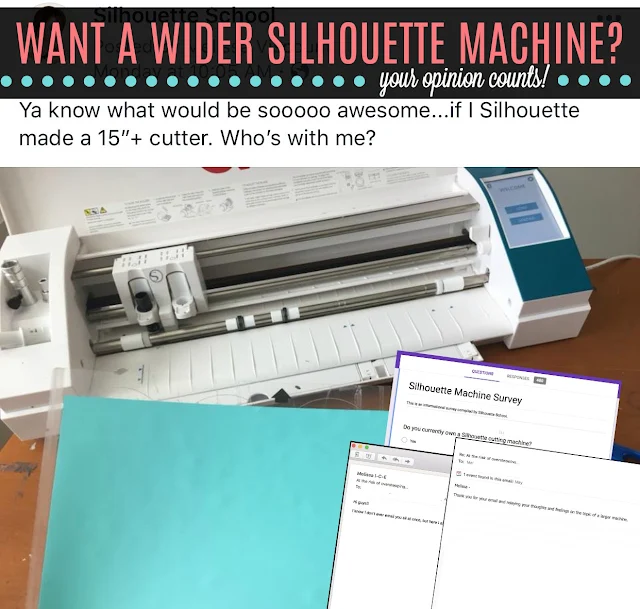
An open letter to you. An open letter to Silhouette America. It's me essentially begging you to help me. This is two years of me hinting...asking...begging Silhouette America to consider making a larger Silhouette CAMEO cutting machine.
I shared a photo on Silhouette School's Facebook page last week and some of you thought I knew something I wasn't saying. The only thing I know is there are currently no plans for a larger machine...but I reeeeeaaally want to change that. And I need your help.

An open letter to you. An open letter to Silhouette America. It's me essentially begging you to help me. This is two years of me hinting...asking...begging Silhouette America to consider making a larger Silhouette CAMEO cutting machine.
I shared a photo on Silhouette School's Facebook page last week and some of you thought I knew something I wasn't saying. The only thing I know is there are currently no plans for a larger machine...but I reeeeeaaally want to change that. And I need your help.
Free Vinyl Application Instructions for Silhouette Small Business Owners (And15% off Cutting a Profit ebook)
Friday, April 20, 2018
It's Freebie Friday around here and we're doing things a little differently this week.

Normally I share a free Silhouette design with you (you can find all 140+ free Silhouette studio designs we've shared on Silhouette School Blog here), but this week I'm not giving you a free Silhouette cut file, but instead one of the 10 printable worksheets included in my book Cutting a Profit....and a coupon code to get Cutting a Profit at 15% off!! Exciting... I know!!!

Subscribe to:
Posts (Atom)


.png)


