Copyright Silhouette School 2016. Powered by Blogger.


Showing posts with label Sewing. Show all posts

How to Switch Your Brother SE2000 from Sewing to Embroidery Mode - Video Tutorial

Ready to take your Brother SE2000 from sewing to embroidery?

brother se2000,brother embroidery,brother sewing,embroidery machine,Sewing,Embroidery,


Switching from sewing mode back to embroidery mode involves a few steps that aren't totally obvious the first time.

How to Transfer Embroidery Designs from Computer to Brother machine

If you just purchased an embroidery design and you're staring at a folder full of files wondering what on earth to do next - you are in the right place. Transferring embroidery designs from your computer to your Brother machine is simpler than it looks, and once you know the steps it takes about two minutes.

brother embroidery,brother se2000,brother sewing,Embroidery,embroidery machine,Sewing,

There are two ways to do this - via USB thumb drive or wirelessly through the Artspira app. This tutorial covers the USB method, which works for any design you purchase or download regardless of where you got it.

Embroidery Machine for Beginners - Everything You Need to Know to Get Started

Machine embroidery is not nearly as intimidating as it looks.  As someone who was only moderately comfortable around as sewing machine, I know when you first see an embroidery machine it can feel overwhelming.  

brother embroidery,Embroidery,brother sewing,Sewing,brother se2000,embroidery machine,

I've been there. My mom gifted me a sewing machine for my 16th birthday (that I still have), but an embroidery machine just seems so much more advanced (and scary). In reality though, embroidery machines are in some ways even easier. Did you know you don't even need to use a pedal?

A few years ago, I started as a total beginner and I have made every mistake in the book - including spending hours trying to fix a "broken" machine that turned out to just be a screensaver. I'm sharing all of it so you don't have to go through what I went through. 

brother embroidery,Embroidery,brother sewing,Sewing,brother se2000,embroidery machine,


This is your complete beginner's guide to getting started with a machine embroidery machine - from choosing the right machine to your first finished project.

Brother SE2000 Review (10 Reasons It's Great for Beginners)

I've been using the Brother SE-2000 since 2024, after upgrading from my SE600, and it's still the machine I recommend most often to beginners. Here's my honest review - ten things that make it work, and who it's actually for.


embroidery,sewing,brother se2000,embroidery machine,brother embroidery,brother sewing,artspira app,


If you're new to embroidery or applique, the Brother SE2000 is not only user friendly it's packed with awesome features like automatic threading and wireless technology.  Read on for my top 10 reasons the Brother SE2000 is the easiest embroidery machine for beginners. 

First Look At The Brother PrintModa Home Fabric Printer

I was absolutely thrilled to get my hands on the Brother Printmoda fabric printer. 


The Brother Printmoda is the first of its kind home fabric printer. 

Print and Cut with Brother Fabric Printer and Silhouette CAMEO

Giving new meaning to 'print and cut'... I'm not sure there's ever been a more perfect duo than the Printmoda Brother Fabric Printer and Silhouette CAMEO! 

cameo 5,brother sewing,Sewing,Rotary Blade,inkjet printable,CAMEO 4,fabric printer,Home Printer,Fabric,


Read on for a step by step beginner project printing on Printmoda from Silhouette Studio then cutting with the CAMEO Rotary blade. 

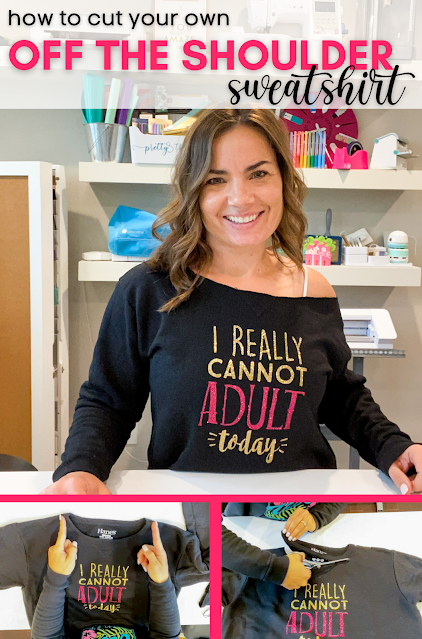
How to Cut a Sweatshirt to Make it Off the Shoulder

It's easy and fast to make a DIY off the shoulder sweatshirt, but I understand it can be intimidating to know exactly where to cut. 

silhouette 101, silhouette america blog, sewing, white toner printer, sublimation

In this tutorial I'll be sharing my tips on how to cut a sweatshirt to make it off the shoulder - a question I get asked a surprising amount. 

How to Cut Fabric on Silhouette CAMEO without Rotary Blade

You can cut fabric with any Silhouette CAMEO or Portrait machine - including those that can't use a Silhouette Rotary blade.


In a pinch you can use almost any NEW blade to cut fabric - in any machine.

How to Connect Artspira to Brother SE2000 (Step by Step Setup)

In order to take full advantage of the Brother SE2000 sewing and embroidery machine you absolutely can not skip on using the Artspira app. It's literally a game changer. 

Embroidery,artspira app,Sewing,brother se2000,Brother SE600,embrilliance essentials

Syncing the Brother app with your SE2000 will allow you to wirelessly transfer designs with ease and speed. No more thumb drives!  Read on for how to do the initial SE2000 and Artspira App sync.

Wirelessly Transfer Embroidery Files to Brother SE2000 (No USB Needed)

I recently upgraded my SE600 Brother embroidery machine to the SE2000 and OMG the technology in this 5x7" embroidery and sewing machine from my starter machine is crazy. 

Embroidery, artspira app, brother se2000, Brother SE600

I have to say the biggest difference is the compatibility with Brother's Artspira app which along with digitizing your own images, also allows you to wirelessly transfer designs from a PC computer or any mobile device to the sewing machine.  

8 Mini Machines to Setup a Killer Small Craft Room

If you have a small craft room setting it up with small equipment with big power is going to help you maximize what you can do so you're not feeling limited. 

laser business,Embroidery,craft room,Sewing,laser engraver,Heat Press,Portrait,Sublimation Printing,craft rooms,Printer,

I took a 6.5' craft table and set it up with my favorite mini machines just to show you how much you can fit in a very small craft room!  Read on for all the details and to see how you can get big results and even run a business in a little space.

How to Download Embrilliance Essentials (Free Version and Paid Upgrade)

Embrilliance Essentials is a sewing and embroidery design software - compatible with both Mac and PC - that will give you a lot of flexibility if you are trying to merge applique or embroidery designs. 

Embroidery,Sewing,brother se2000,embrilliance essentials,Brother SE600

I use it with my Brother SE2000 and my older Brother SE600, which Brother has since replaced with the SE700

Embrilliance Express is the free version. It opens and converts embroidery files, but you can't merge designs, add lettering, or resize with stitch recalculation. Essentials is the paid upgrade, and it's a one time purchase rather than a subscription. 

In this tutorial I'll show you how to download Embrilliance Essentials for beginners on a Mac. The process is essentially the same on PC. 

Embrilliance Express vs Essentials: What you Get

Express is the free version and it's free - no email signup, no strings. Essentials is the paid upgrade and it's a one time purchase, not a subscription. Here's where the difference between them:  

Feature Express (free) Essentials (paid)
Open and view embroidery filesYesYes
Save stitch files for your machineYesYes
Install and type in BX fontsYesYes
Runs on Mac and WindowsYesYes
Combine and merge multiple designsNoYes
Resize 50% to 250% with stitch recalculationNoYes
Stitch editingNoYes
Lettering and monogram tools, 21 built in fontsNoYes
Applique toolsNoYes
Thread color changes and brand conversionNoYes
Remove hidden and overlapping stitchesNoYes
Print full size templatesNoYes
Built in stitch simulatorNoYes
Send designs to Brother and Baby Lock over wifiNoYes
One licence, unlimited computers, Mac and Windows-Yes

The short version: if you only need to open a design and send it to your machine, Express is enough. The moment you want to combine two designs, resize one, add a name, or do applique, that's Essentials.

The one that matters most if you own a Silhouette: Essentials can generate applique cut files straight from the placement stitches, so your CAMEO cuts the fabric and your embroidery machine stitches it. Here's how to use PES embroidery files in Silhouette Studio

How to Cut Fabric with Silhouette CAMEO 4 AutoBlade

If you don't have a Silhouette CAMEO 4 Rotary Blade, you can use a Silhouette Autoblade to cut fabric. 

silhouette 101, silhouette america blog, autoblade, fabric, cameo 4

It does require more preparation to cut fabric with an auto blade, since you need to stabilize it, but it is possible in a pinch. This tutorial will walk you through how to cut fabric with a Silhouette CAMEO 4 Autoblade

Trick to Use Silhouette Studio to Perfectly Place Embroidery Designs

With the power of Silhouette Studio software, you can accurately place and stitch out your embroidery and applique designs with your embroidery machine. 

silhouette 101, silhouette america blog, embroidery, rotary blade, silhouette studio v4

This trick to add placement lines on your embroidery designs, will take all the guesswork out of lining up your embroidery machine so it stitches the design exactly where you want it!

Embroidery Machine Applique for Beginners (Cut the Fabric on Your Silhouette)

If you own an embroidery machine and a Silhouette machine you can combine the best of both worlds!

silhouette 101, silhouette america blog, cameo 4, embroidery, fabric

Can you applique with an embroidery machine?

Silhouette Studio Designer Edition Plus or higher will open embroidery files which means you can cut fabric applique with your Silhouette then finish the machine embroidery applique on your embroidery machine!

Combining HTV and Embroidery with Rip Away Applique

Combining HTV and embroidery is a great way for Silhouette crafters who also have an embroidery machine to use their HTV scraps!

Silhouette 101, Silhouette America Blog, Embroidery, Applique, Sewing

The great thing about using heat transfer vinyl with embroidery is it's rip away applique. That means means NO cutting fabric applique which can take time and patience - even with a Silhouette rotary blade!

I actually think this technique with HTV is great for beginners as their first machine applique embroidery project!

Brother SE600 Unboxing and Set Up ( & How to Use with Silhouette CAMEO)

I jumped on the embroidery bandwagon during the pandemic after dusting off my 20+ year old sewing machine to make masks.
Update: Brother has replaced the SE600 with the Brother SE700. If you're shopping for an embroidery machine now, the SE700 is the current model. If you already own an SE600, everything below still applies.

silhouette 101, silhouette america blog, embroidery, sewing, sewing machine

I was one of the lucky ones to pick up a Brother SE600 in 2020 before sewing and embroidery machines became impossible to find. 

Now that they're finally back in stock I'm sharing this Brother SE600 unboxing and embroidery machine set up.   Plus I have some ideas on how to use an embroidery machine with a Silhouette CAMEO or Portrait machine.

Can the Silhouette Rotary Blade be Used in CAMEO 3

The Silhouette Rotary Blade is hands down one of my favorite Silhouette accessories.

silhouette 101, silhouette america blog, rotary blade, cameo 4, 15" silhouette cameo 4 plus, CAMeo 4 blades

The ease of use in cutting fabric, felt, tissue paper, and other difficult to cut materials has made it extremely popular. It's so popular the rotary blade is often difficult to find....and highly intriguing to users with older model Silhouette machines as well who are left hoping and wondering: "Can I use the rotary blade in Silhouette CAMEO 3?

How to Open Embroidery Files in Silhouette Studio to Cut with CAMEO

If you own an embroidery machine and a Silhouette machine you can combine the best of both worlds!

Silhouette 101, Silhouette America Blog, Applique, Embroidery, Designer Edition Plus

What you need to open embroidery files in Silhouette Studio

Silhouette Studio Designer Edition Plus will open embroidery files which means you can cut fabric applique with your Silhouette CAMEO then finish the machine embroidery applique on your embroidery machine!

Fabric Mask Challenge: Can Team Silhouette School Make 47,684 Masks Together?

Fabric masks have become the one of the main ways Silhouette crafters have found they can help during the Covid 19 pandemic.


The free fabric mask patterns we have on our sister site So Fontsy and the free sewing pattern in the Silhouette store have been downloaded tens of thousands of times. The start to finish face mask assembly tutorial has been read more than 52,000 times in just two weeks and the Silhouette School Facebook Live videos on making masks and mask clips have been watched a total of more than 650,000 times. Plus - I've seen the masks you're making so I know we've become an army of crafters cutting fabric with our Silhouette CAMEO machines and sewing as fast as we can..and I am so proud of us!

But we need to keep going so now I have a challenge for you! 

With stay at home orders being lifted soon in some states, protective face coverings in public are one of the best ways to prevent spreading the virus and protecting yourself.  That means EVERYONE should have a mask...which means we need A LOT of masks!

Let's see if WE as Silhouette School can cut and sew more masks than the current number of US deaths due (as of 4/23) to this awful virus. In other words - can our little crafting community do everything in our power to help SAVE more lives than those already lost? I know we can!

Today I'm so excited to announce the Silhouette School Fabric Mask Challenge! Our goal is to make 47,684 masks by May 15. Here's how this works...and some tips on you how can make homemade fabric masks as quickly and efficiently as possible.