Copyright Silhouette School 2016. Powered by Blogger.


Free Silhouette Design: I'm Nicer Than My Face Looks (Commercial Use Avaliable)

It's time for another free Silhouette design here at Silhouette School! 

freebie friday, free silhouette studio file, free studio design, free silhouette design, free silhouette studio design

And this one's for those of you with a sense of humor..and maybe a bit of "if my mouth doesn't say it, my face certainly will." 

How to Print Patterned HTV with Silhouette CAMEO and EasySubli

With Siser's new EasySubli HTV it's now easier than ever to print high quality custom pattern heat transfer vinyl at home!

silhouette 101, silhouette america blog, patterned htv, diy htv, diy patterned vinyl

While it's certainly possible to use printable HTV sheets in an inkjet printer, you'll get a much better, more vibrant, and professional quality print using a sublimation printer! 

How to Wood Burn Wooden Spoons (and Make Them Food Safe!)

Wood burning on wooden spoons is actually really easy to do..and you can make them food safe! 

silhouette 101, silhouette america blog, silhouette stencils, wood burning, torch paste

Using vinyl stencils or silk screen reusable stencils made with Ikonart and torch paste you can make beautiful custom wood burned wooden spoons! 

How to Cut Flocked HTV with Silhouette CAMEO 4

Flocked HTV is a type of heat transfer vinyl that has a luxurious soft and fuzzy texture to it, like a suede or velvet.  
silhouette 101, silhouette america blog, heat press, flock htv, heat transfer vinyl

Working with flocked HTV is very similar to regular HTV, but there are some differences that are important to know so that your project goes more smoothly. In this tutorial, we'll show you how to cut, weed, and press flocked HTV to create this snuggly buffalo plaid blanket.

How to Put Vinyl on Wood Cutting Boards

If you're looking for a quick and easy gift a custom wood cutting board with vinyl doesn't get much easier or make a bigger statement. 

silhouette 101, silhouette america blog, wood cutting boards, oracal 651, gift ideas

I love putting vinyl on wood cutting boards and always make sure to use the hinge method to ensure the vinyl is straight and centered. 

Free Silhouette Design: Home with Pumpkin (Commercial Use Available)

It's officially pumpkin-everything season and it's also Freebie Friday! So this week at Silhouette School we are combining the two and sharing a design that is perfect for your fall and halloween crafting!
freebie friday, free silhouette studio file, free studio design, free silhouette design, free silhouette studio design

I love this Home design with the Pumpkin, so I had to share it with you! 

5 Mind Blowing Ways to Use Inkjet Printable HTV

Inkjet printable HTV is one of my favorite products because of how quick, easy, and versatile it is! 

silhouette 101, silhouette america blog, printable heat transfer paper, printable heat transfer, printable vinyl

While it's marketed mostly as an alternative to sublimation for clothing you can do so much more with it - including applying to wood, canvas, flock, and glitter HTV.  Here are five of my favorite - and mind blowing - ways to use Inkjet Printable HTV. Read this and you'll see why I say it's a must have in every craft room! 

What Vinyl To Use for Wall Decals and How to Apply Decals to Walls Straight!

Adding vinyl wall decals doesn't have to be stressful. If you know how to apply vinyl decals straight and centered AND you know the best vinyl to use - it's easy! 

This Silhouette tutorial will go over all of that so you can cut and apply your vinyl wall decal perfectly on the first try! 

silhouette 101, silhouette america blog, oracal 631, cameo 4, transfer tape

Open Silhouette Studio and import or open the design you want to use for the wall decal. I'm using this farmer's market design from the Bundle of Bundles on So Fontsy

How to Etch on Slate (Video)

Ever wonder how to etch on slate coasters, a plaque or a cheese or cutting board? It's really actually very easy! 

Silhouette 101, Silhouette America Blog, Etching, Slate etching, Ikonart

In this tutorial I'll show you how to use Armor Etch to etch on slate in just a few quick steps! 

Free Silhouette Design: Farm Girl (Commercial Use Available)

Where are my farm girls? It's time for another freebie here at Silhouette School and this one has your name all over it! 

freebie friday, free silhouette studio file, free studio design, free silhouette design, free silhouette studio design

And I love this design so much because when I say it can be used for anything - I mean anything!

How to Use Laser Printer Sheets for Stencils When You Have Inkjet Printer

If you got an Ikonart Stencil Kit and you now have a pack of inkjet or laser printer sheets that aren't compatible with your printer - all is not lost. 

silhouette america blog, silhouette 101, silhouette stencils, ikonart, oracal 651

If you have an inkjet printer, like I do, you can actually use the laser printer sheets that came with it to make custom reusable stencils. Read on for how to use the Ikonart Laser Sheets for stencils even if you don't have a laser printer (and same goes for inkjet!)...and how to save 15% off anything on the Ikonart site!

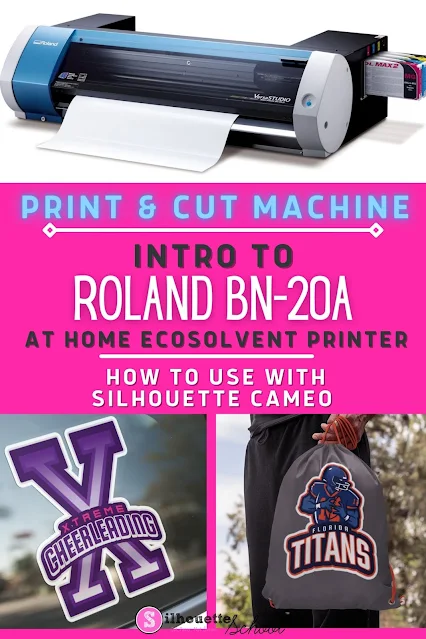
Roland BN-20A: Introducing the New (More Affordable) All-In-One Print and Cut Vinyl Machine (First Look Video)

If printing and cutting vinyl stickers aka multi color, no layer vinyl decals is on your wishlist - Roland just announced the brand new 20" Roland BN-20A print and cut machine for at home use and I have one of the very first of these print and cut machines! 

Roland BN20A print and cut vinyl machine

Just like the Uninet iColor 560 White Toner printer and Ikonart Reusable Stencil Kit, this desktop ecosolvent print-and-cut machine fills a need that many Silhouette hobby-crafters-turned-small-business-owners find themselves in need of for faster production and growth with a small footprint for at home use and a lower-than-commercial-price tag. 

How to Distress Painted Wood Signs - No sanding!

Achieve that aged, distressed, rustic look of the popular farmhouse signs using this sandpaper-free method of distressing painted wood signs. 

silhouette 101, silhouette america blog, wood signs, painting projects, stencils

It's easier than you think because it's not supposed to look perfect - in fact, don't overthink it! Then, in no time you'll be creating perfectly imperfect distressed farmhouse wood signs!

How to Do Bleach Shirts with Vinyl

After I shared my 7 best tips for how to bleach shirts at home, I got a lot of questions from people asking how I do bleach shirts with vinyl. 

silhouette america blog, silhouette 101, bleach shirts, oracal 651, cameo 4

Using adhesive vinyl as a way to block the bleach from areas of the shirt gives a really cool effect and it's not hard to do. 

Free Silhouette Design: Survivor Stacked Mirror Text (Commercial Use Available)

It's that time of the week again...Freebie Friday!! 

freebie friday, free silhouette studio file, free studio design, free silhouette design, free silhouette studio design

And since it's Breast Cancer Awareness month, it is always good to bring awareness! 

Halloween Nail Art Set: Free Silhouette Studio Cut Files

My daughter and I love to do DIY holiday manicures - so this week, for Freebie Friday, I'm sharing a recent set I created for some fun Halloween vinyl nail art!

Silhouette Studio, free cut file, Halloween, vinyl, nail art, vinyl nail art

The set, which you can download below, includes three sizes of pumpkins (sized for adults and kids),  #31, dots and stripes.  Everything is already sized to fit 'average' nails.  I'm assuming the two us are average haha....so don't resize the shapes.

How to Import Photos to Silhouette Studio To Use as Fill Patterns (3 Easy Steps)

You can import photos into Silhouette Studio and use the photo to fill a shape in just a few easy steps. 

silhouette 101, silhouette america blog, silhouette studio v4, patterns, photos

Importing photos to Silhouette Studio through the Patterns folder allows you the greatest control including cropping photos in Silhouette Studio, filling other shapes with the image and printing and cutting photos. 

How to Make Sets of Kiss Cut Stickers with Silhouette CAMEO 4

Once you have mastered how to make kiss cut stickers with Silhouette CAMEO, you can take it one step further to create sticker sets! 

silhouette 101, silhouette america blog, stickers, cameo 4, sticker paper

Sticker sets are a little trickier with Silhouette CAMEO 4 because you need to set the blade to a kiss cut setting for the stickers, but then adjust the settings to cut fully through the sticker sheet and liner to cut the individual sets. 

How to Make Gradient Rhinestone Transfers

Want to take your rhinestone transfers and decals up a level?  Make gradient rhinestone designs! 

silhouette 101, silhouette america blog, silhouette cameo rhinestones, rhinestones, gradient rhinestones

While it's a little more time consuming to make gradient rhinestone transfers, it's not hard to do. Follow this rhinestone tutorial for my tips on how to gradient rhinestones. 

Free Silhouette Design: Favorite Place to Be (Commercial Use Available)

It's that time again for another freebie here at Silhouette School! 

freebie friday, free silhouette studio file, free studio design, free silhouette design, free silhouette studio design

This week we are sharing a file for all of the families and friends that are like families. The ones that you want to tell that being with them is your favorite place to be!