After less than two months in closed beta, Silhouette Studio V4.1 has been released in open beta which means anyone has access to the free Silhouette Studio update packed full of bells and whistles.
I'm all about V4.1. I think the new features in Silhouette Studio V4.1 are off the charts. I think you're going to love it...when it's ready or at least semi-ready. Right now it's not ready (in my humble opinion) and I would strongly suggest you hold off on downloading it.
I also can't help but point this highly anticipated version of the software was released late Friday, as we go into a weekend when Silhouette America's customer support is closed. Another reason to hold off.
It's so, so tempting though...and that's honestly my fear.
Showing posts sorted by relevance for query v4. Sort by date Show all posts
Why Does My Silhouette Studio Look So Different Than the Tutorials?
Wednesday, June 28, 2017
So you're new to Silhouette world and you're looking for information on how to use your Silhouette CAMEO, but all the beginners tutorials you find look different than what's on your computer.
First, don't worry! You didn't accidentally buy the wrong machine or download the wrong software.
Here's why things look so different....
First, don't worry! You didn't accidentally buy the wrong machine or download the wrong software.
Here's why things look so different....
Silhouette Studio V4 Beta Released: What You Need to Know to Get Started
Monday, February 13, 2017
The long awaited Silhouette Studio Version 4 (aka Silhouette Studio
V4.0) is finally here...in open Beta. That means all Silhouette users can download it from Silhouette America's Legacy and Beta Software page.
Be aware there is no official technical support on how to use Silhouette Studio V4 yet...but I am here to help you and it's honestly pretty easy and not that scary!
That being said, at this point I would go so far as to say I am hesitant to encourage you to take the free update for the simple fact there is no support. But...since I know some of you will anyway and others are just curious about what Silhouette Studio V4 looks like...I'm here to show you!
Be aware there is no official technical support on how to use Silhouette Studio V4 yet...but I am here to help you and it's honestly pretty easy and not that scary!
That being said, at this point I would go so far as to say I am hesitant to encourage you to take the free update for the simple fact there is no support. But...since I know some of you will anyway and others are just curious about what Silhouette Studio V4 looks like...I'm here to show you!
Silhouette Studio V4 vs. V5: Which Version Should You Actually Be Using?
Wednesday, March 25, 2026
There's a lot of confusion right now about Silhouette Studio V4 and V5 — specifically whether you should update, whether you have to update, and why so many experienced Silhouette users are still on V4 by choice.
The short answer is that most people do not need (and should not be using) V5. For the majority of Silhouette machines, V4 is still the better option.
How to Remove a Background in Silhouette Studio (Two Methods)
Tuesday, April 28, 2026
One of the most common questions I get is how to remove a photo background in Silhouette Studio. And the good news is there are two ways to do it right inside the software - no Photoshop, no Canva, no extra apps needed.
Here's the thing. The method you use depends on your photo. I'm going to show you both so you can pick the right one for whatever you're working on.
I'm using these techniques to make DIY big head cutouts - but this works for any project where you need a cut-to-shape image, like photo booth props or custom stickers.
Updating Silhouette Studio Software: A Complete Step By Step How To Guide
Wednesday, May 26, 2021
Every time there is a Silhouette Studio update I get questions about how to update to the newest version of the software. This step by step guide applies to updating to any new Silhouette Studio Version...beta or otherwise.
I know it can be scary and intimidating to update...but the good news is I'm here to walk you through step by step.
Please note this tutorial applies to going from V4 to V4.1 and V4.1 to V4.2 and V4.2 to V4.3 and between versions of V4.4!
It's Here!! The Ultimate Silhouette Guide, Second Edition for V4 Released
Sunday, June 4, 2017
In case you haven't heard...the Second Edition of the hugely popular Ultimate Silhouette Guide (for V4) is here!!
And...for the first time The Ultimate Silhouette Guide is available as an eCourse!! That's a 169 page ebook and video instruction combined for your best possible learning! So not only has the original Ultimate Silhouette Guide been completely updated for Silhouette Studio V4, we've added an hour and 45 minutes of video instruction as well!
(There will be no exchanges or refunds for ordering the wrong version. Not sure if you need this version or the original 2015 version of USG for V3? Email us before buying - because they're not exchangeable!)
And...for the first time The Ultimate Silhouette Guide is available as an eCourse!! That's a 169 page ebook and video instruction combined for your best possible learning! So not only has the original Ultimate Silhouette Guide been completely updated for Silhouette Studio V4, we've added an hour and 45 minutes of video instruction as well!
(There will be no exchanges or refunds for ordering the wrong version. Not sure if you need this version or the original 2015 version of USG for V3? Email us before buying - because they're not exchangeable!)
How to Design Shaped Greeting Cards in Silhouette Studio
Tuesday, December 21, 2021
Turn any shape into a custom-shaped greeting card with Silhouette Studio!
Silhouette Studio Font Creator Beginners Tutorial (V4.2 Feature)
Tuesday, February 19, 2019
Silhouette Studio V4.2 now lets you turn your own handwriting into a font.
The Silhouette font creator is a new tool accessible to users who have both updated to Silhouette Studio V4.2 and who also have Business Edition.
How to Outline an Image in Silhouette Studio
Thursday, February 6, 2025
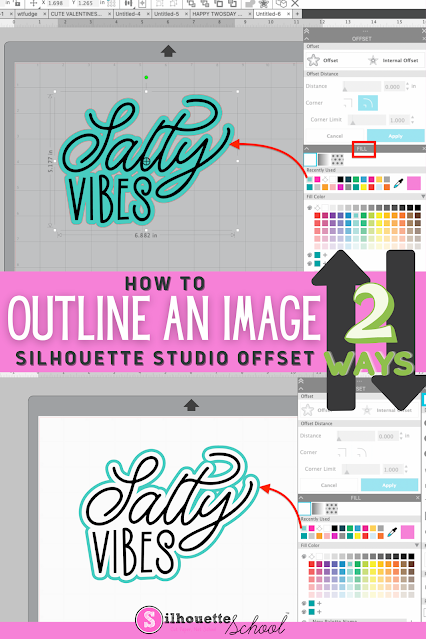
If you want to add an outline to an image in Silhouette Studio, it's easy to do with the Offset tool.
Adding an outline in Silhouette Studio can help you create a base shape, thicken your design, or allow you to add layers to your design. Follow these simple steps for how to outline an image in Silhouette Studio.
Split Monogram Design: How to Add More Space for Text in Silhouette Studio
Tuesday, January 5, 2021
Ever needed more room to fit your name or quote (or whatever you want) in the gap between a split monogram?
The way to do it isn't always so cut-and-dry, so here are some helpful steps to get you through it - without messing up the split monogram design!
How to Export Silhouette Studio Library (V4.3 or V4.4)
Monday, June 22, 2020
If you need to move your Silhouette Studio Library to a new computer you'll need to export your entire library.
The process for how to export your Silhouette Studio library has changed slightly in Silhouette Studio V4.3 and V4.4 from earlier versions of the software. This tutorial will walk you through how to move your entire Silhouette Studio library to a new computer.
Silhouette Studio Upgrade Features List: Designer Edition, Designer Edition Plus, Business Edition (Updated 2022)
Thursday, March 3, 2022
I get asked all the time - is Silhouette Studio Designer Edition
worth the upgrade? What features are included with Silhouette Studio
Business Edition? Does the highest upgrade include the features of the
others? Finally, I decided to put together an easy to read list of
features, tutorials, and FAQs about all of the Silhouette Studio
upgrades.
Silhouette Studio: How to Create a Shadow for Text
Tuesday, June 25, 2024
Step up your custom t-shirt game with this super quick and easy Silhouette Studio design trick to adding a cool shadow effect to any text design!
You can use this trick in any version of Silhouette Studio and it's perfect for beginners who are looking to start adding more elements to their designs.
How to Shape Words in Silhouette Studio
Tuesday, August 30, 2022
If you ever wanted to shape words in Silhouette Studio you've come to the right spot.
In this tutorial we'll walk through how to make words fit in a shape by manipulating the text using edit points in the Silhouette software.
Silhouette Studio V4.1 Released: Should You Update (And Why)
Monday, August 21, 2017
The highly anticipated Silhouette Studio V4.1 is now fully released and out of Beta. It's listed on the Silhouette America website as the current version of the software. So should you update to V4.1 (and how do you update your Silhouette Studio software)?
When 4.1 was released in beta I suggested you hold off on updating to it despite all the attractive new features. Fast forward to now, five weeks later, and V4.1 has proven itself to be not only the most stable version of the software, but also the Silhouette Studio software version offering the most attractive features.
9 Silhouette Studio V4.2 Tutorials
Tuesday, September 4, 2018
Silhouette America has released a big new update to Silhouette Studio. Silhouette Studio V4.2 is officially out and ready to download!
I've been sharing some tutorials on Silhouette Studio 4.2 features for the last few months, but today I'm putting them all in one spot so they're easy to find!
6 New Silhouette Studio V4 Features
Tuesday, April 11, 2017
As some of you have probably noticed Silhouette Studio V4 is available, but remains in open BETA. The good news is some of the promised new Silhouette Studio V4 features have started rolling out...and the better news is Silhouette America is taking to heart some of the changes those of us in the Beta program have been suggesting.
I thought I'd do another update on V4 while it's still in Beta since I get questions about it regularly.
Alright so let's talk about the newest features in V4: object to path, trace by color and magnet trace, heat transfer vinyl mirroring prompts, and most recently: barcodes.
I thought I'd do another update on V4 while it's still in Beta since I get questions about it regularly.
Alright so let's talk about the newest features in V4: object to path, trace by color and magnet trace, heat transfer vinyl mirroring prompts, and most recently: barcodes.
Silhouette Studio V4: 6 Reasons Not to Upgdate...Yet
Tuesday, March 7, 2017
As you probably know Silhouette Studio V4 is currently available to all users in Beta. So the question becomes...should I update to Silhouette Studio V4?
At this point, with the software still being tweaked, de-bugged, changed, and tested constantly I would not recommend Silhouette CAMEO or Portrait users take the free Silhouette Studio V4 upgrade.
How to Paint Wood Round Signs with a Vinyl Stencil (to Avoid Paint Bleed)
Monday, June 12, 2023
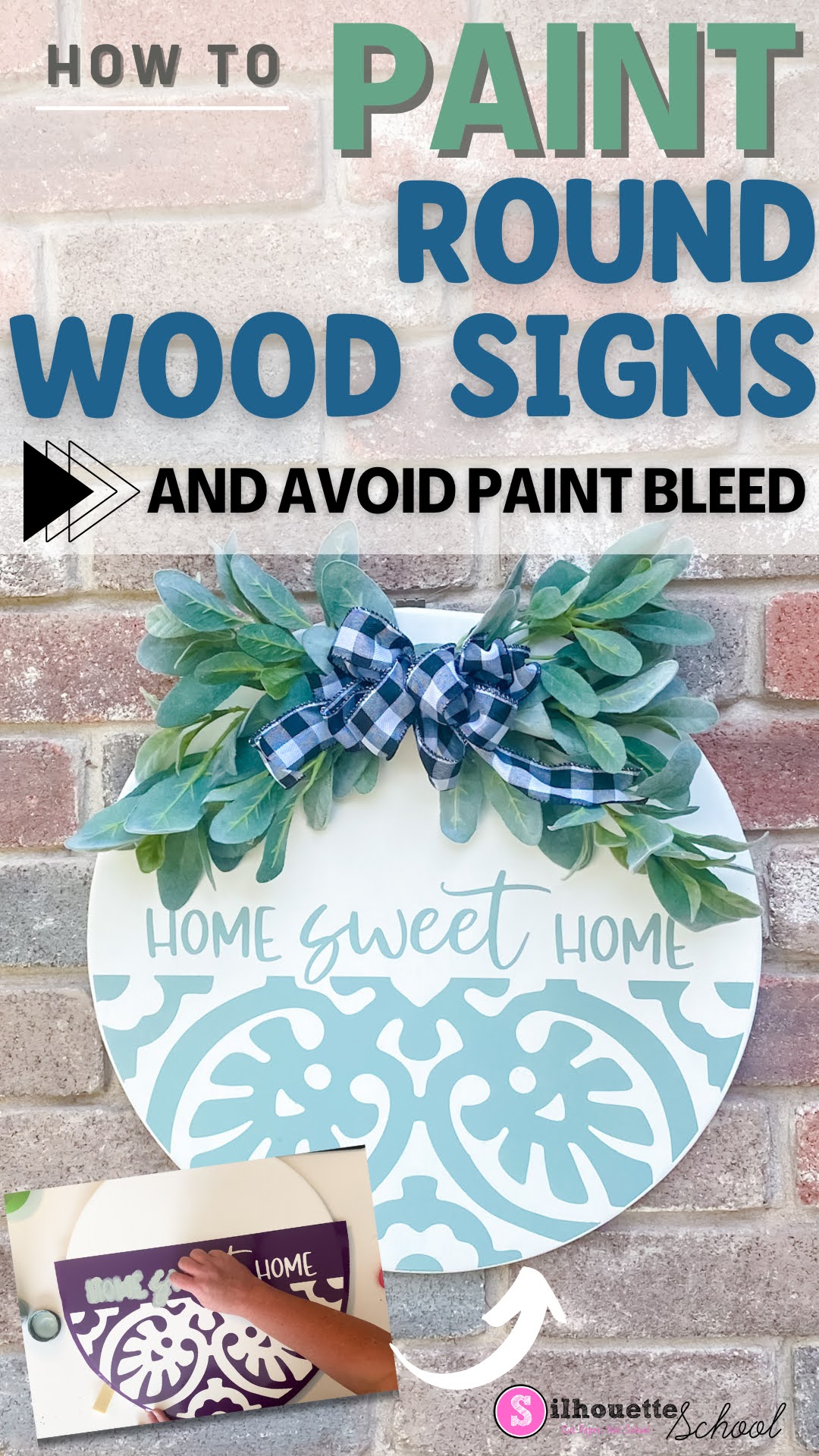
There are several ways to customize a round wood sign and painting it with a one-off vinyl stencil is one of them.
Vinyl is a good option for making stencils that will only be used once because it's quick to cut, easy to weed, and inexpensive to make. But nothing ruins a project faster than paint bleed. In this tutorial I'll share some tips on how to paint wood rounds with vinyl to avoid the dreaded paint bleed!
Labels:
How to,
Painting Projects,
Signs,
Silhouette Studio 4,
Software,
wood,
wood signs
Subscribe to:
Posts (Atom)


.png)