Copyright Silhouette School 2016. Powered by Blogger.


Showing posts with label font management. Show all posts

Installing Fonts in Bulk: The Easiest & Fastest Way - Video Tutorial

Would you believe me if we told you that you could install over 100 fonts in just two minutes?

bulk install fonts,font bundles,Fonts,installing fonts,font management,

 It sounds impossible, but it's not! Many crafters are intimidated by big font bundles because they think installing them will take forever.

Cutting Script Fonts with Silhouette Studio (Why You Should Stop Welding)

If you're still welding script fonts in Silhouette Studio you should stop now.  

Fonts,font bundles,font management,Script Fonts,Text,Text to Path,text tool,


Welding a script fonts joins the overlapping areas between letters, but it then makes it impossible to change the text or even see the name of the text.  

Read on for the auto-weld solution you have to try! 

New Font Bundle? Bulk Install Fonts on a MAC the Easy Way!

You can bulk install Fonts on a MAC making it super fast and easy when you get a font bundle or pack. 

font glyphs,So Fontsy,Fonts,font management,installing fonts,


Once installed fonts and after a program re-start, your new fonts will show up in Silhouette Studio. Read on to learn how in just a few clicks and less than 2 minutes you, too, can install a bundles-worth of new fonts! 

How to Retro Warp Text in Silhouette Studio

Have you ever wondered how to get the popular warped text effect in Silhouette Studio? 

Script Fonts,Warp Tool,So Fontsy,specialty fonts,Text,Fonts,font management,text tool

This retro look is all the rage right now so read on for the step by step details on how to make retro wavy text in Silhouette Studio. 
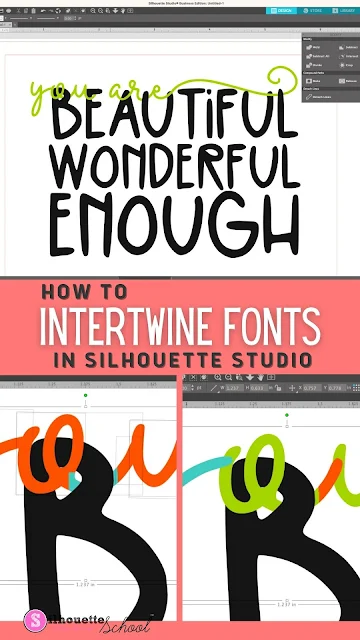
How to Intertwine Fonts in Silhouette Studio

Silhouette Studio is such a feature packed design software! You can easily intertwine fonts and make your designs come to life from signs to cards and invitations, mixing and matching fonts is the perfect way to give your projects a unique look!

silhouette america blog, silhouette 101, silhouette studio v4, silhouette fonts, speciality fonts, script fonts

You may be wondering how to get started – but fear not! I’ll walk you through the basics of combining fonts in Silhouette Studio so that you can create beautiful designs quickly and easily.

How to Preview Fonts on my Computer (PC)

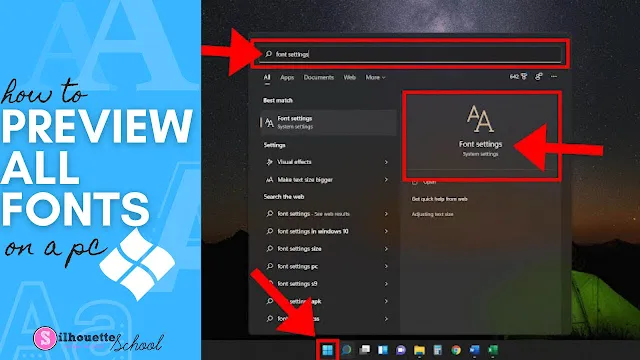
When you’re trying to find that perfect font for your project (in a hurry), wouldn’t it be nice to be able to see ALL the fonts installed on your PC? 
silhouette 101, silhouette america blog, silhouette studio for pc, fonts, font management

In this tutorial, we’ll show you how to do it. It’s called the Font Settings menu and it’s such a valuable tool for font-a-holics!

How to Install Multiple Font Styles in Silhouette Studio at The Same Time (PC)

When you save time installing new fonts in Silhouette Studio, that means there's more time for crafting!

silhouette 101, silhouette america blog, install fonts, font management, silhouette studio

This quick tutorial will show you how to speed up the process of installing new fonts that have multiple font styles on a PC. 

10 Halloween Fonts for Silhouette Craft Projects

If you're looking for some Halloween fonts for your fall Silhouette craft projects, look no further.

silhouette 101, silhouette america blog, fall crafts, Silhouette fonts, Cricut fonts

Today I have gathered up 10 fonts for Halloween! Just download, install on your computer, restart Silhouette Studio and get crafting!

Silhouette Studio Font Creator Beginners Tutorial (V4.2 Feature)

Silhouette Studio V4.2 now lets you turn your own handwriting into a font.

font creator, studio v4.2, silhouette fonts, silhouette font creator, silhouette america blog
The Silhouette font creator is a new tool accessible to users who have both updated to Silhouette Studio V4.2 and who also have Business Edition.

Organize Fonts in Silhouette Studio V4

Silhouette America quietly released an upgrade in V4.1 allowing users to organize fonts right in Silhouette Studio. 


silhouette studio, silhouette design studio, silhouette studio tutorials, how to use silhouette, silhouette tutorial

The feature allows you to organize and categorize fonts - but only those purchased from the Silhouette Design Store.

Forcing Accurate Text Size in Silhouette Studio

Did you ever type out text in Silhouette Studio and the sizing dimensions shows are clearly way off?
silhouette studio, silhouette design studio, silhouette studio tutorials, how to use silhouette

Silhouette School contributor, EllyMae from Silhouette Secrets+, is here to share tips on how to get an accurate size on text in Silhouette Studio. 

14 Free Use-However-You-Want (Public Domain) Fonts for Silhouette Crafters

So...let's have a little chat about fonts.  I know there's a lot of confusion about how fonts (and designs) can be used when crafting - specifically when it comes to selling items in physical form and selling digital files.
silhouette business, public domain fonts, commercial use fonts, commercial use files
It's something that holds a lot of Silhouette crafters back from moving forward with actually selling...but if you know what you're looking for when it comes to fonts you can legally use, you should be good to go!  That's why today I'm sharing 14 of my favorite Public Domain fonts.

Free Font Manager to Help Organize and Categorize Silhouete Studio Fonts

I get more questions about font management in Silhouette Studio than pretty much anything else.   While Silhouette Studio's font management is rather limited in the current versions of the software, there are third party software programs that can be extremely helpful especially when you're trying to sort commercial fonts and view special font glyphs and characters.

silhouette 101, silhouette america blog, font management, silhouette fonts, fonts for silhouette cameo

Silhouette School weekly contributor Becky Dykes is here today to introduce you to one free font management software she's found extremely helpful!

