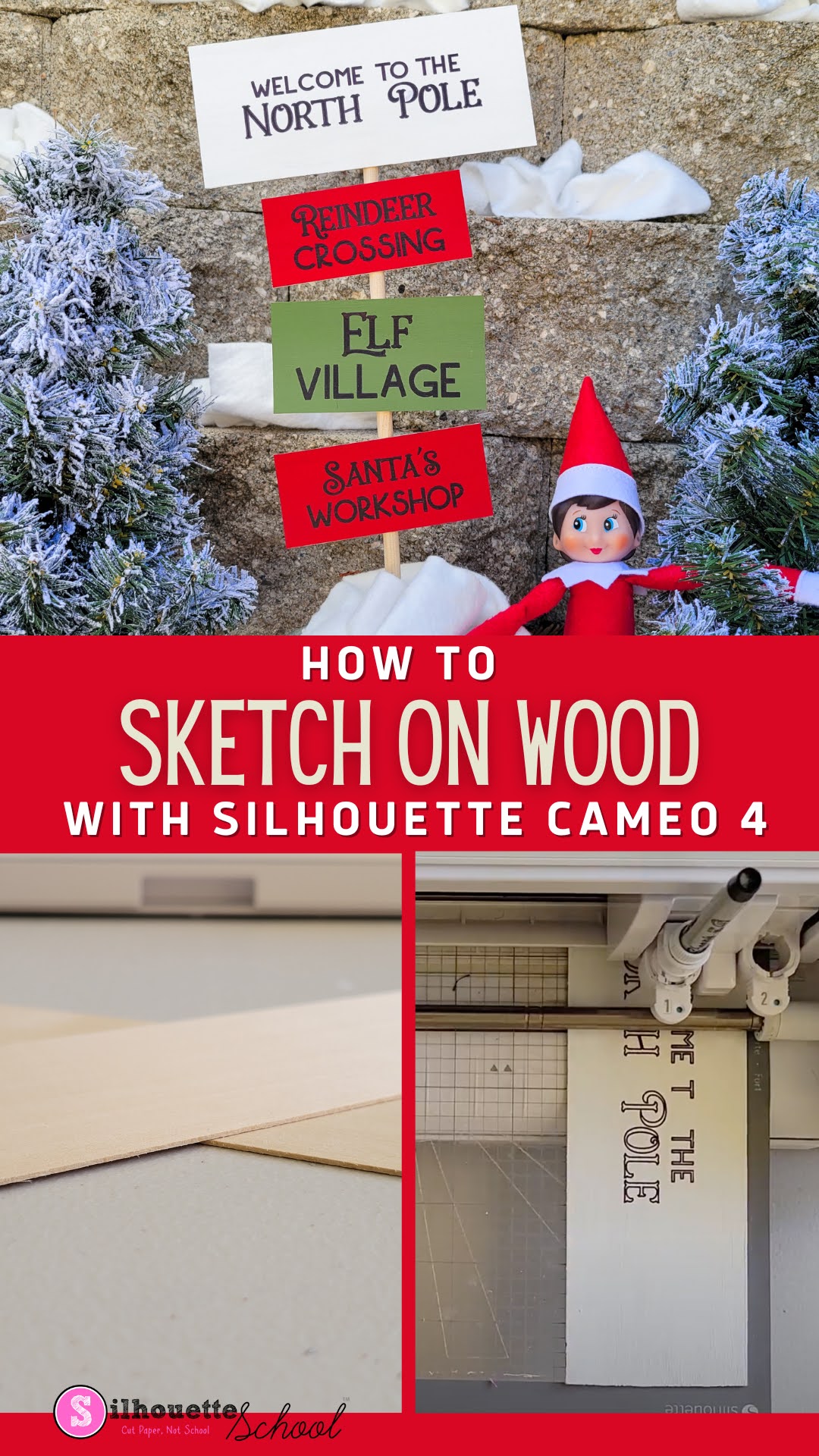
If you're new to Silhouette Sketch pens this beginner tutorial will walk you through step by step on how to draw with your Silhouette cutting machine.
It's best to think of a Silhouette sketch pen just like the auto blade or ratchet blade as far as how it will draw. Instead of cutting however, when a pen is in the carriage, the machine will sketch.
Showing posts sorted by relevance for query sketch pens. Sort by date Show all posts
How to Use Multiple Sketch Pens with Silhouette
Thursday, May 8, 2014
Our popular Silhouette School Sketch Pen Series continues today with a tutorial on how to use multiple sketch pens on a single Silhouette design. This is actually easier than it sounds as long as you have a basic understanding of sketch pens.
If this is your first time sketching, I highly suggest you go through our Sketch Pens 101 tutorial because this tutorial will assume you have some basic knowledge of how to use sketch pens on your Silhouette machine. Go ahead, I'll wait right here...promise.
For this tutorial let's use one of the free designs that comes in the Silhouette library. I'm going to pick the 'Sunshine Always Follows the Rain' design because it's a combination of an image and text. So go ahead and open up your design in Studio.
If this is your first time sketching, I highly suggest you go through our Sketch Pens 101 tutorial because this tutorial will assume you have some basic knowledge of how to use sketch pens on your Silhouette machine. Go ahead, I'll wait right here...promise.
For this tutorial let's use one of the free designs that comes in the Silhouette library. I'm going to pick the 'Sunshine Always Follows the Rain' design because it's a combination of an image and text. So go ahead and open up your design in Studio.
Perfect Sketch with Sketch Pens in Silhouette Cameo 4
Tuesday, January 26, 2021
If you're having trouble using Silhouette Sketch pens in your Silhouette Cameo 4, you're not alone. But you don't need to give up on them - they can be useful tools to adding some seriously awesome flair to your projects.
Then, head back here for a few more tips for getting that perfect sketch with Silhouette Sketch pens in the Silhouette Cameo 4.
Why Use Silhouette Sketch Pens Rather than Print?
Tuesday, August 8, 2017
I get asked quite a bit about why you could want to use Silhouette Sketch Pens rather than simply printing.
It's a fair question...and one that I often think about as I spend time laying out, fiddling with sketch fills, and then sketching a sketch pen design - when I could simply print it in a quarter of the time.
How to Sketch on Wood with Silhouette CAMEO 4
Tuesday, August 16, 2022
Ever want to sketch on wood with Silhouette CAMEO?
It's possible to use your Silhouette CAMEO 4 to draw or sketch on thin wood to make signs! If you've ever sketched on paper or cardstock, this process is almost exactly the same - there's just a few things you want to do a little differently to get the best results when sketching on wood.
4 Ways to Fill Fonts with Sketch Pens
Friday, May 2, 2014
Perhaps the most frequently asked question we get here at Silhouette School regarding sketch pens is how to get the pens to fill in a font. The answer isn't nearly as simply as I wish it was, although this lesson will show you a few different ways to get font that appears filled.
Let's take a step back first, though. When you think about sketch pens, it's easiest to think about them the same way you think about the blade. Just as the blade only cuts around the edge and leaves the negative space solid, the pen is only going to sketch the outline of a letter. It's not going to act as a crayon to color in the inside of the letters. That being said...I have a few tricks up my sleeve.
The most straight forward - and least labor intensive - way to get sketch pens to fill in a font are to buy sketch fonts specific for this. However, most are thin handwriting-style fonts and they're not 'filled' in as much as they are just a single solid line instead of an outline. Sketch fonts can be purchased at the Silhouette Online Store the same way you purchase designs. Use the search box in the SOS to search for "Sketch Font".
Let's take a step back first, though. When you think about sketch pens, it's easiest to think about them the same way you think about the blade. Just as the blade only cuts around the edge and leaves the negative space solid, the pen is only going to sketch the outline of a letter. It's not going to act as a crayon to color in the inside of the letters. That being said...I have a few tricks up my sleeve.
The most straight forward - and least labor intensive - way to get sketch pens to fill in a font are to buy sketch fonts specific for this. However, most are thin handwriting-style fonts and they're not 'filled' in as much as they are just a single solid line instead of an outline. Sketch fonts can be purchased at the Silhouette Online Store the same way you purchase designs. Use the search box in the SOS to search for "Sketch Font".
Silhouette Sketch Pen Bleed: How to Avoid It
Monday, September 14, 2020
If you've used the Silhouette sketch pen feature you know that sometimes you can be left with a pool of ink at the very end.
The ink pool, which can lead to ink bleeds and smears, is caused by the pen or marker just sitting stationary at the end of the sketch for a good 3-5 seconds before returning to the starting position. This quick Silhouette Studio trick can save your sketch projects.
New Silhouette Sketch Pens Review (2x the Ink, but 2x Better?)
Monday, August 21, 2017
The Silhouette Sketch Pens got an overhaul recently and were re-released with two times as much ink as the original pens.
I've been using the new Silhouette Sketch Pens for several months now and feel it's about time to give my honest opinions about the new pens. Ya know...in case you've been holding out or don't know what to do with Silhouette sketch pens.
How to Use Two Sketch Pens in Silhouette CAMEO 3
Wednesday, April 4, 2018
Thanks to the dual carriage, the Silhouette CAMEO 3 makes it easy to use two tools at the same time - including sketch pens.
Using two different color sketch pens takes a little set up in Silhouette Studio - which is what I'm going to show you today!
31 Silhouette Sketch Pen Project Ideas...Get Your Sketch On
Friday, May 16, 2014
Silhouette Sketch Pens are a really cool - and easy - way to add sentiments and designs to you Silhouette projects. They can be used in so many different ways...now that you have taken our 5 part Silhouette Sketch Pen course - your imagination and creativity are your only limits. If you're looking for ideas and inspiration on how to put your sketch pens to use, check out the 31 amazing projects below and get your sketch on.
Filling in Silhouette Sketch Pens (or Pencil) Designs
Friday, October 24, 2014
I shared awhile back a trick on how to fill in fonts with sketch pens, but I was recently asked how to fill in designs. Filling the designs with a solid color in Silhouette Studio will allow you to visualize what the image will look like filled it, but it will not actually make the sketch pen 'color in' the design when it's sketching. However, if you have Silhouette Studio Designer Edition, which I recommend for these 13 reasons (and counting), you can sketch 'filled in' designs.
49 Sketch Designs and Fonts for Silhouette Sketch Pens and the Foil Quill! (Including Freebies)
Thursday, March 14, 2019
If you're using Silhouette sketch pens or the new Foil Quill, using single line designs and fonts are ideal.
Designs and fonts specifically created specifically for drawing, engraving, etching, and foiling tools will give you a single line design rather than an outline.
Addressing Envelopes with Silhouette Sketch Pens
Tuesday, July 22, 2014
Okay so what you want to do is first get your envelope and put it on your mat. This tutorial assumes you know the basics of using sketch pen, since we had a full 6 part Sketch Pen series on them, but if you're not too comfortable start here with the 101 lesson.
How to Sketch and Cut with Silhouette CAMEO 4
Thursday, September 2, 2021
If you ever wanted to sketch and cut with your Silhouette CAMEO 4, it's possible although not as easy as it is with a machine with dual carriages.
The trick to sketch then cut with Silhouette CAMEO 4 is to use cut by line color! Read on for the step by step Silhouette tutorial on sketching then cutting.
Multi Color Sketch Pens on Silhouette CAMEO 4
Thursday, December 23, 2021
Silhouette CAMEO 4's high pressure carriage offers a ton of benefits (hello rotary and kraft blades!!!), but also sacrificed a couple of techniques a lot of users got used to on the dual carriage CAMEO 3 and Curio.
Just like with the single carriage Silhouette machines, it's not possible to do a multi color sketch (with two different color sketch pens), foil and cut, or a sketch and cut in a single pass with CAMEO 4. This is because Carriage 2 is exclusively for the specialty tools. That means sketch pens and the sketch pen holder won't fit. But the good news is, it is still possible and just an extra step or two.
Silhouette Sketch Pens Tutorial for Beginners
Wednesday, April 16, 2014
4/29 Update: Be sure to read to the bottom of the post if you are using Studio V3 as the upgraded version slightly changes the location of the sketch pen option.
Our Sketch Pen Series continues today with the very basics on how to use Silhouette Sketch Pens. This lesson covers how to sketch (aka draw) a single design (or font) with a single color pen
The basic rule of thumb in Sketch Pens 101 is you're going to design in Silhouette Studio like you would for a regular cut line, but when you go to cut it you'll just draw it instead. For this example, let's use one of free designs that comes in the Silhouette library - the bicycle.
Open Silhouette Studio > navigate to the library > double click the bike or whatever design you want to use to bring it into the work area.
Our Sketch Pen Series continues today with the very basics on how to use Silhouette Sketch Pens. This lesson covers how to sketch (aka draw) a single design (or font) with a single color pen
The basic rule of thumb in Sketch Pens 101 is you're going to design in Silhouette Studio like you would for a regular cut line, but when you go to cut it you'll just draw it instead. For this example, let's use one of free designs that comes in the Silhouette library - the bicycle.
Open Silhouette Studio > navigate to the library > double click the bike or whatever design you want to use to bring it into the work area.
Handwriting Fonts and Silhouette Sketch Pens to sign Easter Bunny (and Santa) Notes
My daughter is at the age where she is starting to recognize my handwriting. She's also at the age where her belief in Santa and the Easter Bunny is unshakable. Unless...but why..? That looks like..? No it can't be, could it? YIKES!
To avoid the dead giveaway that we are in fact one in the same...and so I didn't have to ask the aunts, uncles, or neighbors to forge this year's notes....I used my sketch pens to sign notes from the Easter bunny to put in my kids' Easter baskets.
Cricut Infusible Ink Markers with Silhouette CAMEO Tutorial
Thursday, June 27, 2019
As soon I showed you guys how to use the Cricut Infusible Ink sheets with Silhouette CAMEO you were begging for a tutorial on how to use the Cricut Infusible Ink pens and markers.
So here it is - this is how you use what are essentially sublimation pens with Silhouette.
$1 DIY (Silhouette) Sketch Pen and Holder
Wednesday, April 9, 2014
A few days ago I asked our Silhouette School Facebook fans if anyone would be interested in learning about sketch pens...the answer was an overwhelming 'YES!' When I say 'overwhelming' I mean the post was liked and commented on more times than any.other.post.ever on our FB page. Okay then...I must give the people what they want.
And so without further ado today, Silhouette School is launching a Silhouette Sketch Pen series.
Now because I know some of you probably couldn't care less about sketch pens - after all you bought this machine to cut, not draw gosh darn it - this series will be presented over the course of the next few weeks rather than during consecutive days. No need to make foes by posting about one subject for a straight week, right!?
After looking at your questions about sketch pens I am breaking the series down like this (not necessarily in this order):
And so without further ado today, Silhouette School is launching a Silhouette Sketch Pen series.
Now because I know some of you probably couldn't care less about sketch pens - after all you bought this machine to cut, not draw gosh darn it - this series will be presented over the course of the next few weeks rather than during consecutive days. No need to make foes by posting about one subject for a straight week, right!?
After looking at your questions about sketch pens I am breaking the series down like this (not necessarily in this order):
Silhouette Sketch Pens: Three Tricks for Better Sketching (and No Skipping)
Wednesday, April 11, 2018
Silhouette Sketch pens don't always get the best rap.
They sometimes skip, they dry out, they leak...but there are a few ways to get a better sketch when using Silhouette Sketch pens with your Silhouette CAMEO or Portrait.
Subscribe to:
Posts (Atom)


.png)