Copyright Silhouette School 2016. Powered by Blogger.


Probably Late For Something Freebie Friday Silhouette Cut File

Happy Friday! We are wrapping up the month of February with another free cut file for you! 

Free Studio Files,free svg,Free Silhouette Designs,Freebie Friday,free,

If you are always running late you are going to love this weeks free cut file.

20 Silhouette School Tutorials You May Have Missed In February 2025

Can you believe February is already over? We've been busy bees at Silhouette School, sharing all sorts of fun projects and tutorials.


February was full of freebies, new techniques, and tons of helpful tutorials. 

How to Print T Shirt Transfers at Home (Full Color and No Layering)

If you're tired of layering HTV and registration marks..I'm going to show you how to print t shirt transfers at home!

transfer printer,Roland,t shirt transfers,printable heat transfer paper,roland bn20a,roland bn2-20,roland bn2-20a,


These are full color, ready to press transfers you can print and cut with a single machine! Read on for the details. 

A Must-Try HTV Vinyl Weeding Technique - Heat Press Weeding

This HTV Weeding Trick Will Change Your Crafting Life!

Weeding,Glitter HTV,HTV,siser HTV,Heat Transfer Vinyl,glitter heat transfer vinyl,Heat Press,

If you love using heat transfer vinyl (HTV) as much as I do, you know the joy of creating custom t-shirts, mugs, and personalized gifts. But you also know the struggle of weeding those delicate, intricate designs. 

How to Add Roland Cut Lines Inside Letters with One Click (BN2 and Flexi)

If you're struggling to get Roland cut lines inside your letters or on internal parts of a design, it's actually very easy. 

Roland,flexi designer,t shirt transfers,transfer printers,printable heat transfer paper,roland bn2-20,roland bn2-20a,


This is probably one of the top questions I get from Roland beginners and it's super easy. Read on to learn the one step you need to take to add cut lines for Roland BN2-20A or BN2-20 inside letters. 

Here For The Shenanigans Freebie Friday Silhouette Cut File

Happy Friday! Time for another freebie!

Free Studio Files,free svg,Free Silhouette Designs,Freebie Friday,free,

St. Patrick's Day is just around the corner, and what better way to celebrate than with some festive and fun apparel or decorations? 

How to Set Up Multi Color Designs in Silhouette Studio

If you want to create multi color designs, this Silhouette Studio tutorial will give you some tips on how to set it all up in the software for easy previewing and cutting! 

silhouette 101, silhouette america blog, silhouette studio, fill color tool, heat transfer vinyl

Creating multi color designs is fun and creative and another way to add value to the products you create (and sell, for all you small business owners out there)! 

Brother Printmoda Fabric Printer: Step by Step Setup Guide

If you're looking for a fabric printer for at home..the Brother Printmoda is a really good option. 

software setup,brother printmoda,fabric printer,machine setup,Fabric,


It's easy to set up! Read on as we go step by step through the Printmoda fabric printer and software setup!  

How to Bulk Install Font Bundles On Mac - Video Tutorial

Tired of installing fonts one by one? 

fonts,installing fonts,bulk install fonts, mac, font bundles


This quick and easy method will save you tons of time, especially when you've downloaded a font bundle or pack.

Why I Only Perf Cut Sheet Cut on my Roland BN2-20A

If you want to save material when printing on your Roland BN2-20A or BN2-20 you can take advantage of the Perf Cut Sheet Cut option. 

Roland,t shirt transfers,transfer printers,printable heat transfer paper,roland bn2,roland bn2-20,roland bn2-20a,

This setting will allow you to clearly tear away the printed material you have already printed, while leaving the bare minimum lead material for the next print - avoiding waste. Read on for how to set up this option.

Let's Be Weird Together Freebie Friday Silhouette Cut File

Happy Valentines Day! We are back this week with another freebie for you.

Free Studio Files,freebies,Free Silhouette Designs,Freebie Friday,free,

If you're looking for a unique and quirky way to show your love, this free Silhouette cut file is perfect for you!

Print and Cut Sticker Printer: Introducing the iColor 250 Sticker Machine (MAC and PC)

If you run a sticker shop or custom sticker business, I just found what hopefully will end up being one of the best printers to print stickers!!

silhouette 101, silhouette america blog, stickers, print and cut, sticker printer

The Uninet iColor 250 is a super compact, super fast print and cut sticker machine that can print on 5" wide sticker and label material as well as speciality materials like magnet, BOPP (a polypropylene material with permanent adhesive), and metallics. 

There is a lot to like about the iColor 250 including that this print and cut sticker printer works on both a PC and a MAC as well as its small size and fast, high resolution printing. Did I mention the small learning curve?

Yes, the price tag is high, but so are the margins on stickers especially for a machine that both prints and cuts leaving you hands off rather than fussing with registration marks and multiple machines. 

Read on to learn if the iColor 250 print and cut sticker machine is right for your small business. 

How to Use an Iron for DTF Transfers

Not needing a heat press and instead being able to use an iron to apply DTF transfers is a bigger deal than you might realize. 

DTF transfers,dtf printer,transfers,dtf,t shirt transfers,


The ability to use an iron which most anyone would have means not only can YOU apply transfers with an iron, but your customers can too...and that means: you can sell DTF transfers to your customers who don't have a heat press. 

How To Recover Missing Silhouette Library - Step by Step Video

Have you ever opened Silhouette Studio only to find your entire library of designs vanished? 

Silhouette Studio Library,library missing,Silhouette Design Store,silhouette library,export silhouette studio library,

Don't panic! I've been there. I once lost over 4,000 designs and thought I was doomed.

Just Here For the Beads Freebie Friday Silhouette Cut File

Happy Friday! This week we are getting ready for Mardi Gras here at Silhouette School.

Free Studio Files,freebies,Free Silhouette Designs,Freebie Friday,free,

Get ready to roll with this festive Mardi Gras freebie!
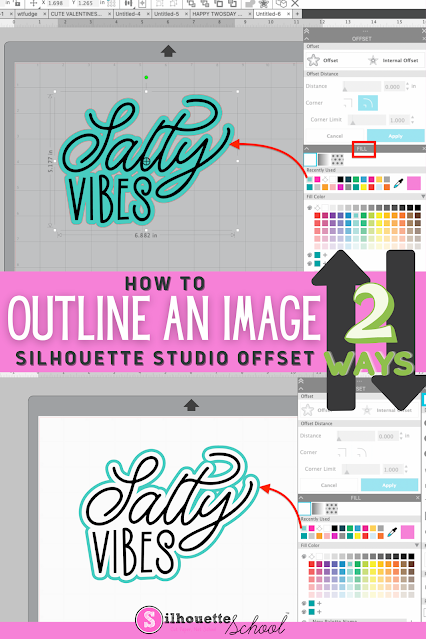
How to Outline an Image in Silhouette Studio

If you want to add an outline to an image in Silhouette Studio, it's easy to do with the Offset tool. 

silhouette 101, silhouette america blog, silhouette studio v4, offset, silhouette designing

Adding an outline in Silhouette Studio can help you create a base shape, thicken your design, or allow you to add layers to your design. Follow these simple steps for how to outline an image in Silhouette Studio.

HTV Transfers: Why Using a Cold Laminator is Key

Want to avoid bubbles when you're masking HTV transfers? The key is a cold laminator.  

Roland,printable heat transfer paper,roland bn 20,roland bn20a,roland bn2-20a,roland bn2-20,Heat Transfer Vinyl,


Read on for how I use a cold laminator to avoid bubbles in my HTV transfers! 

First Look At The Brother PrintModa Home Fabric Printer

I was absolutely thrilled to get my hands on the Brother Printmoda fabric printer. 


The Brother Printmoda is the first of its kind home fabric printer. 

Print and Cut with Brother Fabric Printer and Silhouette CAMEO

Giving new meaning to 'print and cut'... I'm not sure there's ever been a more perfect duo than the Printmoda Brother Fabric Printer and Silhouette CAMEO! 

cameo 5,brother sewing,Sewing,Rotary Blade,inkjet printable,CAMEO 4,fabric printer,Home Printer,Fabric,


Read on for a step by step beginner project printing on Printmoda from Silhouette Studio then cutting with the CAMEO Rotary blade.

