



Showing posts with label Shortcuts. Show all posts
Silhouette Cutting Mat Cleaning: Easiest Way to Remove Lint, Dust & Paper
Thursday, April 28, 2022
All Silhouette cutting mats need a good cleaning once in a while. Dust, fibers and tiny pieces of paper get stuck to the mat's sticking area, which can make the mat lose its stickiness. As we all know that can result in poor cutting.
 Sometimes even the Silhouette spatula and can't remove all the tiny fibers and paper bits on the mat. I have to admit, I'm a little embarrassed and ashamed to show you my 'before' mat....but it's all for the good of the blog, right?
How to Draw a Perfect Circle, Square or Straight Line in Silhouette Studio (Updated Tutorial)
Monday, April 15, 2019
Silhouette Studio has a couple of drawing options - circles, squares, rectangles, and lines. Flex shapes were introduced V4.2 given even more options for built-in shapes! But how do you make any of these shapes perfectly symmetrical?

Just because you can click on the 'Draw an Eclipse' Tool doesn't mean you'll get a perfectly round circle. But I have a cool trick that will guarantee you get a perfectly symmetrical shape every.single.time.

Just because you can click on the 'Draw an Eclipse' Tool doesn't mean you'll get a perfectly round circle. But I have a cool trick that will guarantee you get a perfectly symmetrical shape every.single.time.
Silhouette Studio Keyboard Shortcut Icons (Free Design File Download)
Monday, August 28, 2017
As if a super cute Silhouette Studio keyboard shortcuts printable isn't awesome email, I now have a cut file so you can cut out the tools in vinyl and place them right on your keyboard!
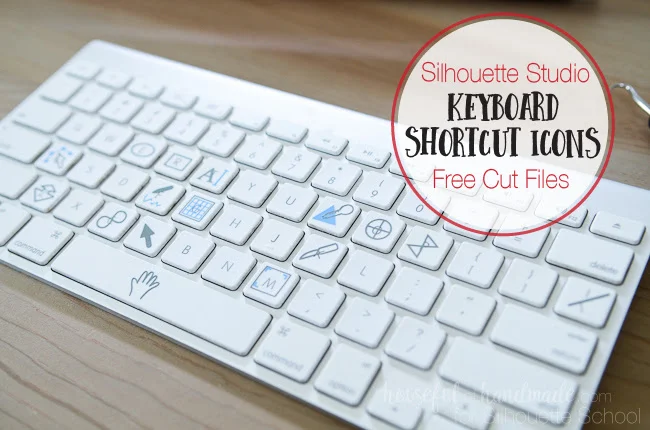 You can thank Silhouette School contributor Kati from Houseful of Handmade. I'll let her take it from here!
 You can thank Silhouette School contributor Kati from Houseful of Handmade. I'll let her take it from here!
 Move Multiple Edit Points In a Jif: Silhouette Tutorial
Tuesday, July 26, 2016
Sometimes you need to modify a design from the edit point level. Edit points are the building blocks of designs. They give you a lot of creative freedom...but they can also be kinda pesky to work with if a design has a lot of them - which most designs do.

Fortunately I recently discovered an edit points shortcut that will have you editing and moving points faster than ever before.
Fortunately I recently discovered an edit points shortcut that will have you editing and moving points faster than ever before.
Replicate Shortcut in Silhouette Studio
Tuesday, May 24, 2016
There are nearly half a dozen ways to replicate a design or text in Silhouette Studio. You can copy/paste, you can right click, you can use the Fill Page function, you can use the functions in the Edit menu, you can use the Replicate tool, you can use the replicate shortcut...but the easiest of them all is a simple click and drag of the mouse.


Silhouette Hack: Registration Marks One Click Keyboard Shortcut
Monday, January 18, 2016
I don't know about you, but I love me some Silhouette hacks. Awhile back I stumbled across the Silhouette Studio keyboard shortcut of all shortcuts. It's a one click trick to adding registration marks to your Studio work area for print and cut.

Silhouette Transfer Tape Substitute: Painter's Tape!
Wednesday, April 2, 2014

Did you know a great substitute for Silhouette Transfer Tape is painters tape? Yup, it's true! I received some samples of 3M Scotch Blue Painters Tape
 which comes in various widths making it great for small and even some medium size vinyl designs.
 My husband came home with this plain old plastic tumbler from a work meeting. He thought it was cool - yeah it would be if it wasn't just so...boring. I immediately snagged it knowing he'd like it even more if I personalized it a little bit.
Get Silhouette to Cut on Different Paper in One Cut (Fail Proof)
Monday, March 17, 2014

Subscribe to:
Posts (Atom)


.png)


