Copyright Silhouette School 2016. Powered by Blogger.


Showing posts with label Designs. Show all posts

How to Change the Colors of a PNG in Silhouette Studio

Wondering how to change the colors of a PNG in Silhouette Studio? 

silhouette 101, silhouette america blog, silhouette studio v4, png file, tracing

There are actually two ways to do it. One is a single click and other requires a bit of manual work. Read on for how to change the colors of a PNG in Silhouette Studio. 

How to Join Two Lines in Silhouette Studio

I get the question of how to join two lines in Silhouette Studio quite a bit.

join two lines silhouette studio, silhouette studio, how to join lines in silhouette studio, silhouette 101, silhouette america blog

There are a couple of different approaches to this depending on what exactly you're trying to accomplish. This tutorial will go through three ways to join lines in Silhouette Studio.

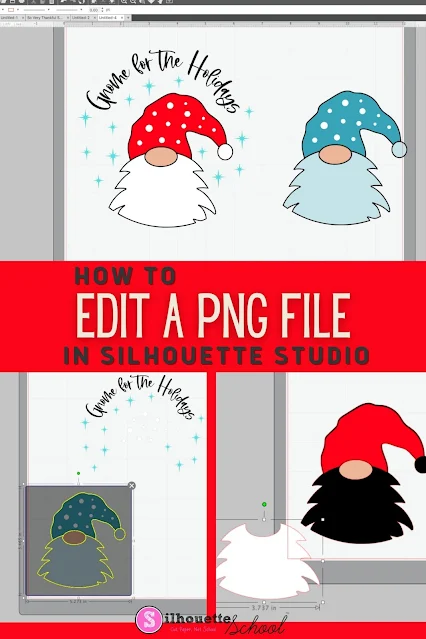
How to Edit a PNG File in Silhouette Studio

If you know the right tools to use, you can edit a PNG file in Silhouette Studio...but there a few things to know! 

Silhouette 101, Silhouette America blog, Silhouette Studio v4, Silhouette Studio, Trace by Color

The easiest file type to open and edit in Silhouette Studio is an SVG, but if you don't have that option you can edit PNG files in Silhouette software as well. This tutorial will explain the best way to go about editing PNGs in Silhouette Studio. 

How to Export Files From Silhouette Studio to Your Hard Drive In a Format You Can Use (Game Changer!)

You can now bulk export files from Silhouette Studio AND access them individually to open in other programs, transfer them, or store them in another location. 

silhouette 101, silhouette america blog, silhouette studio library, silhouette studio v4, export silhouette studio library

This is one of the biggest - and impactful - changes to Silhouette Studio in a long time. Anyone who has ever wanted to transfer Silhouette Studio files to another program or hard drive  knows how big of a game changer this is. 

How to Open Files and Designs in Silhouette Studio from Free Google Drive

If you're not storing your Silhouette files and designs in the Silhouette library any longer in favor of using the free Google Drive - now you might be wondering "How do I open them in Silhouette Studio?"

Silhouette Studio,import files,Designs,Silhouette Studio Library,Cut Files,silhouette library,Files,silhouette files,svg files,


It's actually very easy and fast to open files that are not stored in the Silhouette library when you're ready to work with them. 

This tutorial is part of a series so if you haven't read the first two parts of the series on creating a free Google Drive account or importing your Silhouette library into Google Drive, check out those first. 

How (And Why) to Import Your Silhouette Library to Google Drive

If you're looking for the best place to store your Silhouette files, I will continue to recommend Google Drive. 

file storage,Silhouette Studio Library,Designs,Cut Files,export silhouette studio library,silhouette library,storage,Silhouette Studio Organization,


In this tutorial, which is part of my Safely Storing Your Silhouette Files series, I am sharing details on how to import your Silhouette library into Google Drive. 

Silhouette Design Store Warning on Reduced Storage Limits (And What to Do NOW!)

If you got the recent email that your Silhouette library cloud storage would be reduced at the end of April 2025 and now you're panicking or confused - you're not alone and you're in the right spot.  

Designs,Silhouette Studio Library,Silhouette Cloud,Silhouette Store,export silhouette studio library,Silhouette Store Subscriptions,


Not only are we going to clear up the confusing email - but I have a step by step guide on what you need to do to save, access, and continue using your Silhouette designs.

And should you even be worried at all? Read on...

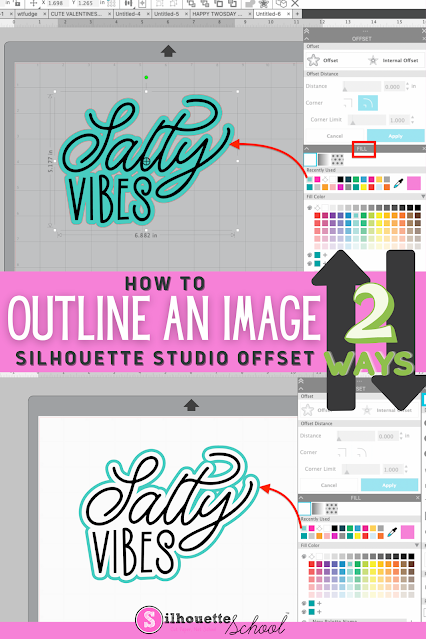
How to Outline an Image in Silhouette Studio

If you want to add an outline to an image in Silhouette Studio, it's easy to do with the Offset tool. 

silhouette 101, silhouette america blog, silhouette studio v4, offset, silhouette designing

Adding an outline in Silhouette Studio can help you create a base shape, thicken your design, or allow you to add layers to your design. Follow these simple steps for how to outline an image in Silhouette Studio.

13 Halloween Signs to DIY in 2024 with Vinyl, Paint or Stencils

DIY Halloween signs are the perfect fix if you're feeling crafty this Halloween or need some on-trend wood signs to sell this fall.  

Holidays,Sihouette Stencils,Designs,Signs,Halloween,Silhouette Stencils,vertical signs,


I rounded up a collection of 13 Halloween Signs to DIY...whether you're looking for something for your front door, front porch or to dress up your mantle.  

How to Recover Silhouette Studio Files

If you find yourself needing to recover Silhouette Studio files you're in luck. 

silhouette 101, silhouette america blog, snapshots, silhouette studio library, silhouette designs

The Silhouette Studio software has a built in file recovery option that will allow you to restore your library to a previous version thus letting you recover lost Silhouette Studio files. 

How to Apply Vinyl to Glass Without Bubbles

Applying vinyl to glass (or other non-porous surfaces like tile) can be especially hard to avoid getting bubbles under the vinyl. 

silhouette 101, silhouette america blog, adhesive vinyl, tips and tricks, oracal 651

The method shown in this tutorial can help you do just that, and all you're going to need, you probably already have in your kitchen - dish soap and a spray bottle.

How to Use the Knife Tool in Silhouette Studio to Separate a Design

When you've found the perfect SVG design, and want to cut different parts of it into different colors of HTV or vinyl - you may need to separate the design to do so. 

silhouette 101, silhouette america blog, knife tool, silhouette studio v4, silhouette studio design tools

If the design is connected, the Silhouette Studio knife tool will help you separate it.

How to Free Up Silhouette Cloud Space Quickly and Easily (2023)

If your Silhouette Cloud storage has reached its max and you need to free up space, it's quick and easy to do.'
Silhouette Cloud, Silhouette Library, Silhouette Studio Library, Silhouette 101, Silhouette America Blog

All Silhouette users have 1 GB of storage space in their Silhouette Cloud, but when you reach that limit you need to move designs off the cloud.

Fastest Way to Resize Large Images in Silhouette Studio

When it comes to designing in Silhouette Studio, we're all about speed and efficiency! 

silhouette 101, silhouette america blog, print and cut, silhouette studio, silhouette studio designing

So, here's another quick tip to resize and move designs or files (like JPEGs or PNGs) that open very, very large.

How to Mark Commercial Use SVGs in Silhouette Studio Library

If you purchase designs with the commercial use license, add them to your library then quickly forget which designs you can use on items you sell - I have a solution for you.

Silhouette 101, Silhouette America Blog, Commercial Use designs, SVGs, silhouette library

While a folder full of Commercial Use SVGs and designs in your Silhouette library is one way to do it...what happens when you do a search for a design? By looking at the design outside of a folder, you have no way to tell how you can use it. That's why I like this option I'm about to share with you organize your Silhouette designs.

Free Silhouette Design: If Found In Microwave (Commercial Use Available)

It's time for another Freebie Friday and everyone's favorite time of the week here at Silhouette School!

freebie friday, free silhouette studio file, free studio design, free silhouette design, free silhouette studio design

This week is for the mom's. The ones that are always having to reheat their mugs of coffee (or tea) in the microwave...and then forget it there only for it to get cold again. 

Free Silhouette Design: What a Wonderful World (Commercial Use Available)

Another Friday has rolled around here at Silhouette School which can only mean one thing...it's time for another freebie! 
freebie friday, free silhouette studio file, free studio design, free silhouette design, free silhouette studio design


Does this make you start immediately singing the song about all of the wonderful things that surround us? I know I do. 

Free Silhouette Design: Hello Treats (Commercial Use Available)

Can you believe that it is time for another Freebie Friday? I feel like time is just flying by!

freebie friday, free silhouette studio file, free studio design, silhouette 101, silhouette america blog

Who are my dog moms and dads? Do you have the dog that just waits at the door when someone comes over? 

Free Silhouette Design: Not Obligated to Tell You What's in Here (Commercial Use Available)

It's Freebie Friday and this week I'm sharing a fun mug design with you! 

freebie friday, free silhouette studio file, free studio design, free silhouette design, free silhouette studio design

I mean how awesome is this design and how fun would it be to have as your work coffee mug? 

Free Silhouette Design: If You've Got It Haunt It (Commercial Use Available)

It is officially time to decorate for Halloween and it's Freebie Friday so we are sharing a great design with you!

freebie friday, free silhouette studio file, free studio design, free silhouette design, free silhouette studio design

How fun is this design you guys? I love that you can use this for so many different things.