Copyright Silhouette School 2016. Powered by Blogger.


Showing posts with label Tips & Tricks. Show all posts

Double Sided Print and Cut Silhouette CAMEO Designs

Did you know it's possible to make double-sided print and cut designs with your Silhouette CAMEO?! Yes!!!


It's a more advanced technique - but one that I suggest you master because it comes in really handy. I've used it to make everything from greeting cards to little printables for my kids with this front/back print and cut technique.

Silhouette Circle Monogram Tutorial (Your Font Choice!)

Circle monogram, Silhouette, Silhouette tutorial, Silhouette Studio
I've been asked more than once how to make a circle monogram in Silhouette Studio.  Sure, you can buy a circle monogram font...or you can make your own using the font of your choice.  There are about 10 steps involved here so just bare with me...I promise it's pretty easy just breaking it down!

Heat Press on Acrylic! The Trick to Avoid Warping, Bending, and Curling

Yes you can heat press on acrylic..but the real question is how to you stop the heated acrylic from curling and warping?!

laser business,Tips & Tricks,xtool P2,white toner printer,Heat Press,laser engraver,uninet icolor 560,Co2 lasers,acrylic blanks,Uninet iColor,


I have a little hack that I use that will keep the acrylic flat when you're trying to sublimate on acrylic or apply white toner transfers and the acrylic has to be heated.

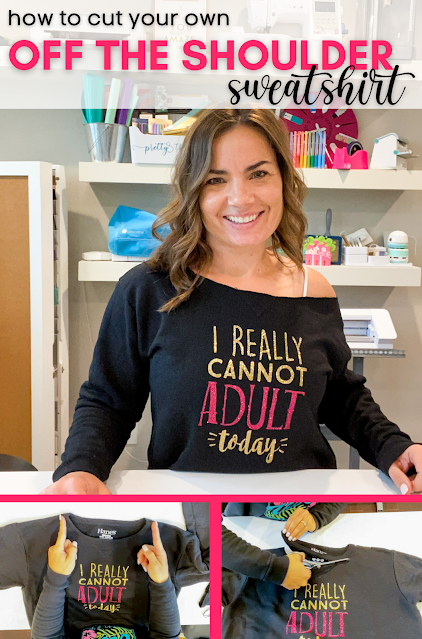
How to Cut a Sweatshirt to Make it Off the Shoulder

It's easy and fast to make a DIY off the shoulder sweatshirt, but I understand it can be intimidating to know exactly where to cut. 

silhouette 101, silhouette america blog, sewing, white toner printer, sublimation

In this tutorial I'll be sharing my tips on how to cut a sweatshirt to make it off the shoulder - a question I get asked a surprising amount. 

How to Screen Print Using Vinyl: Silhouette Tutorial

So you want to know how to screenprint with vinyl and Silhouette?! 

Silhouette tutorial, screen print using vinyl, vinyl

You've come to the right spot because today I'm going to show you how easy it is to cut a re-usable vinyl stencil with your  Silhouette to make screen print shirts with a silk screen.

Sketch Pen Fonts: The Best Thin Fonts for Silhouette

Finally! Finally I have found what I consider to be the best thin sketch pen font for Silhouette. 

 Silhouette sketch pens, thin fonts, Silhouette Studio
 
If you've been working Silhouette sketch pens for any length of time you know finding handwriting fonts to use with sketch pens isn't an easy feat.

Heat Press Pressure Test: The Paper or Dollar Bill Test

You've probably noticed that heat transfer vinyl manufactures give recommendations on the amount of pressure to use when heat pressing heat transfer vinyl.

heat press, heat press machine, heat press vinyl, heat press nation, t shirt heat press heat press
 
Question is - how do know you what pressure you're actually pressing on? That's where the heat press pressure test comes in.

Silhouette 'Subtract' & 'Subtract All' Tool Tutorial

Let's talk about the Silhouette Subtract Tool today.  I had a reader question about how to use it recently so I thought it was worth a quick lesson. 

Subtract, subtract all, Silhouette tutorial, Silhouette Studio, silhouette 101

The subtract tool lets you cut out or subtract sections of designs so they perfectly align with other designs. In this example, a portion of the M and B are subtracted around the ampersand.

The secret to the subtract tool is layers. Depending on which layer of your design is in the foreground and which is in the background will determine what piece is 'subtracted.'

For this example, since I wanted M and B to have subtracted areas, I made sure the '&' was 'in front.'

Okay let's get started.

Silhouette Layering Vinyl Tutorial (The No-Fail Method)

Well, I've heard your pleas...you want to know how to layer vinyl! I must give the people what they want and so today we're going to talk about the easiest, no-fail, pretty much 100% guarantee way to perfectly layer vinyl...on the first try!  You're in, aren't you?

layering adhesive vinyl, Silhouette tutorial, Silhouette Studio, silhouette 101, silhouette america blog

Just a heads up, this method is meant for adhesive vinyl since it uses transfer tape, not meant for HTV.  If you're trying to layer heat transfer vinyl, click here for some tips and tricks!

I needed a way to better organize my vinyl and of course, I needed to make a label.  For this project, I wanted to make a text label with an outline aka offset...let's get started!

Vinyl Nail Decal Tips and Sizing Guidelines: Silhouette Tutorial

If you've joined the vinyl nail art club - welcome! I've been using vinyl to decorate my own, as well as my daughter's finger and toenails, for almost as long as I've owned a Silhouette.  Whenever I share a photo of our vinyl nail art I get questions - most about cutting such small designs and sizing the decals. Today I am going to answer the three biggest questions I get about Silhouette vinyl nail designs so you can get decorating your nails, too!


Coffee Mug Decal Placement Tips

Cutting vinyl decals for coffee mugs is popular with Silhouette crafters, but there's one big question that people often ask.

Coffee mug decals, how to make decals for coffee mugs, how to make coffee mug decals, mug decals, mug decal transfer,

Which side of the mug does the vinyl decal go on?

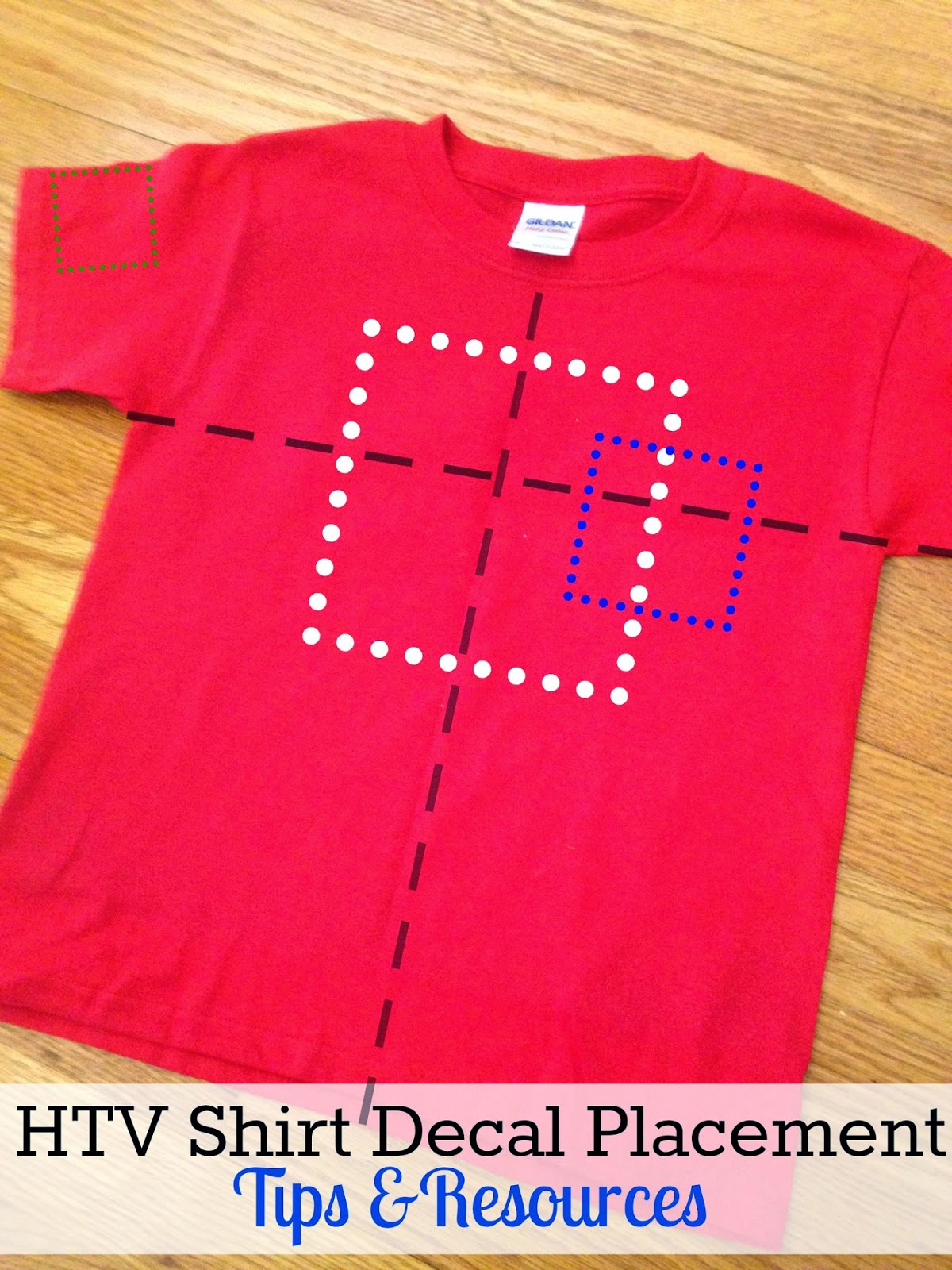
HTV Shirt Decal Placement and Size Tips and Resources

One of the main questions about working with Heat Transfer Vinyl is how to know where to place the decal on a shirt.  For instance, exactly what is the correct pocket logo placement and how far down from the neckline should a large centered decal start?

HTV, heat transfer vinyl, decal placement, heat transfer placement shirt, silhouette 101

Today I'm going to share some tips and resources I use when placing heat transfer vinyl on blank shirts.

Secret to Storing Pre-Cut Heat Transfer Vinyl Designs

If you're pre-cutting a lot of heat transfer vinyl - filling orders, making stock, or making an elaborate design with lots of colors - it can get tricky to store the HTV before you apply to the surface. It's not always time efficient to cut and apply immediately.

storing heat transfer vinyl, htv designs, heat transfer vinyl, silhouette cameo tutorials, silhouette 101

Since nobody wants dust bunnies, hair or pet fur stuck to their sticky heat transfer vinyl transfer sheets...it's best not to lay it on the floor or stick it to a place where it's at risk for falling on the floor.

How to Make a Border Around a Shape in Silhouette Studio V4 (Beginner Offset Tutorial)

Making a border around a shape in Silhouette Studio is simple - but it's not as simple as making a copy of a design and then enlarging it.

Silhouette 101, silhouette america blog, Silhouette Studio Software tutorials, Silhouette Design Studio tutorials, silhouette tutorial, silhouette cameo tutorial for beginners

That won't actually make you a border around your shape - but the Offset tool will. 

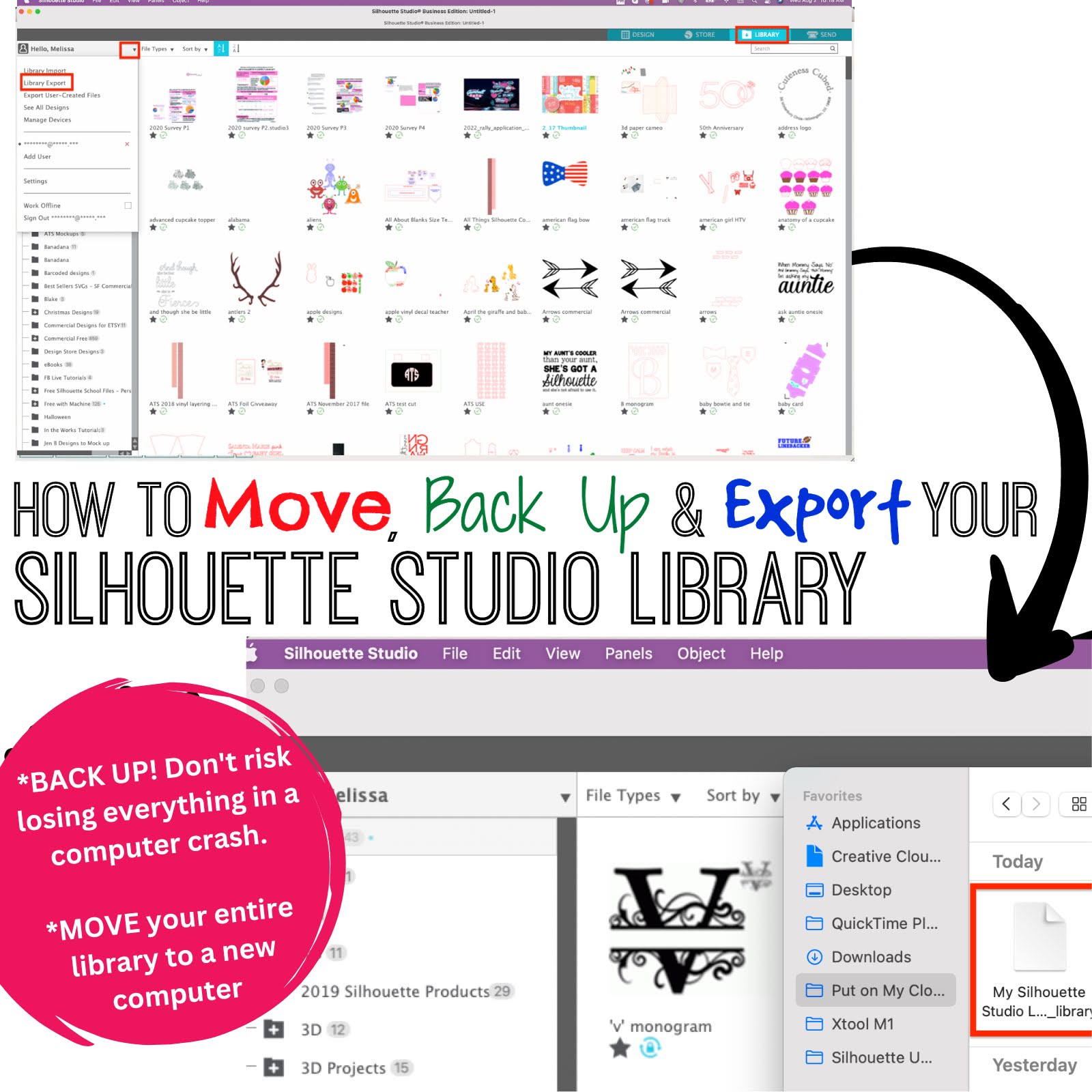
How to Move Your Silhouette Studio Library to a New Computer (2023)

If you have a new computer and you need to move your entire Silhouette Studio library to it - it can seem super scary. Will you lose all of your designs? Will everything transfer? Do you have to move every designs individually?  What about the Cloud designs and the ones you created yourself?

silhouette studio library, export silhouette studio library, silhouette 101, silhouette america blog

I recently had to move my entire Silhouette Studio library to a new computer when I got a new laptop.  I'm here to tell you - if you do even a little bit of planning ahead - you'll be fine.

Follow along and I'll help you move your Silhouette Studio library. 

Silhouette Hack: Craft Foil over HTV for an Amazing Effect!

I just blew my own mind with this little Silhouette hack!!  I have figured out a way to add metallic craft foil to fabrics and apparel and the results are amazing!  

craft foil, silhouette hacks, heat transfer vinyl, silhouette 101, silhouette america blog

The secret is not ink and heat (as is normally the case with reactive foils), but heat transfer vinyl and heat.  Yes, just plain ol' smooth HTV!!

12 Silhouette Hacks You Shouldn't Craft Without

If you've been hanging around Silhouette School for any length of time, you know I love to share Silhouette hacks and workarounds with you.  They're the little crafting shortcuts that make crafting more fun, easier, faster, and cheaper.  They're also often times the ones that make you go "Why Didn't I Think of That?!"   

silhouette hacks, silhouette portrait, silhouette cameo tutorials, silhouette 101, silhouette america blog

Today I am sharing 12 of the best Silhouette Hacks that I advise you don't craft without. Hold on to your hats because you're about to have your mind blown.  Click on any of the title links to go to the Silhouette CAMEO Tutorial.

Transferring Photos to Wood with Silhouette Temporary Tattoo Paper

A few weeks ago I shared a cool trick on using Silhouette Temporary Tattoo paper on stone tiles to make coasters...and I got a lot of questions about whether the same method would work on wood.

transfer photos to wood, wood ornaments, tattoo paper, silhouette project ideas, temporary tattoo paper

So I'm back...and I'm happy to report you can in fact use Silhouette Temporary Tattoo paper to transfer photos to wood!

Tracing in Silhouette Studio V4 for Beginners: Solid and Multi Color JPEGs and PNGs

I get a lot of questions about how to trace in Silhouette Studio V4.

silhouette cameo tutorial for beginners, silhouette cameo for beginners, silhouette cameo tutorials for beginners, silhouette 101, silhouette america blog

This beginner tracing tutorial will show you how to get the best trace in Silhouette Studio V4. 

How to Back Up, Save, and Export Your Silhouette Studio Library Files

If you've ever been on the losing end of a computer crash you know how upsetting and frustrating it can be to lose photos, files, and months or years of work. 

Silhouette Studio, library, back up, export library, silhouette america blog, silhouette tutorial beginner, silhouette cameo 3, Silhouette cameo 4,

Or perhaps you are getting a new computer and don't want to have to manually move each and every file in your Silhouette Studio library.  Well lucky for you and me Silhouette America has created a really fast way to backup, save, move and/or export your entire Studio Library. 

And the best part is...you don't even have to be computer savvy to do it.