Copyright Silhouette School 2016. Powered by Blogger.


Showing posts with label xtool P2. Show all posts

xTool Creative Space Tutorial | 5 Tips for Laser Beginners

The xTool laser software is pretty user friendly - even for beginners. While it's definitely not a full fledge design software by any means, there are some pretty cool hidden features that make the laser cutting software that much better. 

laser, xtool laser, xtool m1, xtool p2, creative space, laser engraving

In this xTool Creative Space tutorial I'll be sharing five little known tips for using XCS that will make your xTool M1, P2, F1, S1 or D1 that much better!  

Corrugated Plastic Laser Cut Settings

If you've been searching for the exact settings to laser cut corrugated plastic - you're in the right place.

Co2 lasers,DIY,laser business,laser cutter,xtool P2,

I made a full set of photo booth props and big head cutouts for my daughter's graduation party using corrugated plastic. I've also used this same material to make holiday yard sign decorations so knowing how to cut coroplast is super helpful! 

I'm going to give you the exact numbers so you don't have to spend time doing test cuts like I did.

How to Prep a Photo for Laser Engraving (And Why Most People Get It Wrong)

Photo engravings on wood either look stunning or look like dull, muddy mess. It's not actually the laser itself - it's the prep work you do on the photo before you send it to be laser engraved. 

laser business,laser engrave,laser engraving,laser engraver,xtool,xtool P2,p2s,

Most bad engravings are directly related to the image that was sent to the laser.  If the photo is low contrast, has a messy background, or is the wrong file format, no power or speed settings will fix it. Here's how to fix photos before engraving. 

Affordable Acrylic Cutting Machine at Home: Meet the CO2 Laser Changing the Game

For years, laser cutting acrylic at home was basically impossible unless you had a budget well into the thousands and a dedicated work area. 

Co2 lasers,laser business,laser cutter,laser engraver,laser engrave,laser engraving,xtool laser,Flux Beamo,xtool P2,

But now there's an option for home crafters who want to cut get professional-quality acrylic cuts without breaking the bank or needing more than a desktop. 

Is the Flux Beamo the Perfect CO2 Laser for Home Use? (Watch First Cut)

Trying to find a laser for home that can cut acrylic, fit on a desktop, and not break the bank is not an easy thing to do..but I may have just found it!  

Flux Beamo,Co2 lasers,xtool P2,laser business,laser cutter,laser engrave,laser engraving,


To cut all colors of acrylic you need a CO2 laser - most are large and expensive. But now there's a new option - the 30W Flux Beamo Laser

It's desktop size and under $1700 making it perfect for home crafters and small businesses who are short on space and budget. 

How to Put DTF Transfers on Acrylic (DTF Printer or Laser Cutter Not Required)

Did you know you can put DTF transfers on acrylic? It's SO easy and creates the most gorgeous ornaments, keychains, and gift tags! 

DTF transfers,laser business,laser cutter,t shirt transfers,transfer printers,xtool,xtool laser,xtool P2,


The best part is you don't need a DTF printer or a laser cuter to do this!  You can buy acrylic blanks and DTF transfers, then just apply them with your heat press!  In this tutorial I'll show you how. 

Perfect Silicone Engraving Settings: My Must-Try Tips and Tricks - Video Tutorial

I know laser engraving silicone and rubber can seem tricky, especially when you're trying to avoid that messy black soot and getting a clean result. 

silicone, laser engraving, xtool p2,


But don't worry, I am going to share my trick when engraving silicone items.

Add Any Font in xTool Creative Space - Video Tutorial

If you're new to xTool Creative Space, this is a game-changer: you can use any font that is installed on your computer right inside the software! 

xtool,xtool creative space,xtool F1,xtool M1,xtool P2,xtool S1,xtool laser,

This opens up tons of design freedom for your laser engraving and cutting projects.

Top 15 Laser Engraving Silicone Blanks on Amazon

I am SO excited to share my favorite silicone blanks that you can get on Amazon for laser engraving!

Co2 lasers,diode lasers,laser cutter,laser business,laser engrave,laser engraver,laser engraving,xtool P2,


If you've been wondering what silicone items work best for laser engraving, I've got 15 silicone blanks that engrave beautifully and have the potential to be your next best seller. 

How to Make Your Own Sublimation Blanks (and Save Money)

You can make your own sublimation blanks which will not only save you money, but also give you creative freedom. 

laser business,Blanks,xtool,xtool P2,xtool S1,Sublimation Printing,laser printer,laser cutter,sublimation,

Cutting full sheets of MDF sublimation hardboard into custom shapes means you can match your sublimation blanks to your designs. Read on for how to make your own sublimation blanks. 

Why Your Laser is Smoking (And How to Fix It!)

Having trouble with your laser smoking? This one fix may solve all of your smoke issues.

xtool,xtool P2,xtool cleaning,xtool air purifier,xtool F1,xtool M1,xtool S1,

If your xTool P2 (or any laser) is producing more smoke or odor than usual while cutting or engraving wood or acrylic, the culprit might not be your air filter

Unboxing and Set Up For the xTool AP2 Air Purifier - Video Tutorial

Fume-free crafting is here! I'm so excited to show you the new xTool AP2 Air Purifier.


If you're anything like me, you love getting creative with your laser cutters and engravers. But with that amazing creativity can come fumes and particles that you definitely don't want lingering in your workspace. 

Which xTool Laser Cutter Can Cut Acrylic?

If you're looking for a laser cutter that can cut acrylic, you'll likely find a wide range of answers.

xtool, xtool m1, xtool p2, laser engraver, acrylic blanks, laser engraving

It's important to understand that not all acrylic is the same, just like not all lasers are the same.  You can technically cut SOME acrylic with all xTool lasers...but if you're serious about cutting all acrylic there's only one option. 

Laser Cutting Pre Printed Images With XTool P2 - Video Tutorial

You've printed your images onto acrylic, but now what? 


Let me show you how to easily cut them out with using your xTool laser camera as a guide.

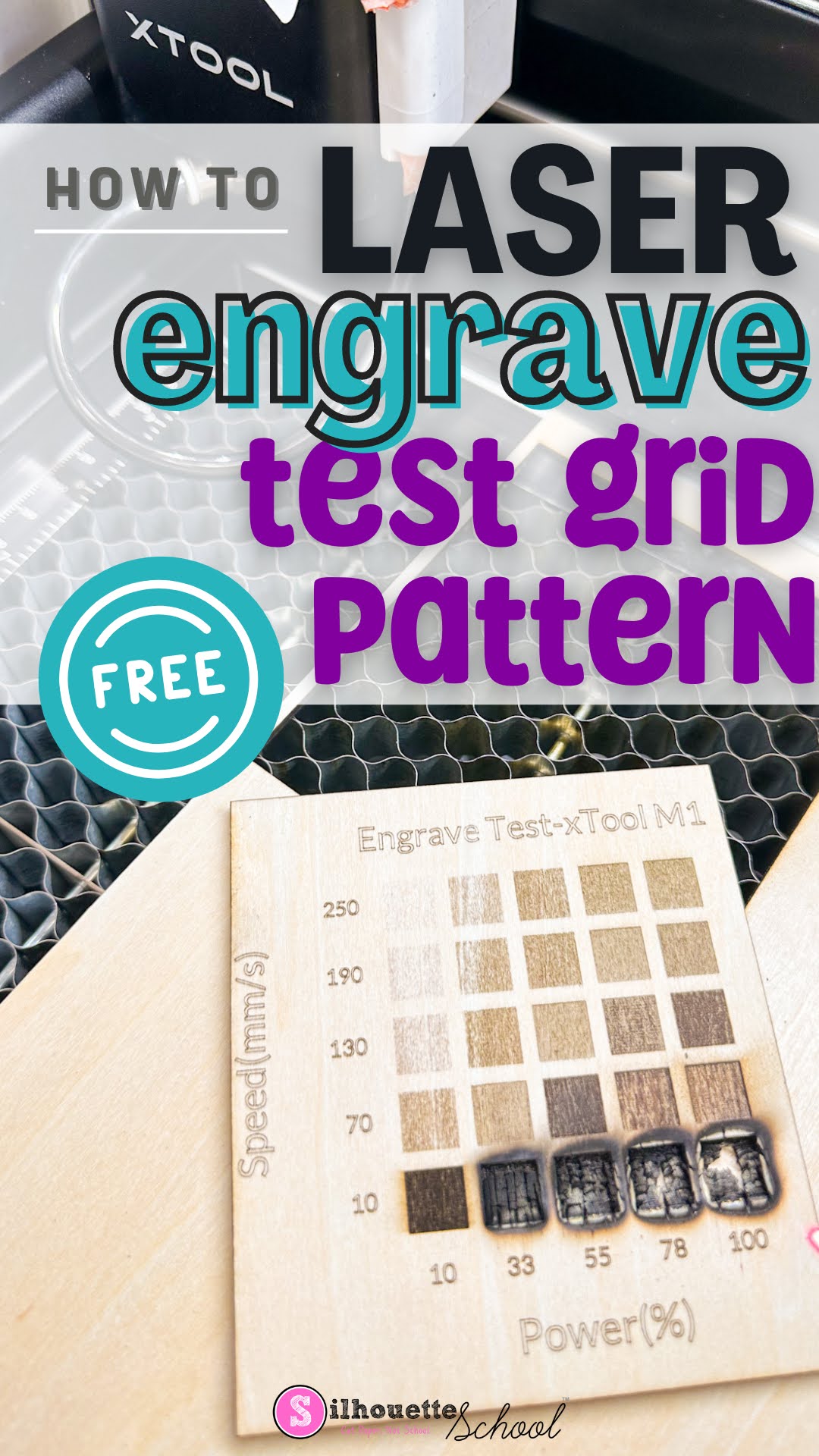
How to Quickly Make an xTool Test Grid Pattern Free

Making an xTool test grid is the easiest and best way to find the perfect laser settings for the material and laser you're using. 

xtool, xtool m1, xtool p2, laser engraver, laser engraving, test grid pattern

When you have a new material you're working with, rather than guessing the laser power and speed, use the free xTool test grid pattern found in xTool Creative Space. Follow along to learn how and where to find a free test grid pattern for xTool lasers! 

Laser Engraving Trick: Use Score for Perfect Placement

Layered laser cut projects that have multiple pieces to place can be tricky and time consuming to assemble if you don't know this one trick.  

laser business,laser engrave,xtool,wood signs,xtool P2,xtool creative space,laser cutter,laser engraving,


Read on to see why scoring is the key to perfect layered laser projects!  

Explained! What is Kerf in Laser Cutting?

If you've heard the term "kerf" in laser cutting but aren't sure what it is...you're in the right spot. 

laser business,wood signs,xtool P2,laser engraver,wood burning,Co2 lasers,laser cutter,laser engraving,


When laser cutting, a portion of the material is eroded or burned away by the laser itself.  Because of this when you cut two pieces of material out of each other the middle one will "fall out".  Enter kerf. 

Tips to Reduce Charring When Laser Cutting Wood

If you're getting charring when laser cutting wood, there are ways to reduce the charring and clean up your wood cuts. 

xtool laser, xtool laser tutorials, wood charring, laser cutting, laser engraving wood, laser cutting wood

Wood charring is often caused when there's not enough air during the laser cutting process. Here I'm sharing my best advice on getting cleaner wood laser cuts and a dramatic side by side! 

Faux Engraving on Glitter Acrylic: Laser Engraving Hack!

Engraving on glitter acrylic doesn't always come out the way I wish it would. It's often more subtle than what I'd like due to the glitter itself.  And in some lights it's nearly impossible to see. 

laser business,xtool P2,white toner printer,Tips and Tricks,laser engraver,uninet icolor 560,laser cutter,Uninet iColor,


But this faux engraving hack..that's actually not engraving at all is one of my favorites! 

Heat Press on Acrylic! The Trick to Avoid Warping, Bending, and Curling

Yes you can heat press on acrylic..but the real question is how to you stop the heated acrylic from curling and warping?!

laser business,Tips & Tricks,xtool P2,white toner printer,Heat Press,laser engraver,uninet icolor 560,Co2 lasers,acrylic blanks,Uninet iColor,


I have a little hack that I use that will keep the acrylic flat when you're trying to sublimate on acrylic or apply white toner transfers and the acrylic has to be heated.