Copyright Silhouette School 2016. Powered by Blogger.


Showing posts with label Mint Studio. Show all posts

Silhouette Studio 64 bit MAC Compatibility Update

Update: If your computer has updated to macOS Catalina, here's what you need to do to stay compatible with Catalina update and Silhouette Studio 

If you're a MAC user and you have received a pop up warning about Silhouette Studio soon not being compatible with your iOS - I have an update for you.

mac 64 bit software, studio, silhouette studio, silhouettestudio, silhouette 101

The compatibility issue stems from software programs running on MAC needing to be 64-bit. Currently Silhouette Studio is 32 bit.

Turn Your Business Logo into a Custom Stamp with Silhouette Mint (Plus Free Mint Templates & Coupon)

Did you know you can turn your business logo into a custom stamp made with the Silhouette Mint?

silhouette mint, silhouette mint stamp kit, silhouette mint review, silhouette mint stamp sheets, silhouette mint stamp

This is awesome for marketing and branding...and yes, for those of you wondering you can use the stamps to mark the back of your wood signs.  And what's even better...I have 25% off code for you hat will work on not only the Silhouette Mint, but also all Mint Bundles and Mint accessories.

Silhouette Mint Review: What's Got Me Giddy...and Griping

My Silhouette Mint stamp maker has finally arrived and I'm happy to report back to all of you with this Silhouette Mint Review.  I'll share a 101 tutorial on setting up the Mint soon and printing your first stamp, but I did want to start off with my first impressions so you can decide if you want to add the Mint to your tool belt.

Silhouette Mint, review, Silhouette, stamp maker

Mint Studio Library: How to Upload Your Silhouette Studio Design Library in Mint Studio

A limited number of Silhouette Mint machines are now shipping...and by the end of the month they'll be much more widely available. So I thought it was a good time to share this tutorial on uploading your design library to Mint Studio.
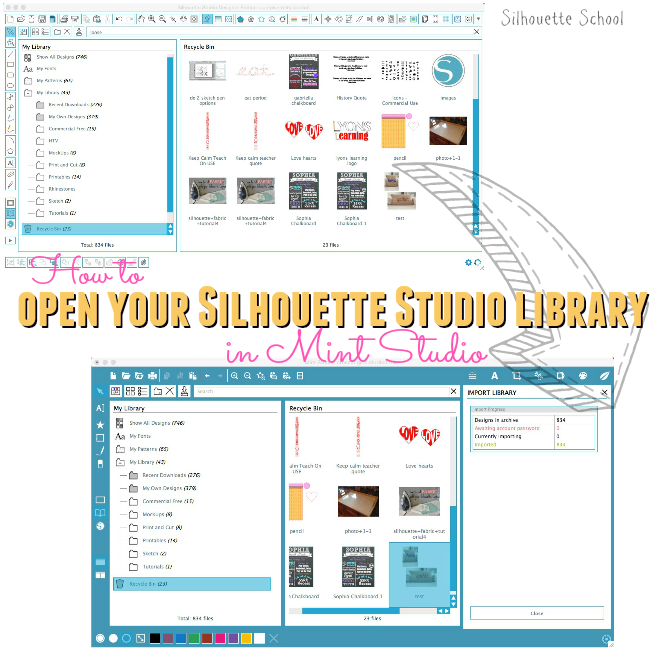
Silhouette Mint, Silhouette Studio, Silhouette Studio library, uploadIf you're a new Silhouette Mint owner you may have noticed that when you downloaded and installed Mint Studio, the required software for the stamping machine, none of your designs from your Silhouette Studio library came over.  (Of course if you don't have a Silhouette CAMEO, Portrait, SD or Curio, and only own the Mint you probably have no idea what I'm talking about and in that case - carry on. You'll build your library of designs as you go.)

But for those who have a Silhouette Studio library in the original software, you can access all of your designs and files in Mint Studio, as well.


Silhouette Mint Studio Software Released Ahead of Stamping Machine: First Look and Free Download!

Silhouette Mint Studio, Silhouette Mint
Silhouette America released the new software required for the soon-to-be released Silhouette Mint late Monday. Unlike the Silhouette Curio, which uses the existing Silhouette Studio software with a few new functions, the Mint stamping machine, requires an entirely new software program known as Mint Studio.

Mint Studio is available for download now even though the Mint won't be available for purchase for several more weeks.

A few things I noticed right off the bat - and please keep in mind I haven't had ANY time to play with the software yet.